Google Ads
Google Ads Remarketing - Strategy & Setup Guide for 2026

Category: Google Ads
Google Ads Remarketing: Strategy & Setup Guide for 2026
Most website visitors do not convert on their first visit. They might explore your services, compare prices, read a case study, or add a product to their cart before leaving without taking action.
That does not necessarily mean they are uninterested. They may simply need more time, additional information, or a reason to choose your business over a competitor.
This is where Google Ads remarketing becomes useful. Instead of relying entirely on new traffic, you can reconnect with people who have already interacted with your website or business and encourage them to return.
A well-planned remarketing campaign can help businesses generate more enquiries, recover potential sales, and make better use of their advertising budget. However, results depend on audience quality, campaign structure, conversion tracking, and the relevance of your ads.
In this guide, we will cover how Google Ads remarketing works in 2026, how to set it up, which audiences to target, and how to optimize campaigns for better results.
What Is Google Ads Remarketing?
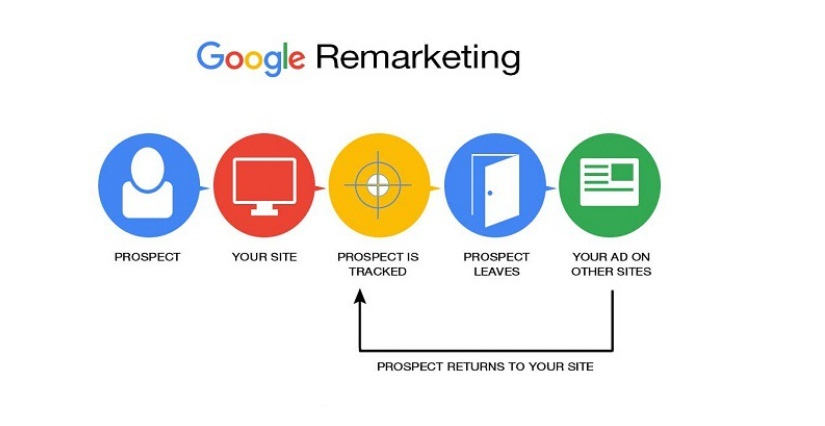
Google Ads remarketing is an advertising strategy that allows businesses to reach eligible people who have previously visited their website, used their app, or interacted with their business.
For example, someone might visit your website after searching for a Google Ads agency. They read your service page but leave without booking a consultation.
With remarketing, you may be able to show that visitor a relevant ad later, reminding them of your services and giving them another opportunity to enquire.
Google's current interface increasingly uses the term your data segments for audiences built from your own website visitors and other first-party data sources.
Depending on audience eligibility and campaign type, these segments can be used across the Google Display Network, Search, YouTube, and other supported advertising formats.
The objective is not simply to show the same advertisement repeatedly. It is to reconnect with potential customers using messaging that reflects their previous interaction with your business.
Why Is Remarketing Important in 2026?
Acquiring website traffic can be expensive, particularly in competitive industries such as SaaS, ecommerce, healthcare, and professional services.
Remarketing gives advertisers another opportunity to convert some of the visitors they have already paid to attract.
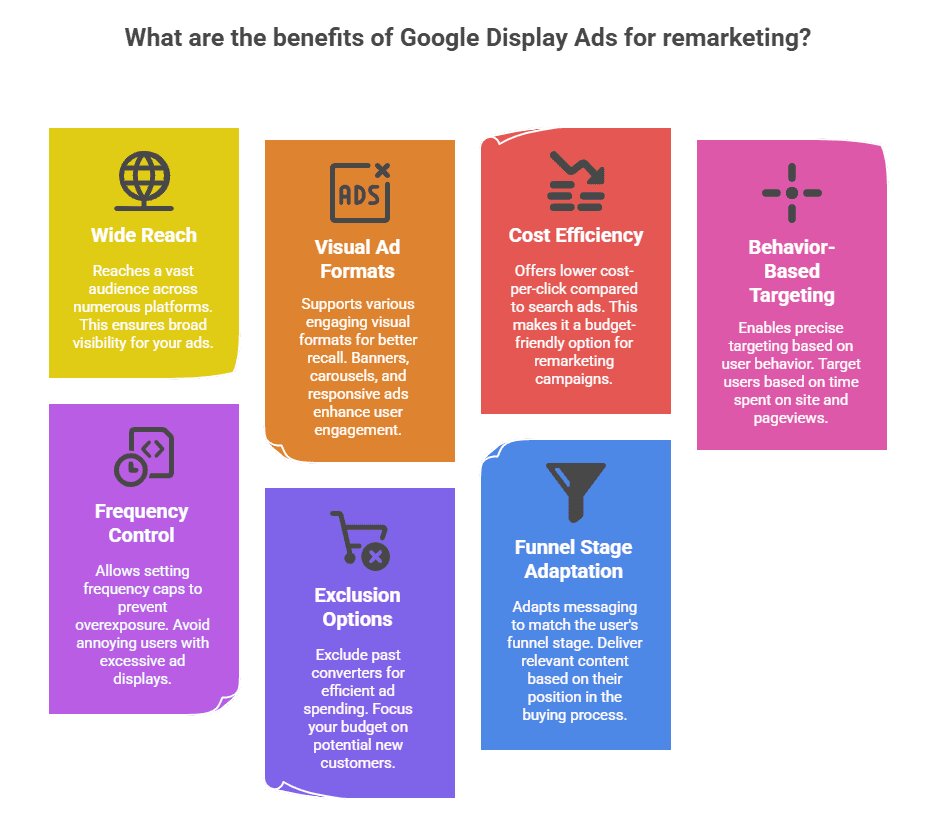
Here are the main benefits:
- Improved conversion opportunities: Reach previous visitors who may still be considering your products or services.
- Better audience relevance: Show different messages to product viewers, service-page visitors, and people who abandoned a checkout.
- Stronger brand recall: Keep your business visible while potential customers compare alternatives.
- More efficient budget allocation: Focus on eligible audiences that have already demonstrated some level of interest.
- Support for longer buying cycles: Re-engage prospects who need several interactions before making a decision.
Remarketing does not automatically reduce your cost per acquisition (CPA). Poor targeting, excessive frequency, weak offers, and ineffective landing pages can still waste money.
For better results, combine remarketing with accurate measurement and a clear conversion-focused campaign strategy.
Types of Google Ads Remarketing Campaigns
Before building your campaign, decide which format fits your business objective.
1. Standard Display Remarketing
Display remarketing shows ads to eligible previous visitors across supported websites and apps on the Google Display Network.
It works well for businesses that want to maintain visibility after someone visits a product page, service page, or informational resource.
For example, an ecommerce store could remind previous product viewers about a collection they explored. A digital marketing agency could promote a consultation to visitors who read its Google Ads service page.
2. Search Remarketing
Search remarketing allows advertisers to use eligible audience segments with Search campaigns.
A visitor who previously explored your services may later search for an agency or solution again. Depending on your campaign settings and audience eligibility, you can use audience targeting or observation to manage how these audiences interact with your Search campaigns.
Observation allows you to monitor audience performance without restricting the campaign exclusively to that audience. Targeting restricts eligible traffic to the selected audience, where supported.
Choose the setting based on whether you want to analyze existing search traffic or deliberately focus on returning visitors.
3. YouTube Remarketing
YouTube remarketing helps businesses reconnect with eligible audiences through video advertising.
You could show a short testimonial, product demonstration, customer success story, or explanation of your service to people who previously visited your website or interacted with your YouTube content.
This format can be particularly useful when customers need more information before making a decision.
4. Dynamic Remarketing
Dynamic remarketing displays ads featuring products or services that people previously viewed.
It is especially valuable for ecommerce businesses with multiple products and a suitable product feed. Depending on the business type and setup, it can also support certain service-based use cases.
For example, a customer who views a specific pair of shoes could later see an ad featuring that product.
Dynamic remarketing requires additional configuration, including an appropriate feed, tagging, and product or service identifiers.
How to Set Up Google Ads Remarketing Step by Step
A successful Google Ads remarketing setup begins with data collection and measurement. Creating an audience without verifying that it is collecting eligible users will not deliver the results you expect.
Step 1: Install and Verify Your Google Tag
First, ensure that your website has the correct Google tag implementation.
You can implement Google Ads tagging directly or use Google Tag Manager (GTM). If your website already uses GTM, managing advertising and analytics tags through the same container can make troubleshooting and maintenance easier.
For a new setup:
- Open your Google Ads account.
- Navigate to the data manager or audience source settings available in your account.
- Set up the appropriate website data source and follow Google's instructions.
- Add the required tag through GTM or your website.
- Configure the relevant consent settings.
- Preview and test the implementation before publishing.
If you use GTM, verify that the tag fires on the intended pages and that the conversion linker is configured where required.
You can follow our guide to Google Tag Manager setup and tracking for beginners to understand the implementation process.
Step 2: Link Google Analytics 4 and Google Ads
If you use Google Analytics 4 (GA4), linking it with Google Ads can help you use eligible Analytics audiences and understand how visitors interact with your website before converting.
Check that:
- Your GA4 property is connected to the correct Google Ads account.
- Advertising features and data collection settings are configured appropriately.
- Your audience definitions use relevant events and conditions.
- Your conversion actions are correctly configured.
- Consent requirements are respected.
GA4 audiences can be useful for more detailed segmentation. For example, you could create an audience of visitors who viewed a service page but did not submit a lead form.
Do not assume that every GA4 audience will immediately be eligible for every Google Ads campaign. Availability depends on audience type, list size, account settings, and network requirements.
Step 3: Create Your Remarketing Audiences
In Google Ads, navigate to the audience management section, commonly available under Campaigns and Audiences.
Create audience segments based on meaningful visitor actions.
Recommended starting audiences include:
- All eligible website visitors.
- Visitors to specific product or service pages.
- Visitors who started a checkout but did not purchase.
- Visitors who viewed pricing or contact pages.
- Users who completed a meaningful engagement event.
- Existing customers, where eligible and appropriate.
For lead-generation businesses, someone who visits a pricing or service page may be more valuable than someone who views only a blog article.
However, audience intent should be validated using actual campaign data rather than assumptions alone.
Step 4: Set Audience Membership Duration
Membership duration determines how long eligible users remain in an audience after meeting its conditions, subject to applicable platform rules.
A practical starting point is to test different durations based on the buying cycle.
For example:
- Ecommerce: 7–30 days for recent product viewers or cart abandoners.
- Lead generation: 30–90 days for visitors who need time to evaluate a service.
- High-value B2B services: Longer periods may be appropriate when the sales cycle is extended.
These are testing suggestions, not universal rules. Shorter buying cycles often benefit from shorter windows, while longer sales processes may require more time.
Step 5: Build Your Remarketing Campaign
Choose a campaign type based on your objective and eligible audience.
For a basic Display remarketing campaign:
- Create a new Display campaign.
- Select the appropriate business objective or campaign goal.
- Configure your location, language, budget, and bidding strategy.
- Add the relevant audience segment using the available audience controls.
- Upload or create responsive display ads.
- Add suitable landing page URLs.
- Review targeting, exclusions, and campaign settings.
- Publish the campaign after testing the setup.
For Search, YouTube, Demand Gen, or Performance Max, audience controls and remarketing functionality differ. Follow the available settings for the campaign type instead of assuming every campaign uses the same configuration.
Step 6: Test Your Tracking
Before spending heavily, verify that your tags and conversion actions are working.
Use GTM Preview, browser developer tools, and the relevant Google Ads or GA4 diagnostics to check whether events fire as expected.
For lead generation, test form submissions, qualified phone calls, and other genuine business outcomes. For ecommerce, verify purchase events, transaction IDs, and revenue values.
Our conversion tracking setup service can help businesses establish more reliable measurement before scaling campaigns.
Google Ads Remarketing Strategy: How to Build Better Audiences
The difference between an average campaign and a profitable one often comes down to audience segmentation.
Showing the same ad to every website visitor ignores the fact that different people have different needs.
Segment 1: All Website Visitors
This is a useful starting audience for businesses with limited traffic.
Use a general brand reminder, a helpful offer, or a reason to return. As traffic grows, split this audience into more specific groups.
Segment 2: High-Intent Visitors
Create audiences around meaningful interactions, such as visits to pricing pages, service pages, product detail pages, or checkout pages.
These users may be closer to making a decision, so the messaging can focus on benefits, proof, and the next step.
Segment 3: Cart or Checkout Abandoners
For ecommerce businesses, visitors who add products to their cart or begin checkout may deserve a dedicated campaign.
Consider highlighting product benefits, shipping information, return policies, or a genuine promotion where commercially appropriate.
Exclude purchasers from abandoned-cart campaigns when the audience and conversion setup support reliable exclusions.
Segment 4: Existing Customers and Converters
Do not automatically continue showing acquisition ads to people who have already completed the desired action.
Exclude converters where appropriate, or build a separate campaign for repeat purchases, complementary products, renewals, or upselling.
For lead-generation campaigns, you may need to distinguish between a form submission and a qualified lead. A submitted form does not always represent a successful sale.
How to Improve Remarketing Campaign Performance
Once your campaign begins collecting data, optimization should focus on business outcomes rather than impressions alone.
Use Relevant Ad Creatives
Match the message to the audience's previous interaction. A visitor who explored your SEO services may respond better to an SEO audit offer than to a generic advertisement promoting every service your business provides.
Create Dedicated Landing Pages
Avoid sending all remarketing traffic to the homepage.
A visitor who clicked an ad about Google Ads management should land on a page explaining your Google Ads service, relevant benefits, and the next step.
Explore our Google Ads agency services to see how a dedicated service page can support a more focused campaign journey.
Control Frequency and Creative Fatigue
Repeated exposure can become annoying and reduce engagement. Monitor frequency and performance, rotate creatives, and adjust campaign settings where frequency controls are available.
Review Bidding and Budget
Start with a budget that reflects the size of your eligible audience and the value of a conversion. A very small audience may not support aggressive spending.
Choose a bidding strategy suited to the campaign objective and available conversion data. Review actual CPA, conversion rate, and revenue before increasing budgets.
Exclude Irrelevant Audiences
Exclude purchasers, existing leads, employees, or other groups when doing so aligns with your campaign goal and available controls.
Also review placements, location settings, and campaign exclusions to reduce irrelevant exposure.
Measure Conversions Correctly
Use Google Ads conversion tracking and GA4 reporting to evaluate performance. Where possible, distinguish between initial enquiries, qualified leads, booked appointments, and completed sales.
For a broader understanding of measurement, read our guide to Google Tag Manager and tracking.
Common Google Ads Remarketing Mistakes to Avoid
Even a technically correct setup can underperform if campaign management is poor.
Watch out for these common mistakes:
- Launching with tiny audiences: Narrow segments may not meet the eligibility requirements for serving ads.
- Using generic creatives: Ads that ignore the visitor's intent may receive little engagement.
- Forgetting exclusions: Converted customers may continue seeing acquisition advertisements.
- Ignoring consent requirements: Tags and audience data must respect applicable privacy rules and Google's policies.
- Optimizing only for clicks: High click-through rates do not necessarily translate into qualified leads or sales.
- Using inaccurate conversion tracking: Duplicate events or incorrect revenue values can distort campaign decisions.
- Running campaigns without testing: Broken tags, incorrect URLs, and unsuitable audience settings can prevent campaigns from performing as expected.
Remember that audience eligibility varies by campaign type and network. Google documents a general minimum of 100 active users within the last 30 days for Display, Search, and YouTube audience serving, subject to the applicable segment type and eligibility rules. Your account's available reach may be lower than your total website traffic.
Privacy, Consent, and Remarketing Compliance in 2026
Privacy compliance is an essential part of any remarketing strategy.
If your website serves users in regions with consent requirements, such as the European Economic Area, ensure that your consent banner, tag configuration, and data practices meet applicable legal requirements and Google's policies.
Google Consent Mode can communicate users' consent choices to supported Google tags. It does not replace the responsibility to obtain consent where required.
You should also review Google's personalized advertising policies, audience restrictions, and Customer Match requirements before using customer data.
For details, consult Google's official documentation on remarketing setup and Consent Mode.
Final Thoughts
Google Ads remarketing can help businesses turn previous website interactions into additional conversion opportunities, but it works best when it is part of a wider performance marketing strategy.
Start with reliable tagging, create a few meaningful audience segments, use relevant ad creatives, and measure the actions that matter to your business. Once you have enough data, refine your audiences, exclusions, and bidding based on actual results.
If you want to improve your advertising performance, explore Scale With Clicks for performance marketing solutions, or learn more about our Google Ads management services.
The goal is not simply to bring visitors back. It is to give the right people a compelling reason to take the next step.
Frequently Asked Questions
1. What is Google Ads remarketing?
Google Ads remarketing lets advertisers reach eligible people who have previously interacted with their website, app, or business. It can help encourage repeat visits, enquiries, and purchases.
2. How do I set up Google Ads remarketing?
Install and verify the appropriate Google tag, configure your audience source, create audience segments, choose a compatible campaign type, set targeting and exclusions, and test your conversion tracking.
3. How much traffic do I need for remarketing?
Audience requirements depend on the campaign type, network, audience source, and account eligibility. Google documents a general threshold of 100 active users in the last 30 days for Display, Search, and YouTube, but meeting that threshold does not guarantee eligibility in every situation.
4. Is Google Ads remarketing suitable for small businesses?
Yes, provided the business has enough eligible audience activity to serve ads. Small businesses can begin with a general visitor segment and prioritize higher-intent audiences as traffic increases.
5. What is the difference between remarketing and retargeting?
The terms are often used interchangeably. Remarketing commonly refers to re-engaging previous visitors or customers, while retargeting often describes showing ads to people based on their previous online behavior.
6. Can I use Google Ads remarketing with Google Analytics 4?
Yes. Linking GA4 and Google Ads can enable the use of eligible Analytics audiences and support campaign analysis. Proper configuration, consent, and audience eligibility are still required.
7. How long should a remarketing audience last?
Choose a membership duration based on the buying cycle, product type, and audience behavior. Shorter windows can suit ecommerce purchases, while high-consideration services may need longer testing periods.
8. Does Google Ads remarketing guarantee a lower CPA?
No. Results depend on audience quality, competition, bidding, ad relevance, landing page experience, conversion tracking, and the value of the offer. Evaluate performance using qualified conversions and business outcomes rather than clicks alone.