Google Ads
How to Generate Leads with Google Ads (Proven Method)

Category: Google Ads
How to Generate Leads with Google Ads (Proven Method)
Generating leads consistently is one of the biggest challenges for businesses today. Whether you run a local business, SaaS company, eCommerce store, or service-based agency, getting qualified leads at the right cost can directly impact your revenue.
That’s where Google Ads becomes powerful.
When set up correctly, Google Ads can help businesses generate highly targeted leads from people actively searching for products or services. Unlike social media ads that interrupt users, Google Ads captures intent — meaning users are already looking for a solution.
In this guide, you'll learn the proven method to generate leads with Google Ads, reduce wasted spend, and improve conversions.
Why Google Ads Works for Lead Generation
Google processes billions of searches every day. People search for:
- “best digital marketing agency”
- “plumber near me”
- “SEO services”
- “Google Ads expert”
- “buy insurance online”
These are high-intent searches.
When your business appears at the top of search results, you can capture leads from users who are already interested in your services.
This is why businesses investing in proper Google Ads Management Services often see faster lead generation compared to organic channels alone.
You can also combine paid traffic with long-term SEO growth by reading our guide on How SEO and Google Ads Work Together.
Step 1 — Start With the Right Campaign Objective
One of the most common mistakes businesses make is choosing the wrong campaign objective.
If your goal is lead generation, your campaign should focus on:
- Website leads
- Form submissions
- Calls
- WhatsApp inquiries
- Appointment bookings
Avoid choosing objectives like:
- Website traffic
- Awareness
- Reach
Traffic alone doesn’t generate revenue.
Your campaigns should be optimized for conversions, not clicks.
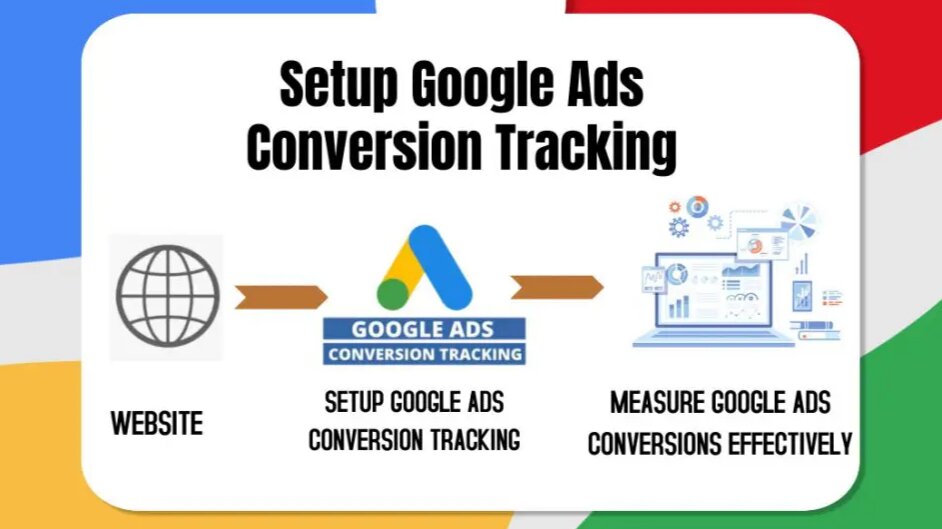
Before launching campaigns, make sure proper tracking is implemented. Here’s a complete guide on How to Set Up Conversion Tracking in Google Ads.
Step 2 — Target High-Intent Keywords
Keywords are the foundation of every successful Google Ads campaign.
The biggest difference between profitable campaigns and campaigns that waste budget often comes down to keyword intent.
High-Intent Keywords Examples
Good keywords:
- Google Ads agency
- SEO company near me
- hire PPC expert
- emergency plumber service
- dental clinic appointment
Low-intent keywords:
- what is Google Ads
- free SEO tips
- marketing examples
High-intent keywords usually include:
- buy
- hire
- near me
- services
- company
- agency
- pricing
- consultation
These users are closer to taking action.
You should also use:
- Exact match keywords
- Phrase match keywords
- Negative keywords
Negative keywords help block irrelevant traffic and prevent wasted spend.
If your campaigns are spending without conversions, check out our article on 7 Costly Google Ads Mistakes That Are Wasting Your Budget.
Step 3 — Create Landing Pages That Convert
Sending traffic to your homepage is one of the biggest lead generation mistakes.
Instead, use dedicated landing pages designed for one specific service or offer.
A high-converting landing page should include:
Clear Headline
Your headline should immediately explain:
- what you offer
- who it’s for
- why users should trust you
Example:
Generate More Leads With Google Ads Management Services
Strong CTA
Use clear calls-to-action like:
- Book Free Consultation
- Get Free Audit
- Request Quote
- Schedule Call
Trust Signals
Add:
- testimonials
- case studies
- client logos
- reviews
- certifications
Fast Loading Speed
Slow websites kill conversions.
You can improve landing page performance by following our Website Audit Checklist Before Running Google Ads.
Step 4 — Use Conversion Tracking Properly
Many advertisers run campaigns without proper conversion tracking.
This leads to:
- inaccurate optimization
- poor bidding decisions
- fake performance metrics
You should track:
- form submissions
- phone calls
- purchases
- WhatsApp clicks
- booked appointments
Google Ads performs significantly better when enough conversion data is available.
Without tracking, Google cannot optimize effectively.
You can also integrate:
- Google Analytics 4
- Google Tag Manager
- Enhanced conversions
Businesses serious about scaling often combine this with advanced Performance Marketing Services.
Step 5 — Write Ads That Increase CTR
Your ad copy directly affects:
- click-through rate
- quality score
- conversion rate
Your ads should focus on:
- benefits
- pain points
- urgency
- trust
Example Structure
Headline Ideas
- Generate More Leads With Google Ads
- Certified Google Ads Expert
- Increase Sales & Reduce Ad Spend
Description Ideas
- Get high-quality leads with optimized Google Ads campaigns designed for better ROI.
- Free account audit available.
Include:
- keywords in headlines
- strong CTA
- numbers
- offers
- trust signals
Step 6 — Optimize for Quality Score
Quality Score impacts:
- cost per click
- ad rankings
- campaign profitability
Google looks at:
- keyword relevance
- landing page experience
- expected CTR
To improve Quality Score:
- tightly group keywords
- improve landing page speed
- use keywords in headlines
- improve ad relevance
Higher Quality Scores can reduce CPC while increasing visibility.
Step 7 — Use Smart Bidding Carefully
Smart bidding works best after collecting enough conversion data.
Recommended bidding strategies:
- Maximize Conversions
- Target CPA
- Target ROAS
Avoid changing bidding strategies too frequently.
Google’s algorithm needs time to learn.
If you're just starting:
- Begin with Manual CPC or Maximize Clicks
- Collect conversion data
- Shift to automated bidding later
Step 8 — Use Remarketing to Recover Lost Leads
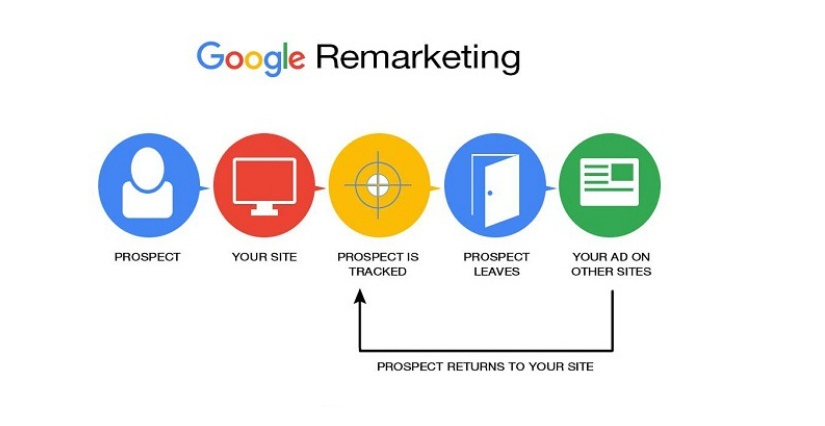
Most visitors don’t convert on the first visit.
Remarketing helps bring them back.
You can show ads to:
- website visitors
- abandoned forms
- previous customers
- engaged users
Remarketing campaigns often generate cheaper conversions because users already know your brand.
This strategy works especially well alongside Facebook Ads Services.
Step 9 — Focus on Search Terms Report
Your search terms report shows the actual queries people typed before clicking your ads.
This report helps you:
- find profitable keywords
- identify wasted spend
- discover negative keywords
Review it regularly.
This alone can dramatically improve lead quality.
Step 10 — Continuously Optimize Campaigns
Google Ads is not a one-time setup.
Successful lead generation requires continuous optimization.
Monitor:
- CTR
- CPC
- Conversion Rate
- Cost Per Lead
- Quality Score
- Impression Share
Pause underperforming keywords.
Scale profitable campaigns.
Test:
- new headlines
- landing pages
- bidding strategies
- ad extensions
Businesses that continuously optimize campaigns outperform competitors consistently.
You can explore more strategies on the Scale With Clicks homepage.
Common Google Ads Lead Generation Mistakes
Here are some common mistakes businesses make:
Targeting Broad Keywords
Broad keywords often attract irrelevant clicks.
No Negative Keywords
Without negatives, your budget gets wasted quickly.
Poor Landing Pages
Even great ads fail with weak landing pages.
No Tracking Setup
Without tracking, optimization becomes impossible.
Sending Traffic to Homepage
Dedicated landing pages usually convert better.
Ignoring Mobile Users
Most searches happen on mobile devices.
Best Industries for Google Ads Lead Generation
Google Ads works especially well for:
- Real estate
- Digital marketing agencies
- Lawyers
- Dentists
- Home services
- SaaS companies
- Consultants
- Local businesses
- Healthcare clinics
- Education businesses
How Much Budget Do You Need?
Budget depends on:
- industry competition
- location
- keyword CPC
- conversion rates
For local businesses:
- ₹20,000–₹50,000/month can work
For competitive industries:
- ₹1,00,000+ may be required
Start with:
- high-intent keywords
- focused locations
- proper tracking
Then scale gradually.
Final Thoughts
Google Ads remains one of the fastest ways to generate qualified leads when campaigns are built strategically.
The key is not just running ads — it’s building a complete conversion-focused system that includes:
- keyword targeting
- landing page optimization
- tracking
- ad copy testing
- remarketing
- continuous optimization
Businesses that treat Google Ads as a long-term growth channel usually see the best results.
If you want help scaling your campaigns, explore our Google Ads Services or read more actionable strategies on our Marketing Blog.
FAQs
How long does Google Ads take to generate leads?
Google Ads can start generating leads within days if campaigns are properly optimized. However, performance usually improves significantly after collecting enough conversion data.
What is the best campaign type for lead generation?
Search campaigns are typically the best for lead generation because they target users actively searching for your services.
How much should I spend on Google Ads?
It depends on your industry and competition. Start with a manageable budget and scale based on conversion performance.
Why am I getting clicks but no leads?
This usually happens because of:
- poor landing pages
- wrong keywords
- weak ad copy
- improper targeting
- lack of trust signals
Should I hire a Google Ads agency?
If you lack experience, hiring a professional agency can help reduce wasted spend and improve ROI faster.
What is a good conversion rate for Google Ads?
A good conversion rate varies by industry, but many successful lead generation campaigns achieve between 5%–15%.
Can Google Ads work for local businesses?
Yes. Google Ads works extremely well for local businesses using location targeting and high-intent keywords.