Facebook Ads
Meta Conversion API (CAPI) - Setup & Best Practices (2026)

Category: Facebook Ads
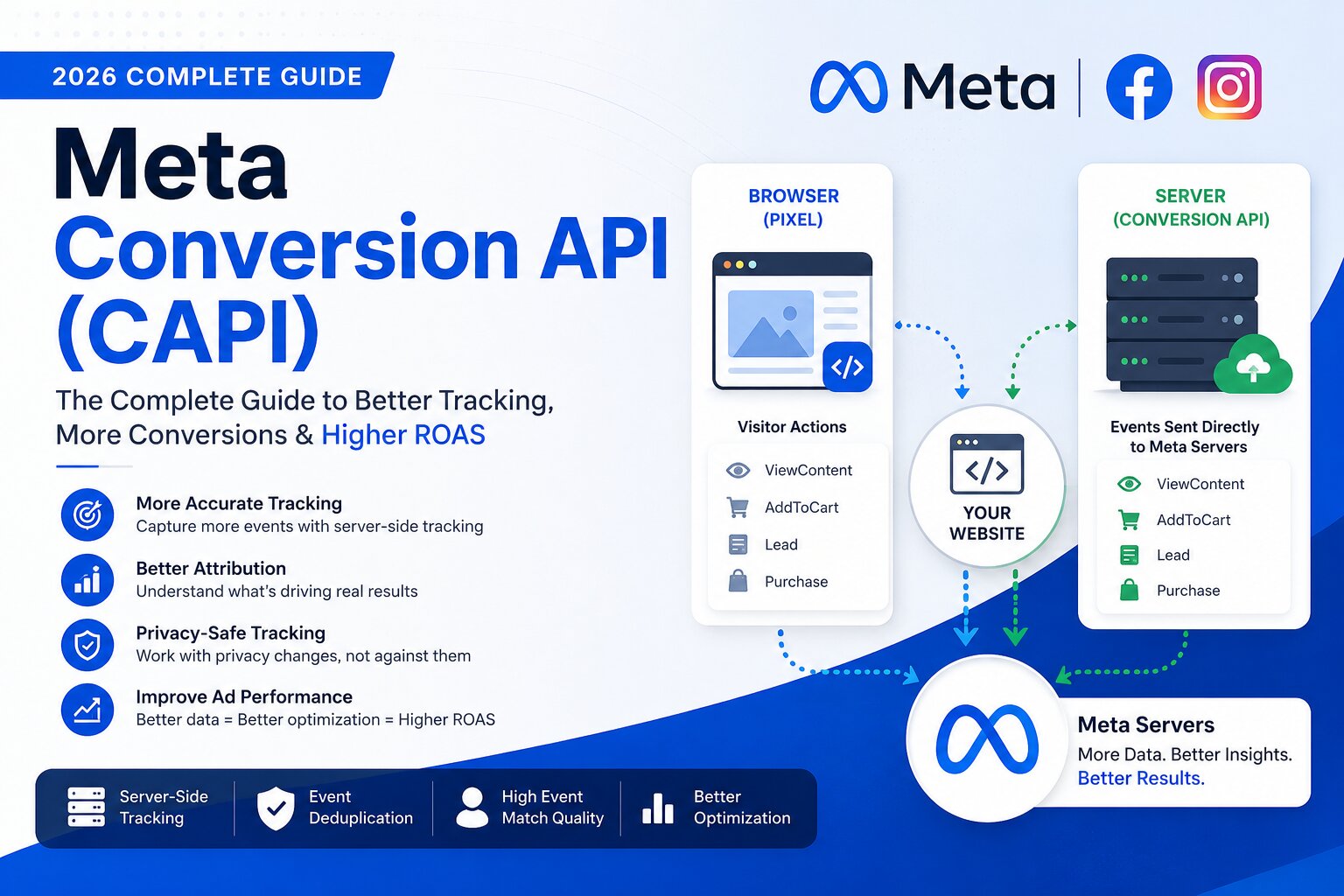
Meta Conversion API (CAPI) Complete Guide (2026)
If you've been running Facebook or Instagram ads for the last few years, you've probably noticed that tracking conversions isn't as reliable as it used to be. Browser restrictions, ad blockers, cookie limitations, and privacy updates such as Apple's App Tracking Transparency (ATT) have significantly affected the accuracy of Meta Pixel.
This is where Meta Conversion API (CAPI) comes into the picture.
Instead of relying solely on browser-based tracking, Conversion API allows your website or server to send conversion events directly to Meta. This results in more accurate data, better attribution, improved campaign optimization, and ultimately higher return on ad spend (ROAS).
Whether you're generating leads, selling products, or running Performance Max alongside Meta campaigns, implementing Conversion API has become one of the most important upgrades for your advertising stack.
If you're new to Meta advertising, start with our comprehensive guide on Meta Ads Agency Services to understand how professional campaign management can improve your results.
Likewise, if you're looking to improve overall conversion measurement across multiple advertising platforms, explore our Conversion Tracking Services.
What is Meta Conversion API?
Meta Conversion API (commonly known as CAPI) is a server-side tracking solution that enables your website, CRM, mobile application, or backend server to send customer actions directly to Meta's servers.
Unlike Meta Pixel, which depends on a visitor's browser, Conversion API communicates directly between your server and Meta.
This server-to-server communication makes event tracking considerably more reliable because it isn't affected by:
- Browser restrictions
- Cookie expiration
- Ad blockers
- iOS privacy changes
- JavaScript failures
- Browser crashes
- Network interruptions
As a result, advertisers receive more complete conversion data, allowing Meta's machine learning algorithms to optimize campaigns more effectively.
Why Meta Introduced Conversion API
Over the last few years, digital advertising has undergone major privacy changes.
Some of the biggest challenges include:
- Third-party cookies are being phased out.
- Safari blocks many tracking scripts.
- Firefox offers Enhanced Tracking Protection.
- Apple ATT requires user permission before tracking.
- Many users install ad blockers.
- Browsers increasingly limit cookie lifespans.
These changes reduce the number of events captured by Meta Pixel.
Conversion API solves much of this problem by allowing servers to send events directly to Meta instead of relying entirely on browsers.
Although CAPI doesn't bypass privacy laws, it provides a more stable and privacy-conscious way to measure conversions while respecting user consent.
How Meta Conversion API Works
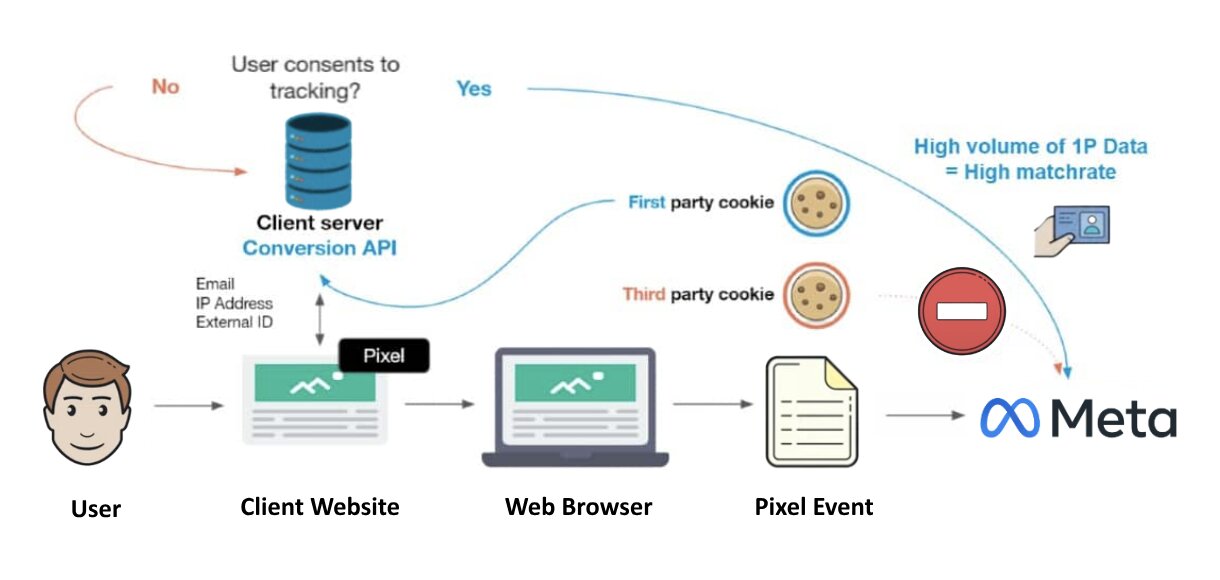
Here's a simplified overview of the tracking process:
- A visitor lands on your website through a Facebook or Instagram ad.
- The visitor performs an action such as:
- Purchasing a product
- Filling out a lead form
- Booking a consultation
- Signing up for a newsletter
- Your website records the event.
- Your server securely sends the event to Meta using the Conversion API.
- Meta receives the event and attributes it to the correct advertising campaign.
When Meta Pixel and Conversion API work together, Meta can deduplicate events using the Event ID. This prevents duplicate conversions while maximizing tracking accuracy.
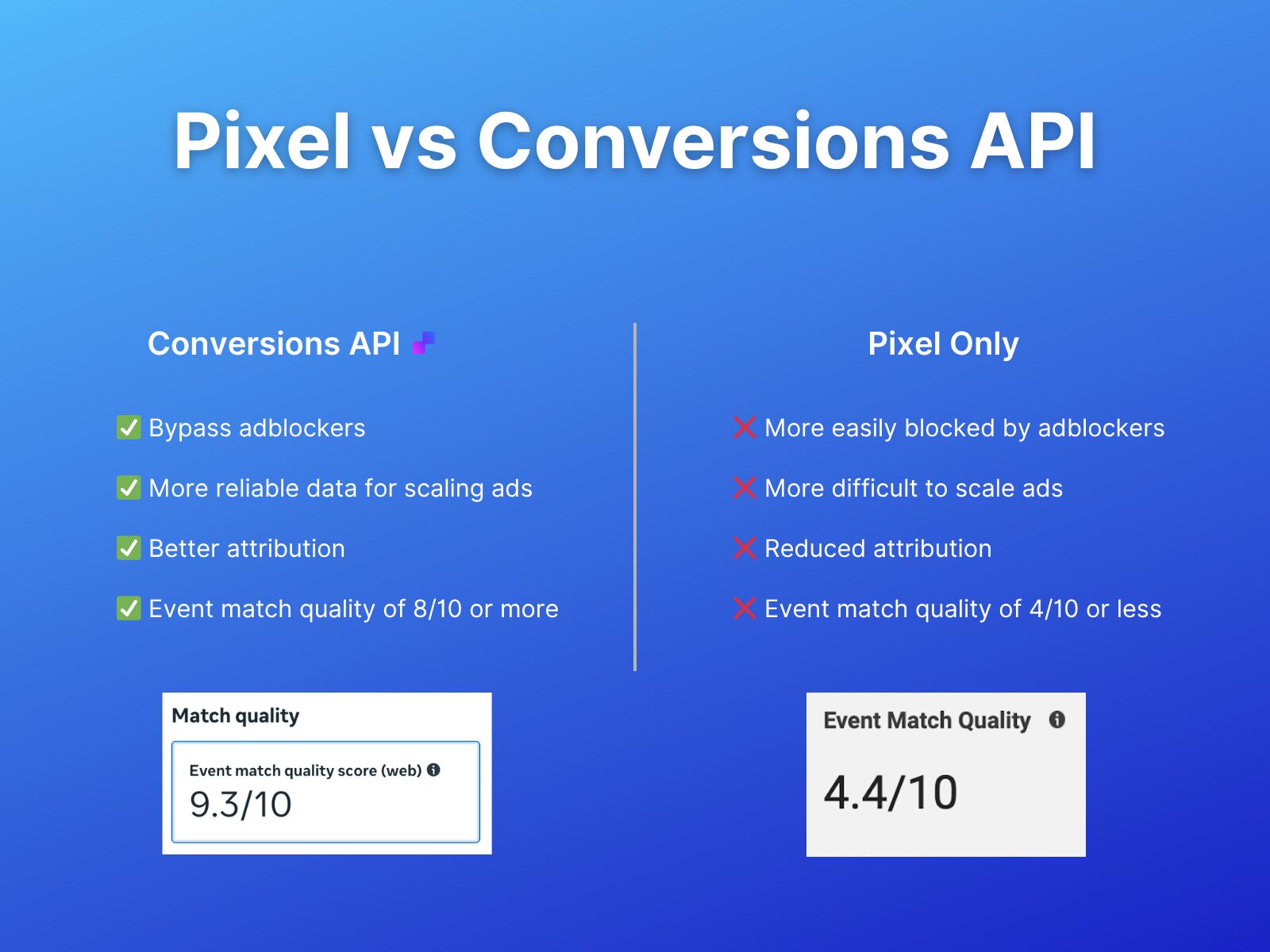
Meta Pixel vs Conversion API
Many advertisers ask whether they should replace Meta Pixel with Conversion API.
The answer is no.
The highest-performing setup uses both technologies together.
| Feature | Meta Pixel | Conversion API |
|---|---|---|
| Browser-based tracking | ✅ | ❌ |
| Server-side tracking | ❌ | ✅ |
| Affected by ad blockers | Yes | Rarely |
| Cookie dependent | Yes | No |
| Better attribution | Moderate | Excellent |
| Works after browser restrictions | Limited | Yes |
| Recommended by Meta | Yes | Yes |
The combination of Pixel + CAPI creates a much stronger tracking infrastructure.
This is also why many businesses pair Meta tracking with proper Google Ads conversion tracking, ensuring consistent measurement across both platforms. If you haven't already, read our guide on How to Track Conversions in Google Ads for additional insights.
Benefits of Meta Conversion API
1. Better Conversion Tracking
Server-side events are significantly more reliable than browser-only tracking.
Even if cookies fail or browsers block JavaScript, many conversions can still be recorded successfully.
Businesses often notice an increase in reported conversions after implementing CAPI correctly.
2. Improved Campaign Optimization
Meta's machine learning relies heavily on conversion signals.
The more accurate data Meta receives, the better it can identify users who are likely to convert.
This usually leads to:
- Better lead quality
- Lower Cost Per Acquisition (CPA)
- Higher Return on Ad Spend (ROAS)
- Faster learning phase completion
3. More Accurate Attribution
Many advertisers notice discrepancies between actual sales and Meta Ads Manager.
Conversion API helps reduce these reporting gaps by capturing events that Pixel alone may miss.
Although attribution will never be 100% perfect, CAPI significantly improves overall reporting accuracy.
4. Better Data Quality
Server events can include additional customer information (shared securely and hashed before transmission), such as:
- Email address
- Phone number
- First name
- Last name
- City
- ZIP code
- External ID
This enables Meta to match events more accurately while maintaining user privacy.
Which Events Should You Send Through Conversion API?
Meta recommends sending the same high-value events through both Meta Pixel and Conversion API. This gives Meta multiple opportunities to record the conversion while using Event Deduplication to prevent double counting.
The most commonly used events include:
| Event | Recommended | Use Case |
|---|---|---|
| PageView | ✅ | Every website visit |
| ViewContent | ✅ | Product or service page visits |
| Search | ✅ | Website search |
| AddToCart | ✅ | eCommerce stores |
| InitiateCheckout | ✅ | Checkout process starts |
| AddPaymentInfo | ✅ | Payment details entered |
| Purchase | ⭐ Highly Recommended | Completed orders |
| Lead | ⭐ Highly Recommended | Form submissions |
| CompleteRegistration | ✅ | User sign-ups |
| Contact | ✅ | Phone calls, WhatsApp clicks, contact forms |
| Schedule | ✅ | Appointment bookings |
| Subscribe | ✅ | Newsletter or membership signups |
If you're running lead generation campaigns, the Lead event should be your highest priority. For eCommerce businesses, Purchase remains the most valuable event because it directly helps Meta optimize toward revenue-generating customers.
How Pixel and Conversion API Work Together
One of the biggest misconceptions is that Conversion API replaces Meta Pixel.
In reality, Meta recommends using both together.
Here's how the tracking flow works:
Visitor
   │
   ▼
Website
   │
   ├────────► Meta Pixel (Browser)
   │
   └────────► Server
                  │
                  ▼
          Meta Conversion API
                  │
                  ▼
             Meta Events Manager
                  │
                  ▼
          Campaign Optimization
Using both technologies provides:
- Better event coverage
- Improved attribution
- More reliable conversion reporting
- Higher Event Match Quality
- Better campaign optimization
When implemented correctly, Meta identifies duplicate events using a shared Event ID, ensuring that each conversion is counted only once.
Event Deduplication Explained
One concern advertisers often have is whether sending events through both Pixel and CAPI will double their conversions.
Fortunately, Meta prevents this using Event Deduplication.
When both tracking methods send:
- the same Event Name
- the same Event ID
Meta understands they're referring to the same conversion and records only one event.
For example:
Pixel Event
Purchase
Event ID: order_987654
Conversion API Event
Purchase
Event ID: order_987654
Since both contain the identical Event ID, Meta counts just one purchase.
If Event IDs don't match, Meta may record duplicate conversions, leading to inflated reporting and poor optimization.
What is Event Match Quality (EMQ)?
Inside Meta Events Manager, you'll find a metric called Event Match Quality.
This score indicates how effectively Meta can match your server events with real Facebook or Instagram users.
A higher Event Match Quality usually leads to:
- Better audience matching
- More accurate attribution
- Improved optimization
- Better Lookalike Audiences
- Stronger campaign performance
To improve EMQ, include hashed customer information whenever possible, such as:
- Email address
- Phone number
- First name
- Last name
- City
- State
- Country
- ZIP code
- External ID
Meta securely hashes this data before processing, helping protect user privacy while improving event matching.
Different Ways to Set Up Meta Conversion API
There isn't a single setup method that works for every business. The right implementation depends on your website platform and technical resources.
1. Partner Integrations (Recommended for Most Businesses)
This is the easiest way to implement Conversion API.
Popular platforms include:
- Shopify
- WooCommerce
- WordPress
- BigCommerce
- Wix
- Squarespace
Most of these platforms allow you to connect Meta through official integrations with little or no coding required.
Best for:
- Small businesses
- eCommerce stores
- Beginners
- Business owners managing their own websites
2. Google Tag Manager Server-Side
Server-side Google Tag Manager (sGTM) is becoming increasingly popular because it offers more control over tracking and data collection.
Advantages include:
- Better tracking accuracy
- Reduced browser dependency
- Improved data governance
- Easier integration with multiple advertising platforms
- Greater flexibility for advanced implementations
This option requires more technical knowledge but provides excellent long-term scalability.
If you're already using Google Tag Manager for analytics and advertising, combining it with server-side tracking creates a powerful measurement framework.
3. Direct API Integration
Large organizations often integrate directly with Meta's Conversion API.
This method involves sending HTTP requests from your backend server to Meta.
It offers:
- Maximum flexibility
- Full control over event data
- CRM integration
- Offline conversion tracking
- Custom event processing
However, it requires developer resources and ongoing maintenance.
Common Mistakes When Implementing CAPI
Even though the setup process has become easier, many businesses unknowingly introduce tracking issues.
Here are some of the most common mistakes:
Sending Duplicate Events
Failing to configure Event Deduplication can result in duplicate conversions being recorded.
Always verify that both Pixel and CAPI share the same Event ID.
Missing Purchase Value
Many advertisers send the Purchase event but forget to include:
- Value
- Currency
- Transaction ID
Without these parameters, Meta has less information for revenue optimization and ROAS reporting.
Not Testing Events
Never assume your implementation is working correctly.
Use Meta Events Manager to verify:
- Incoming events
- Event status
- Processing errors
- Deduplication status
- Event Match Quality
Testing before launching campaigns can save hours of troubleshooting later.
Ignoring Consent Requirements
If your website serves users in regions with privacy regulations such as GDPR or similar laws, ensure that your consent management process aligns with local legal requirements before sending marketing-related data.
Conversion API improves data collection but does not replace the need for obtaining appropriate user consent where required.
Best Practices for Meta Conversion API
To get the most value from CAPI, follow these best practices:
- Use Meta Pixel and Conversion API together rather than replacing one with the other.
- Send high-priority events like Lead and Purchase consistently.
- Include event values and currency for revenue-based optimization.
- Configure Event IDs correctly to enable deduplication.
- Monitor Event Match Quality regularly in Events Manager.
- Test every implementation before scaling campaigns.
- Keep your integrations and plugins updated to avoid compatibility issues.
- Combine CAPI with accurate GA4 and Google Ads conversion tracking for a complete view of your marketing performance.
How to Test Whether Conversion API Is Working Correctly
Setting up Conversion API is only half the job. Before relying on the data for campaign optimization, you should verify that events are being received correctly and that Meta isn't reporting any implementation issues.
The easiest way to do this is through Meta Events Manager.
Step 1: Open Events Manager
Navigate to your Meta Business account and open Events Manager. Select the Pixel associated with your website.
Here you'll see:
- Recent website activity
- Browser events
- Server events
- Event Match Quality
- Diagnostics
- Test Events
- Event Deduplication status
Step 2: Use the Test Events Tool
The Test Events tab lets you verify events in real time.
Simply:
- Open the Test Events section.
- Enter your website URL (if required).
- Visit your website.
- Perform actions like:
- View a product
- Submit a lead form
- Add an item to cart
- Complete a purchase
Within a few seconds, Meta should display the incoming events.
You should ideally see both:
- Browser Event
- Server Event
If Event Deduplication is configured correctly, Meta will merge them into a single conversion.
Step 3: Check Diagnostics
The Diagnostics section highlights implementation issues such as:
- Missing parameters
- Duplicate events
- Invalid Event IDs
- Low Event Match Quality
- Server communication errors
It's a good practice to review this section regularly, especially after making website updates or installing new plugins.
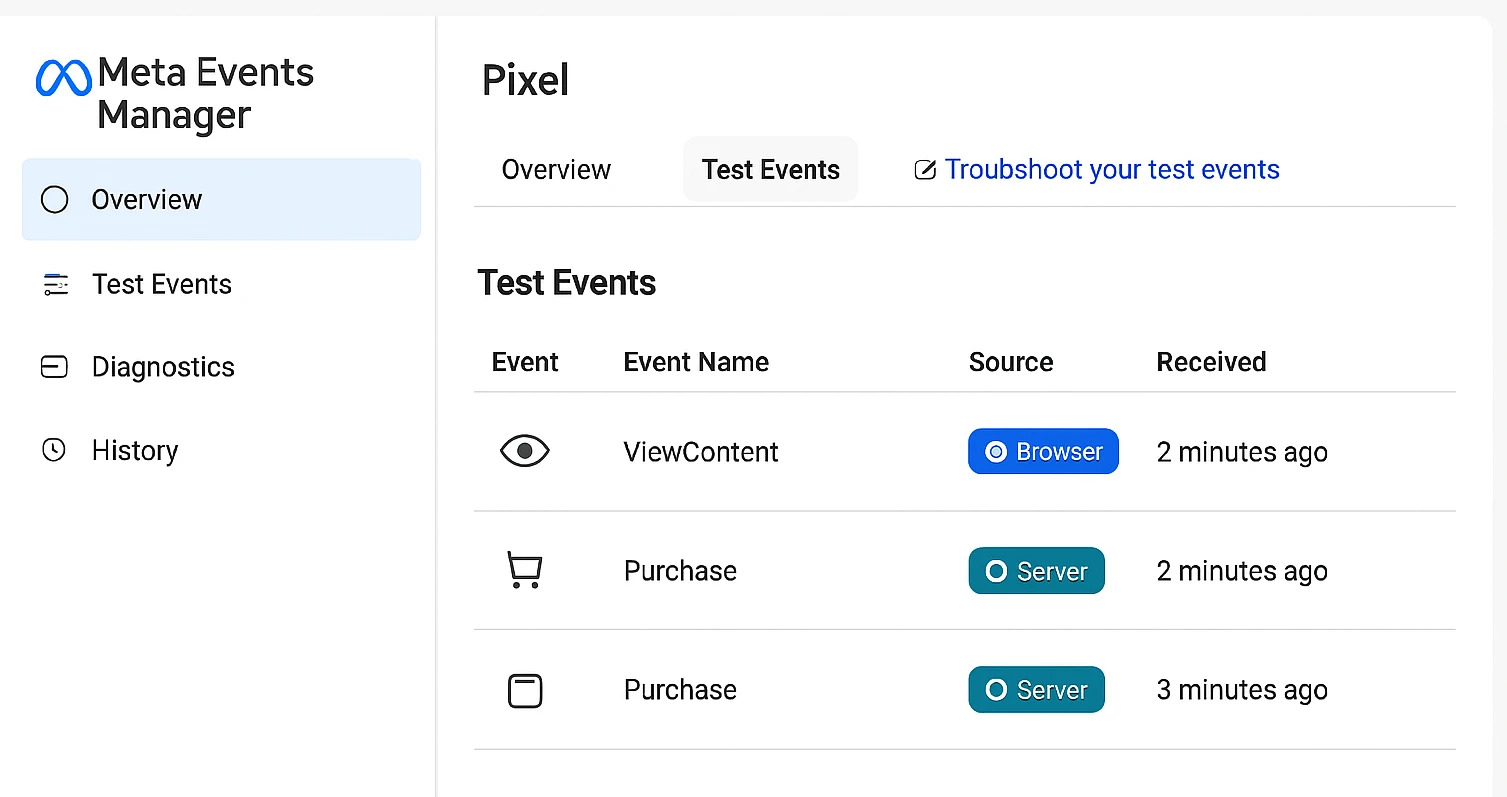
Understanding Meta Events Manager
Meta Events Manager serves as the central hub for monitoring all your website tracking.
Some of the most important metrics include:
Event Match Quality
Shows how well Meta can associate incoming events with real users.
Higher scores generally improve campaign optimization and audience creation.
Total Events Received
Displays how many browser and server events have been recorded.
Monitoring trends over time can help identify sudden drops caused by implementation issues.
Processing Status
Meta indicates whether events are:
- Received successfully
- Pending
- Ignored
- Duplicated
- Rejected
Addressing rejected events promptly helps maintain accurate reporting.
Event Parameters
Clicking on an individual event lets you inspect the parameters being sent.
For example, a Purchase event may include:
- Value
- Currency
- Event Time
- Event ID
- Content IDs
- Customer Information
- Order Number
Verifying these parameters ensures that Meta has the data needed for effective optimization.
What Is Meta Conversion API Gateway?
Meta has also introduced Conversion API Gateway, a simplified deployment option for businesses that want server-side tracking without building a custom integration.
Instead of manually developing server infrastructure, Gateway provides a guided setup experience that reduces technical complexity.
Some advantages include:
- Faster deployment
- Reduced development effort
- Improved reliability
- Automatic updates
- Official Meta support
While many businesses still prefer partner integrations or server-side GTM, Conversion API Gateway is worth considering if you want a managed solution.
Conversion API for Lead Generation Businesses
Many advertisers assume CAPI is only useful for eCommerce stores.
That's not true.
If your business generates leads through:
- Contact forms
- Quote requests
- Consultation bookings
- WhatsApp inquiries
- Demo requests
- Appointment scheduling
Conversion API can significantly improve the quality of your conversion data.
For lead generation campaigns, consider sending events such as:
- Lead
- Contact
- Schedule
- CompleteRegistration
Providing Meta with stronger conversion signals helps its algorithm identify users who are more likely to become qualified leads—not just form fillers.
If lead generation is your primary objective, you may also find these resources helpful:
Although these articles focus on Google Ads, many of the principles around conversion tracking, landing pages, and optimization apply equally to Meta campaigns.
Conversion API for eCommerce Stores
For online stores, Conversion API becomes even more valuable because it captures revenue-focused events that directly influence Meta's optimization algorithms.
Important events include:
- ViewContent
- AddToCart
- InitiateCheckout
- AddPaymentInfo
- Purchase
Including additional parameters like:
- Product IDs
- Product Category
- Order Value
- Currency
- Quantity
helps Meta better understand purchasing behavior and optimize for customers with a higher likelihood of completing future purchases.
Businesses often see improvements in:
- Return on Ad Spend (ROAS)
- Cost Per Purchase
- Purchase Attribution
- Audience Quality
- Campaign Stability
Meta Conversion API and Google Analytics 4
Many marketers mistakenly believe they should rely on either GA4 or Conversion API.
In reality, they serve different purposes and work best together.
A modern tracking setup often looks like this:
Website Visitor
        │
        ▼
Google Tag Manager
        │
        ├────────► Google Analytics 4
        │
        ├────────► Google Ads
        │
        ├────────► Meta Pixel
        │
        └────────► Meta Conversion API
With this architecture:
- GA4 provides detailed website analytics and user behavior.
- Google Ads uses conversion data for bidding and optimization.
- Meta Pixel captures browser-based interactions.
- Conversion API supplements browser tracking with reliable server-side events.
Together, they provide a much more complete picture of your marketing performance than any single tool alone.
For businesses investing in multiple advertising platforms, implementing an integrated tracking strategy is essential. Learn more about our Conversion Tracking Services to ensure every important action on your website is measured accurately.
Is Conversion API Worth It?
For most advertisers, the answer is yes.
Whether you're spending a few hundred dollars a month or managing large advertising budgets, accurate conversion tracking has a direct impact on campaign performance.
By providing Meta with more reliable conversion data, CAPI can help:
- Improve attribution accuracy
- Strengthen optimization signals
- Reduce data loss caused by browser restrictions
- Enhance audience targeting
- Support more informed marketing decisions
While implementation requires some effort, the long-term benefits typically outweigh the initial setup time—especially for businesses that depend on measurable results from Facebook and Instagram advertising.
Final Thoughts
Privacy-focused browser updates have fundamentally changed how digital advertising platforms collect and process conversion data. Relying solely on browser-based tracking is no longer enough for businesses that want accurate reporting and effective campaign optimization.
Meta Conversion API addresses many of these challenges by sending events directly from your server to Meta. When combined with Meta Pixel, it creates a more resilient tracking setup that improves event coverage, enhances attribution, and gives Meta better signals for optimization.
Whether you're running lead generation campaigns, managing an online store, or scaling a service-based business, implementing Conversion API is no longer just a technical enhancement—it's an important part of building a reliable measurement strategy.
Of course, tracking is only one piece of the puzzle. Strong landing pages, compelling ad creatives, clear audience targeting, and ongoing optimization all play a significant role in achieving profitable results. When these elements work together with accurate conversion tracking, you're in a much better position to scale your campaigns confidently.
Frequently Asked Questions (FAQs)
1. What is Meta Conversion API (CAPI)?
Meta Conversion API (CAPI) is a server-side tracking solution that allows your website, CRM, or backend server to send conversion events directly to Meta. Unlike Meta Pixel, which relies on a visitor's browser, CAPI communicates directly with Meta's servers, making event tracking more reliable and less affected by browser restrictions or ad blockers.
2. Do I need both Meta Pixel and Conversion API?
Yes. Meta recommends using Meta Pixel and Conversion API together.
Pixel captures browser-side events, while Conversion API sends server-side events. When both are configured correctly with Event Deduplication, you get more accurate conversion tracking without counting the same event twice.
3. Does Conversion API improve Facebook Ads performance?
Conversion API doesn't automatically improve campaign performance, but it provides Meta with more complete and accurate conversion data.
This helps Meta's machine learning better understand which users are most likely to convert, often leading to:
- Better optimization
- Improved attribution
- Higher-quality leads
- More stable campaign performance
4. Is Meta Conversion API free?
Yes.
Meta does not charge any additional fee for using Conversion API. However, depending on your implementation method, you may incur costs for:
- Server hosting
- Google Tag Manager Server-Side hosting
- Third-party plugins
- Developer implementation
5. Can I use Conversion API without Meta Pixel?
Technically, yes.
However, Meta recommends using both together because Pixel captures browser events while Conversion API captures server events. Combining both generally provides the best event coverage and reporting accuracy.
6. Does Conversion API work for lead generation websites?
Absolutely.
If your website collects leads through:
- Contact forms
- Demo requests
- Appointment bookings
- Consultation forms
- WhatsApp inquiries
Conversion API can improve lead tracking and provide stronger optimization signals to Meta's advertising algorithm.
7. Which platforms support Meta Conversion API?
Many popular website platforms offer built-in or official integrations, including:
- Shopify
- WooCommerce
- WordPress
- Magento
- BigCommerce
- Wix
- Squarespace
For custom websites, developers can implement Conversion API directly using Meta's APIs or through Google Tag Manager Server-Side.
8. How can I verify if Conversion API is working?
You can check your implementation in Meta Events Manager by reviewing:
- Test Events
- Diagnostics
- Event Match Quality
- Server Events
- Event Deduplication
Regular testing helps identify issues before they affect campaign performance.