Google Ads
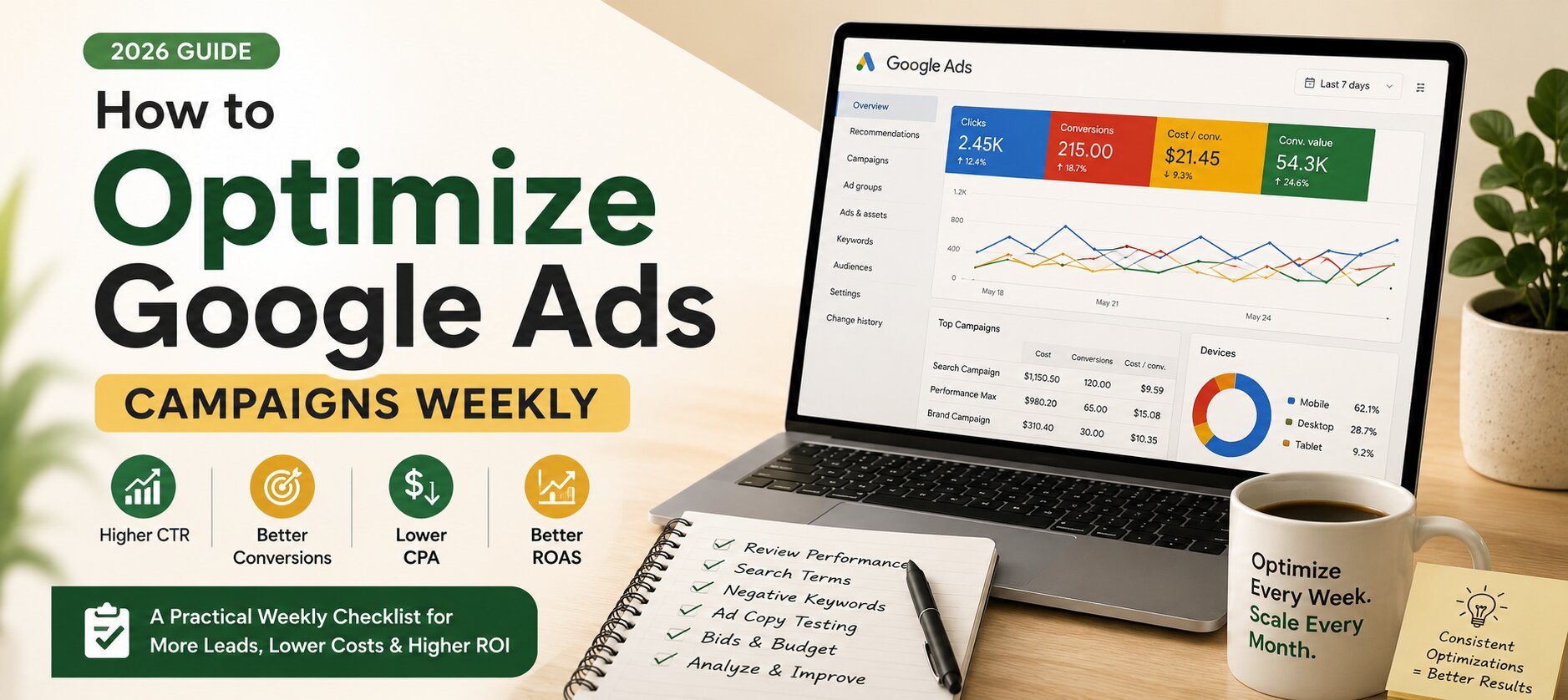
How to Optimize Google Ads Campaigns Weekly (Complete 2026 Checklist)

Category: Google Ads
Google Ads isn't a platform where you launch campaigns and wait for results. Even a well-structured account can slowly lose efficiency if it isn't monitored regularly. Competitors change their bids, search trends evolve, new search terms appear every day, and user behavior shifts over time.
That is why successful advertisers don't simply create campaigns—they optimize them consistently.
Whether you're running campaigns for a local business, an eCommerce store, a SaaS company, or a lead generation business, having a weekly optimization routine can significantly improve your return on investment while reducing wasted ad spend.
In this guide, you'll learn exactly how to optimize Google Ads campaigns every week with a practical checklist that many PPC professionals follow. These strategies will help you improve click-through rates (CTR), increase conversions, lower cost per acquisition (CPA), and maximize your overall return on ad spend (ROAS).
If you're just getting started with Google Ads, you may also want to read our complete guide on Google Ads Setup for Beginners (2026)
If you're looking for professional campaign management, our Google Ads Management Services can help you build campaigns that consistently generate qualified leads.
Why Weekly Optimization Matters
Many advertisers make the mistake of checking their campaigns only once a month. Unfortunately, by the time they notice problems, hundreds or even thousands of dollars may already have been wasted.
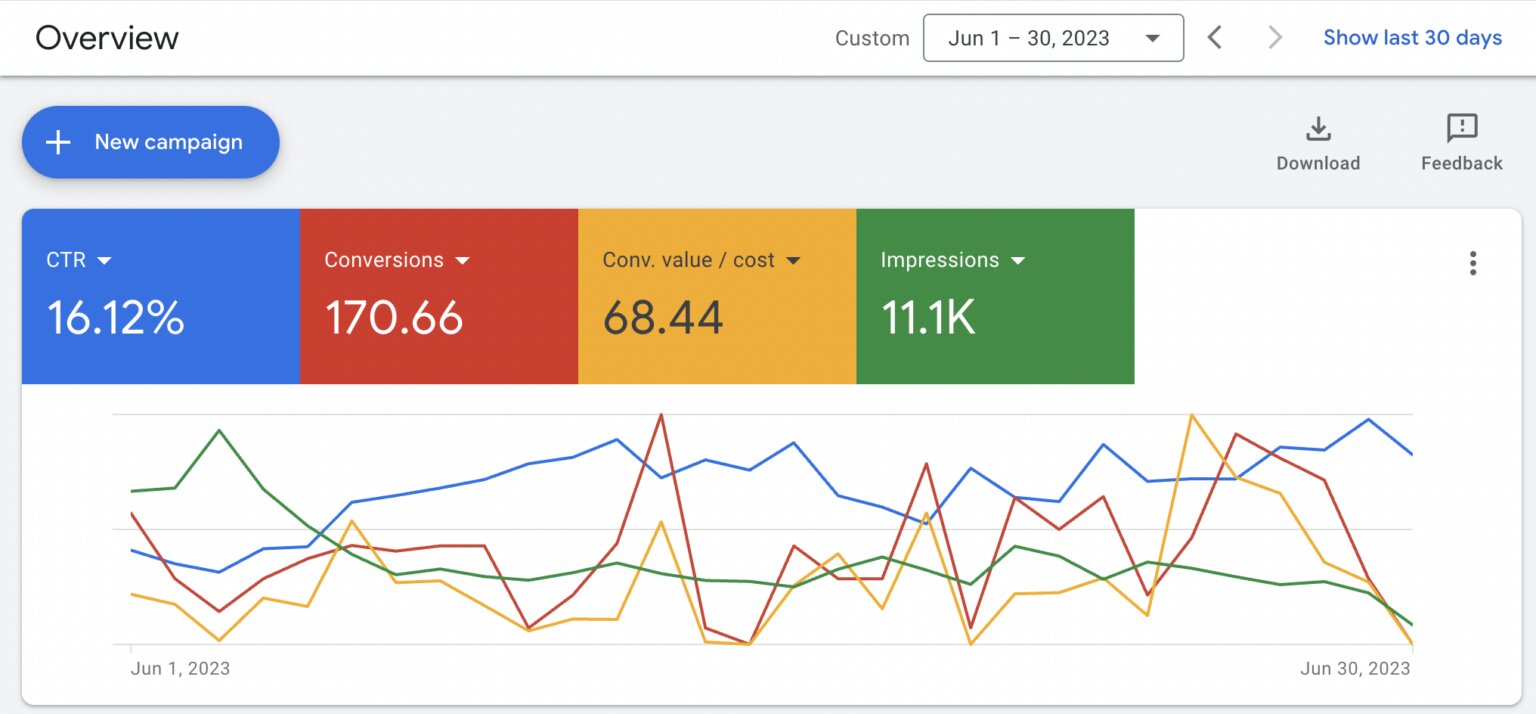
Weekly optimization allows you to:
- Detect wasted ad spend early
- Improve Quality Score
- Find profitable keywords
- Pause poor-performing ads
- Increase conversion rates
- Reduce cost per click (CPC)
- Improve Return on Ad Spend (ROAS)
- Scale winning campaigns confidently
Think of your Google Ads account as a high-performance vehicle. It requires regular tuning to continue performing at its best.
Your Weekly Google Ads Optimization Checklist
Instead of making random changes throughout the week, it's better to follow a structured optimization process.
Here's the weekly workflow used by experienced PPC managers.
1. Review Campaign Performance
Before making any changes, understand how your campaigns performed during the last seven days.
Navigate to:
Campaigns → Last 7 Days
Review metrics like:
- Impressions
- Clicks
- CTR
- CPC
- Cost
- Conversions
- Conversion Rate
- CPA
- ROAS
- Impression Share
Ask yourself:
- Which campaigns improved?
- Which campaigns declined?
- Which campaigns spent money without generating conversions?
Avoid making decisions based on one day's performance. Weekly data usually provides a more reliable picture.
2. Analyze Search Terms Report
The Search Terms Report is one of the most valuable optimization tools inside Google Ads.
It reveals the actual search queries people typed before clicking your ads.
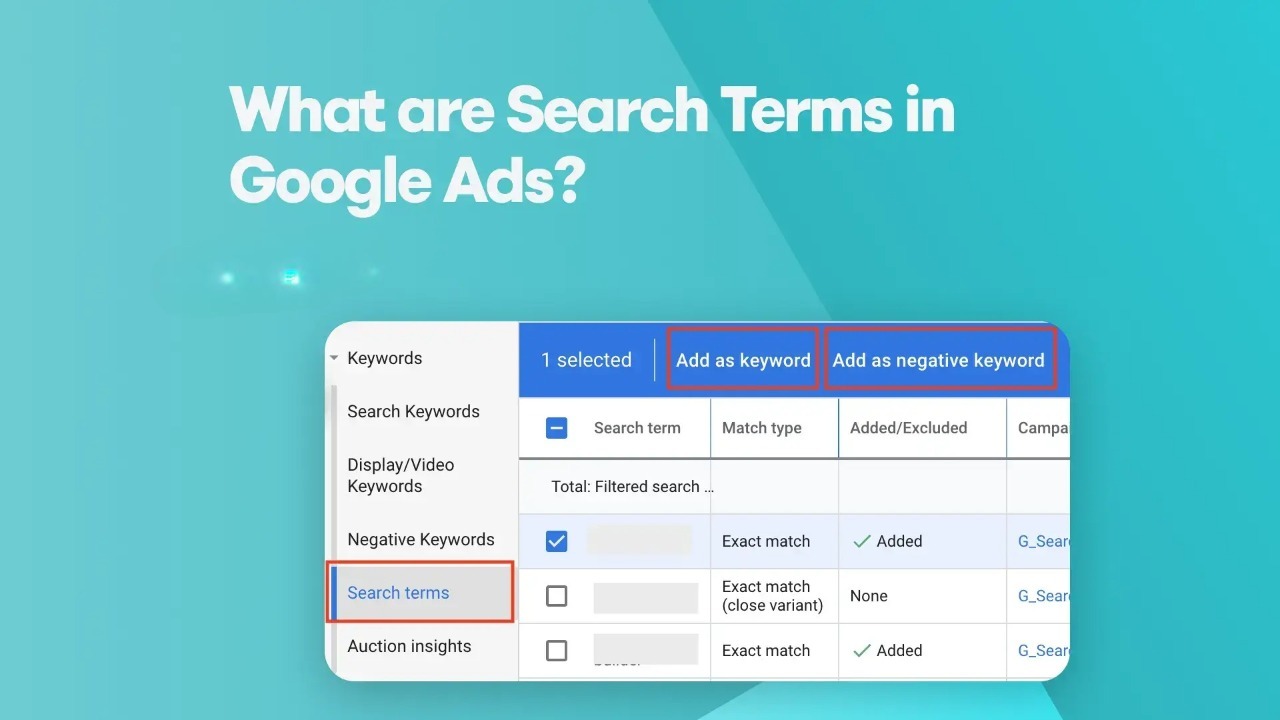
You'll often discover:
- Irrelevant searches wasting budget
- New keyword opportunities
- High-converting long-tail keywords
- Seasonal search trends
Navigate to:
Keywords → Search Terms
Look for searches such as:
cheap services
free software
jobs
internship
salary
course
training
pdf
template
If these aren't relevant to your business, add them as negative keywords.
Removing irrelevant traffic helps improve:
- Conversion Rate
- CTR
- Quality Score
- Budget efficiency
If you want to learn more about reducing unnecessary clicks, read our guide on Why Your Google Ads Are Not Converting
3. Add New Negative Keywords
Negative keywords prevent your ads from showing for irrelevant searches.
This simple optimization often produces immediate improvements in campaign performance.
For example:
If you sell premium marketing services, you may want to exclude searches containing:
- Free
- DIY
- Tutorial
- Course
- Job
- Internship
- Salary
- Download
- Template
Every business should build a growing negative keyword list.
Over time, this list becomes one of your most valuable optimization assets.
4. Review Keyword Performance
Not every keyword deserves to stay active.
Every week, review performance based on:
- Clicks
- Conversions
- Cost
- Conversion Rate
- CPA
- Quality Score
Look for keywords that:
✅ Generate conversions consistently
These can often support increased budgets or higher bids.
Also identify keywords that:
- Spend heavily
- Generate many clicks
- Produce zero conversions
These keywords may need:
- Bid reductions
- Different match types
- Better landing pages
- Better ad copy
- Or simply be paused.
Remember that optimization isn't about having more keywords—it's about keeping the right ones.
5. Improve Quality Score
Quality Score has a direct impact on your CPC and Ad Rank.
A higher Quality Score often means paying less while achieving better ad positions.
Review the following columns:
- Expected CTR
- Ad Relevance
- Landing Page Experience
If any keyword shows below-average ratings, investigate why.
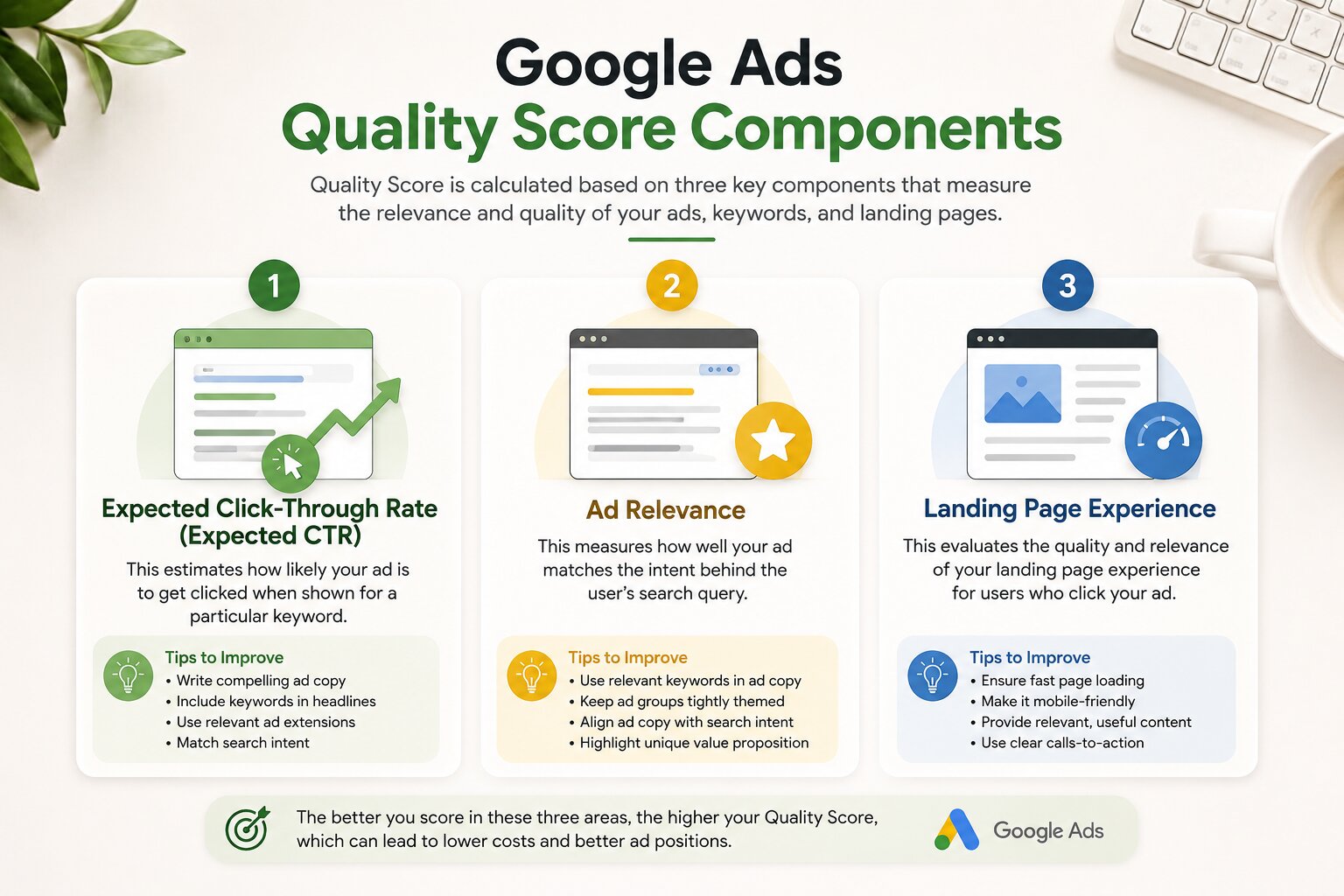
Common improvements include:
- Using the keyword naturally in headlines
- Writing more relevant descriptions
- Improving landing page speed
- Matching landing page content with ad intent
- Creating tighter ad groups
6. Check Conversion Tracking
Optimization is impossible without accurate data.
Every week, confirm that conversion tracking is functioning correctly.
Verify that:
- Form submissions are recording
- Phone call conversions are tracked
- Purchases are being reported
- Enhanced Conversions are active
- GA4 events match Google Ads conversions
- No duplicate conversions are firing
Even a small tracking issue can lead to poor optimization decisions.
If you haven't implemented proper tracking yet, learn more about our Conversion Tracking Services, where we set up Google Tag Manager (GTM), Google Analytics 4 (GA4), Enhanced Conversions, and accurate Google Ads conversion tracking.
7. Review Your Responsive Search Ads (RSAs)
Google Ads continuously tests different combinations of headlines and descriptions within Responsive Search Ads (RSAs). While Google's automation is powerful, it still requires regular review to ensure your messaging stays relevant and competitive.
Navigate to:
Ads & Assets → Ads
Review metrics such as:
- Impressions
- CTR
- Conversion Rate
- Conversions
- Asset Performance
Pay close attention to Google's asset ratings:
- Best
- Good
- Low
- Learning
If multiple headlines consistently receive a "Low" rating, replace them with fresh variations.
When writing new headlines, include:
- Primary keyword
- Clear value proposition
- Trust signals
- Strong call-to-action
For example, instead of:
Digital Marketing Agency
Try:
Certified Google Ads Experts
Increase Qualified Leads Faster
Google Ads Management That Delivers Results
Small improvements in ad copy can significantly increase CTR and Quality Score over time.
8. Test New Ad Copy Every Week
One of the biggest mistakes advertisers make is running the same ad copy for months.
Even high-performing ads eventually experience ad fatigue, especially in competitive industries.
Aim to test at least one new variation every week.
Ideas to test include:
- Different headlines
- New calls-to-action
- Promotional offers
- Customer-focused messaging
- Social proof
- Numbers and statistics
- Question-based headlines
Examples:
Version A
Get More Leads With Google Ads
Version B
Struggling With Low-Quality Leads? Let's Fix Your Google Ads.
Version C
Stop Wasting Ad Spend—Generate Better Leads Today
Keep one variable changing at a time so you can clearly measure what improves performance.
9. Review Landing Page Performance
Google Ads optimization doesn't stop inside the Ads dashboard.
A poorly optimized landing page can reduce conversion rates even when your campaigns generate quality traffic.
Each week, review:
- Bounce Rate
- Average Engagement Time
- Scroll Depth
- Conversion Rate
- Form Completion Rate
- Mobile Experience
- Page Load Speed

Ask yourself:
- Does the headline match the ad?
- Is the call-to-action immediately visible?
- Are trust signals clearly displayed?
- Is the form simple to complete?
- Are there unnecessary distractions?
Even reducing your landing page load time by one or two seconds can improve conversions.
10. Evaluate Bid Strategies
Bid strategies should evolve as your account collects more data.
Review whether your current bidding approach still aligns with your campaign goals.
Common bidding strategies include:
- Maximize Clicks
- Maximize Conversions
- Target CPA
- Target ROAS
- Manual CPC
- Maximize Conversion Value
Questions to ask:
- Is the campaign generating enough conversions for Smart Bidding?
- Has CPA increased recently?
- Is ROAS improving or declining?
- Has Impression Share dropped?
Avoid changing bid strategies every few days.
Google's machine learning typically needs time to stabilize after significant adjustments.
11. Optimize Device Performance
Not every device performs equally.
Navigate to:
Campaign → Devices
Compare:
- Desktop
- Mobile
- Tablet
Review:
- Conversion Rate
- CPA
- CPC
- ROAS
- Average Order Value (for eCommerce)
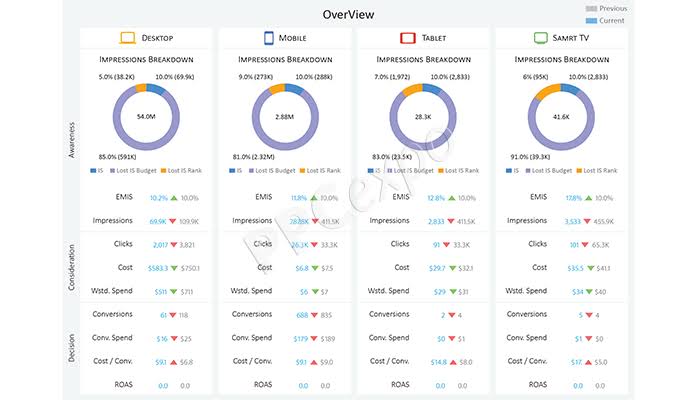
For example:
Desktop
- Conversion Rate: 8%
Mobile
- Conversion Rate: 2%
If mobile traffic spends a large portion of your budget without converting, investigate:
- Mobile page speed
- Form usability
- Button placement
- Checkout experience
- Tracking issues
Device insights often reveal quick optimization opportunities.
12. Review Geographic Performance
Businesses targeting multiple cities, states, or countries should review location performance every week.
Navigate to:
Locations Report
Look for:
- Cities generating conversions
- High-spending regions
- Low-performing locations
- Cost per Conversion by location
- ROAS by location
You may discover that one city delivers excellent results while another consumes budget with little return.
Consider:
- Increasing bids for profitable regions
- Reducing bids for underperforming areas
- Excluding locations that consistently fail to convert
- Creating separate campaigns for high-value regions
Location-based optimization becomes increasingly important as campaigns scale.
13. Analyze Ad Schedule Performance
Customers don't search with the same intent throughout the day.
Some businesses receive their highest-quality leads during office hours, while others perform better during evenings or weekends.
Navigate to:
Ad Schedule
Review:
- Hour of Day
- Day of Week
- CPA
- Conversion Rate
- ROAS
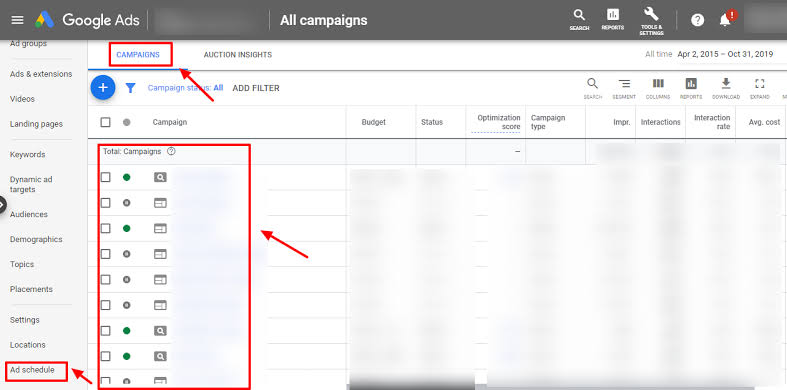
Questions to consider:
- Which hours consistently produce conversions?
- Are there periods with high spend but no leads?
- Should bids be adjusted during peak hours?
Instead of running ads 24/7, focus more budget on the times that generate the strongest results.
14. Review Audience Performance
Even Search campaigns benefit from audience insights.
Navigate to:
Audiences
Review audience segments such as:
- In-Market Audiences
- Affinity Audiences
- Customer Match
- Remarketing Lists
- Website Visitors
Compare:
- CTR
- Conversion Rate
- CPA
- ROAS
You may find that returning visitors convert at twice the rate of new users or that certain in-market audiences consistently outperform others.
These insights can guide future targeting, bid adjustments, and remarketing strategies.
If you're also running paid campaigns on social platforms, our Meta Ads Management Services can help you build high-performing remarketing funnels that complement your Google Ads efforts.
15. Monitor Budget Allocation
Weekly budget reviews ensure your best-performing campaigns aren't limited by budget while weaker campaigns continue to consume spend.
Look for campaigns that show:
- Limited by Budget
- High Conversion Rate
- Strong ROAS
- Low CPA
These campaigns may deserve additional budget.
Likewise, review campaigns that:
- Spend consistently without conversions
- Have declining ROAS
- Produce expensive leads
Consider shifting budget toward your strongest performers rather than increasing total spend.
Budget optimization is one of the fastest ways to improve overall account efficiency without changing your total advertising investment.
16. Review Auction Insights
Google Ads isn't just about your own performance—it's also about understanding how you compare against competitors.
Each week, review the Auction Insights report to identify changes in the competitive landscape.
Navigate to:
Campaigns → Auction Insights
Key metrics to monitor include:
- Impression Share
- Overlap Rate
- Position Above Rate
- Top of Page Rate
- Absolute Top of Page Rate
- Outranking Share

If you notice a competitor suddenly increasing their Impression Share, they may have raised their bids, improved ad quality, or expanded their budget.
Instead of immediately increasing your bids, ask yourself:
- Can I improve my Quality Score?
- Can I write more compelling ads?
- Is my landing page relevant?
- Am I targeting the right audience?
A smarter strategy often outperforms simply spending more.
17. Monitor Impression Share
Losing impression share means your ads are missing opportunities to appear when potential customers are searching.
Review these metrics weekly:
- Search Impression Share
- Search Lost IS (Budget)
- Search Lost IS (Rank)
Interpret the data carefully:
High Lost IS (Budget)
Your campaigns are constrained by budget.
Possible actions:
- Increase daily budget
- Shift budget from low-performing campaigns
- Improve targeting to reduce wasted spend
High Lost IS (Rank)
Your ads aren't competitive enough.
Possible improvements:
- Increase Quality Score
- Improve ad relevance
- Enhance landing page experience
- Adjust bids where appropriate
Improving Impression Share doesn't always require spending more—it often requires spending smarter.
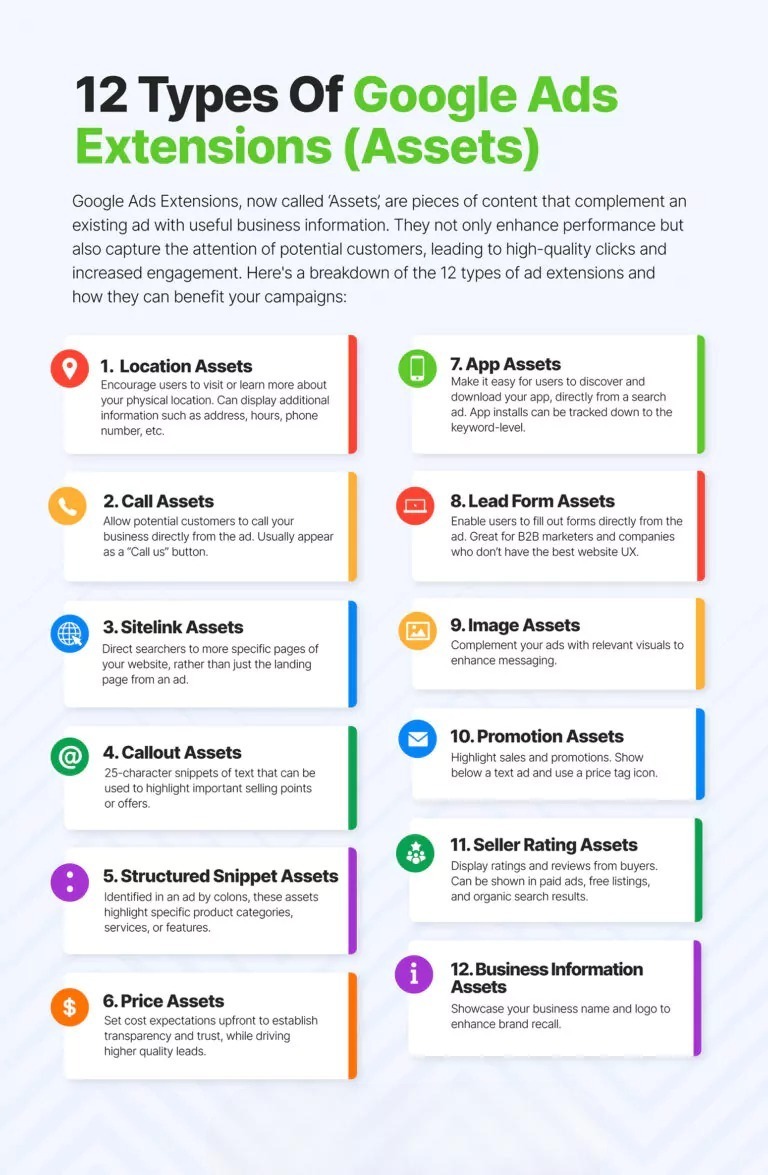
18. Review Ad Assets (Extensions)
Ad Assets (formerly called Extensions) can significantly improve ad visibility and CTR.
Every week, ensure your campaigns include relevant assets and that they're performing well.
Review:
- Sitelink Assets
- Callout Assets
- Structured Snippets
- Call Assets
- Image Assets
- Promotion Assets
- Price Assets
- Lead Form Assets (where applicable)
Remove outdated assets and add new ones that reflect current offers, seasonal promotions, or recently published content.
For example, you can add sitelinks pointing to:
-
Google Ads Services
https://scalewithclicks.com/services/google-ads-agency -
SEO Services
https://scalewithclicks.com/services/seo-services -
Conversion Tracking Services
https://scalewithclicks.com/services/conversion-tracking
Using relevant assets improves both user experience and Ad Rank.
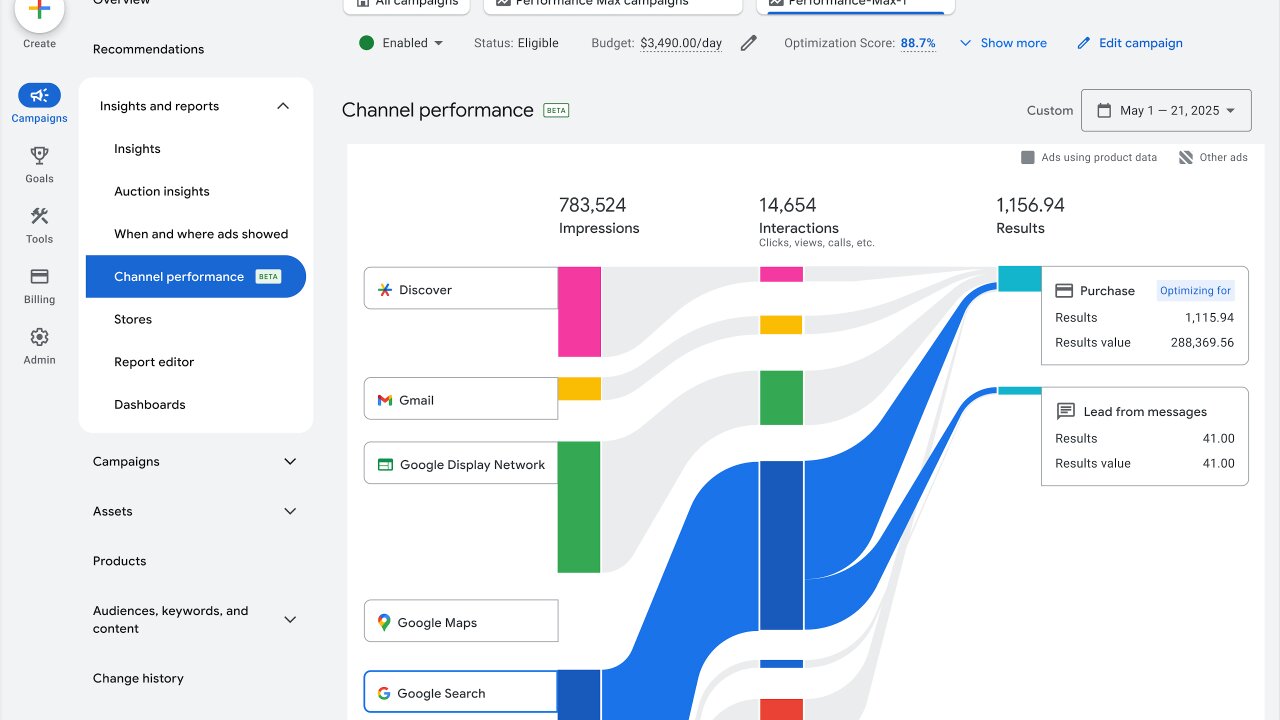
19. Review Performance Max Insights (If Applicable)
If you're running Performance Max campaigns, don't rely solely on Google's automation.
Review the available insights each week, including:
- Top-performing search themes
- Audience Signals
- Asset Group performance
- Product performance (for eCommerce)
- Conversion trends
- Search categories
- Customer acquisition metrics
Pay attention to:
- Low-performing asset groups
- Underperforming products
- Weak creative assets
- Missing audience signals
Refresh creative assets periodically to prevent performance from plateauing.
If you're new to Performance Max, our guide on Search vs Performance Max Campaigns explains when each campaign type is most effective:
20. Check Automated Recommendations Carefully
Google Ads frequently provides optimization recommendations, but not every suggestion aligns with your business goals.
Navigate to:
Recommendations
Review suggestions such as:
- Adding keywords
- Updating bidding strategies
- Improving ad strength
- Repairing tracking issues
- Adding assets
Before applying any recommendation, consider:
- Will this improve lead quality?
- Does it match my campaign objective?
- Will it increase unnecessary spend?
Treat recommendations as ideas—not instructions.
21. Run Controlled Experiments
Testing is one of the most effective ways to improve long-term performance.
Rather than making large-scale changes directly in live campaigns, use Google Ads Experiments to compare different approaches.
Ideas to test include:
- Landing pages
- Bid strategies
- Ad copy
- Match types
- Target CPA values
- Target ROAS values
Allow experiments to collect enough data before deciding on a winner.
A disciplined testing process helps you make data-driven decisions instead of relying on assumptions.
22. Maintain a Weekly Optimization Log
One of the habits that separates experienced PPC managers from beginners is documentation.
Create a simple spreadsheet or dashboard where you record:
| Week | Changes Made | Reason | Result |
|---|---|---|---|
| Week 1 | Added 25 negative keywords | Reduce wasted spend | CPA decreased by 11% |
| Week 2 | Updated RSA headlines | Improve CTR | CTR increased by 8% |
| Week 3 | Increased budget for Brand Campaign | Limited by Budget | Conversions increased |
| Week 4 | Paused low-performing keywords | Reduce CPA | Lower overall acquisition cost |
Tracking your changes makes it easier to identify what works and prevents repeated mistakes.
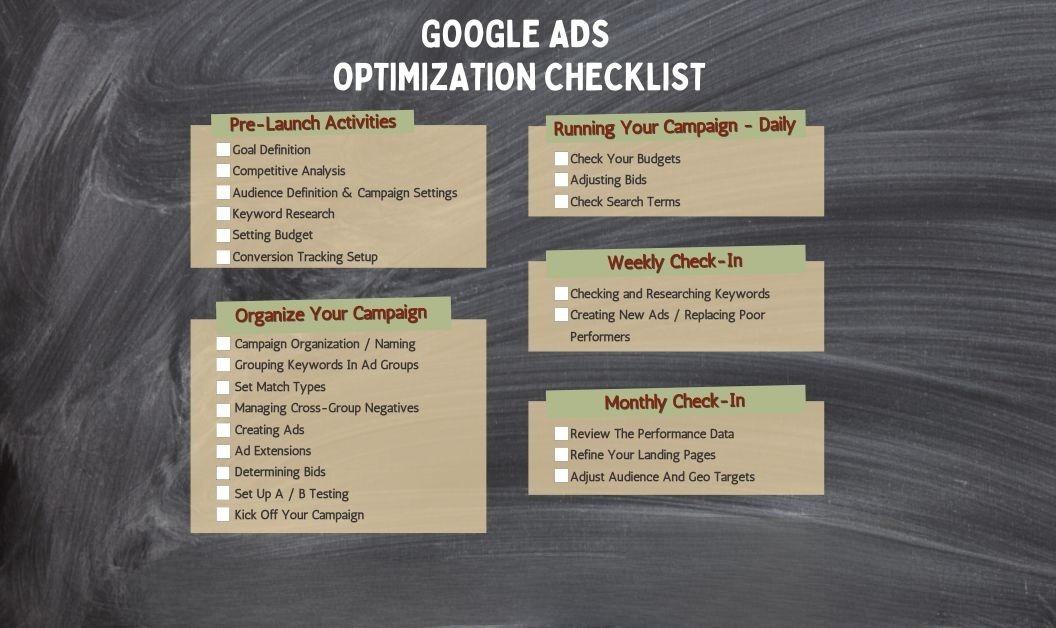
Weekly Google Ads Optimization Checklist
Use this quick checklist every week to stay on top of your account.
| Task | Status |
|---|---|
| Review campaign performance | ☐ |
| Analyze search terms | ☐ |
| Add negative keywords | ☐ |
| Review keyword performance | ☐ |
| Improve Quality Score | ☐ |
| Verify conversion tracking | ☐ |
| Test new ad copy | ☐ |
| Review landing pages | ☐ |
| Check bid strategies | ☐ |
| Optimize devices | ☐ |
| Review locations | ☐ |
| Optimize ad schedule | ☐ |
| Review audience performance | ☐ |
| Adjust budgets | ☐ |
| Review Auction Insights | ☐ |
| Monitor Impression Share | ☐ |
| Update ad assets | ☐ |
| Review Performance Max insights | ☐ |
| Evaluate recommendations | ☐ |
| Document optimization changes | ☐ |
Following this checklist consistently will help you identify issues early, improve campaign efficiency, and make informed optimization decisions over time.
Final Thoughts
Weekly optimization is what separates profitable Google Ads accounts from campaigns that gradually waste budget.
You don't need to make dozens of changes every week. Instead, focus on reviewing the right metrics, identifying opportunities, and making small, data-driven improvements consistently. Over time, these incremental optimizations compound into significant gains in click-through rate (CTR), conversion rate, Quality Score, and return on ad spend (ROAS).
A simple routine—reviewing search terms, adding negative keywords, testing new ad copy, optimizing bids, checking conversion tracking, and monitoring landing page performance—can make a noticeable difference without increasing your advertising budget.
Remember that optimization is an ongoing process rather than a one-time task. Search behavior changes, competitors adjust their strategies, and Google's algorithms continue to evolve. Staying proactive helps ensure your campaigns remain competitive and profitable.
If managing your campaigns every week feels overwhelming, partnering with experienced PPC specialists can save time while improving results.
At Scale With Clicks, we help businesses build, optimize, and scale high-performing Google Ads campaigns that focus on measurable business growth rather than vanity metrics.
Whether you need help with:
- Google Search Campaigns
- Performance Max Campaigns
- Shopping Ads
- Lead Generation Campaigns
- Conversion Tracking
- Landing Page Optimization
- Remarketing Campaigns
Frequently Asked Questions (FAQs)
1. How often should I optimize my Google Ads campaigns?
For most businesses, reviewing campaigns once every week is ideal. Weekly optimization allows you to identify wasted spend, improve keyword performance, refresh ad copy, and make informed adjustments before small issues become expensive problems.
2. What should I check first during weekly optimization?
Start by reviewing your campaign's overall performance for the last seven days. Pay attention to impressions, clicks, CTR, conversions, CPA, ROAS, and budget utilization before making any changes.
3. Should I add negative keywords every week?
Yes. The Search Terms Report generates new queries every week. Regularly adding irrelevant search terms as negative keywords helps reduce wasted spend and improves the quality of your traffic.
4. Is it okay to change bids every week?
Yes, but only when your decisions are backed by sufficient data. Avoid making frequent or drastic bid changes based on one or two days of performance, as this can disrupt campaign learning—especially when using Smart Bidding strategies.
5. How long should I wait before judging campaign performance?
While the exact timeframe depends on your budget and conversion volume, reviewing the previous seven days is a practical starting point for weekly optimization. For major strategic changes, allow additional time for Google's algorithms to gather enough data.
6. How can I improve my Google Ads Quality Score?
Focus on three areas:
- Writing highly relevant ad copy
- Improving expected click-through rate (CTR)
- Providing a fast, user-friendly landing page that closely matches the search intent
Better Quality Scores often lead to lower CPCs and improved ad positions.
7. Why is conversion tracking important for optimization?
Without accurate conversion tracking, it's impossible to know which keywords, ads, or campaigns are driving real business results. Reliable tracking enables better bidding decisions, more accurate reporting, and smarter budget allocation.
8. Which metrics matter most during weekly optimization?
Some of the most important metrics include:
- Click-Through Rate (CTR)
- Conversion Rate
- Cost Per Click (CPC)
- Cost Per Acquisition (CPA)
- Return on Ad Spend (ROAS)
- Quality Score
- Impression Share
- Search Lost IS (Budget)
- Search Lost IS (Rank)
Reviewing these metrics together provides a comprehensive view of campaign health.
9. Can I optimize Performance Max campaigns every week?
Absolutely. While Performance Max relies heavily on automation, you should still review asset performance, search themes, audience signals, product performance (for eCommerce), and conversion trends on a weekly basis.
10. Should I hire a Google Ads agency for ongoing optimization?
If you lack the time, experience, or resources to monitor campaigns consistently, working with a professional Google Ads agency can help improve performance while avoiding costly mistakes. An experienced team can implement advanced optimization strategies, maintain accurate tracking, and continually refine campaigns to maximize your return on investment.