Landing Page Optimization
Landing Page Optimization Checklist - 25+ Things to Fix

Category: Landing Page Optimization
Landing Page Optimization Checklist: 25+ Things to Fix
Getting traffic to your website is only half the job.
You can have a well-optimized Google Ads campaign, strong Meta Ads creatives, good keywords and a healthy amount of traffic, but if your landing page doesn't convince visitors to take action, you're still going to struggle to generate leads or sales.
This is where landing page optimization becomes important.
A good landing page should make it immediately clear what you're offering, who it's for, why someone should trust you, and what they should do next.
Google also recommends making the connection between your ads and landing pages as relevant as possible, while paying close attention to mobile usability, speed, navigation and useful content.
In this guide, we'll go through a practical landing page optimization checklist with 25+ things you can review and fix.
What Is Landing Page Optimization?
Landing page optimization (LPO) is the process of improving a landing page so that more visitors complete the desired action.
That action could be:
- Filling out a lead form
- Booking a consultation
- Calling your business
- Starting a free trial
- Requesting a quote
- Purchasing a product
- Downloading a resource
- Signing up for a webinar
The goal isn't simply to make a page look better.
The goal is to make the page easier to understand, easier to trust and easier to convert from.
If you're running paid advertising, this becomes even more important because you're paying to bring visitors to the page.
For businesses running Google Ads, a dedicated landing page that closely matches the keyword, ad and search intent can provide a much better experience than sending every visitor to a generic homepage.
If you're working on your paid search campaigns, you may also want to review our guide to building a high-ROI Google Ads campaign structure.
Landing Page Optimization Checklist
Use the following checklist to audit your landing page before increasing your advertising budget.
1. Make Your Main Headline Clear
Visitors should understand what you offer within a few seconds.
Avoid vague headlines such as:
"We Help Businesses Grow"
Instead, explain exactly what the visitor gets.
For example:
"Generate More Qualified Leads With Google Ads"
Your headline should communicate the primary benefit rather than forcing visitors to figure out what your company does.
2. Match the Headline With the Ad
One of the most common landing page problems is message mismatch.
Imagine someone searches for:
Google Ads management services
They click an ad promising Google Ads management but land on a page talking mainly about general digital marketing.
That's a disconnect.
Your keyword, ad copy and landing page should feel like parts of the same conversation.
This is particularly important for Google Ads landing page optimization, where relevance between the search, advertisement and destination page matters.
3. Put the Main Value Proposition Above the Fold
The visitor shouldn't have to scroll halfway down the page to understand the offer.
Above the fold, try to include:
- Clear headline
- Supporting statement
- Primary benefit
- CTA
- Relevant visual
- Trust indicator where appropriate
You don't need to put everything above the fold.
You simply need to give visitors enough information to understand why they should continue.
4. Use One Primary CTA
Don't make visitors choose between ten different actions.
If your primary objective is lead generation, your main CTA could be:
- Get a Free Audit
- Book a Consultation
- Request a Quote
- Get Started
- Talk to an Expert
You can have secondary actions, but the primary conversion path should remain obvious.
5. Make Your CTA Specific
"Submit" isn't particularly persuasive.
Compare:
Submit
with:
Get My Free Google Ads Audit
The second option tells the visitor what happens when they click.
Your CTA should communicate the action and, where possible, the benefit.
6. Repeat the CTA Naturally
Long landing pages shouldn't force users to scroll back to the top.
Consider placing your CTA:
- Near the hero section
- After the benefits section
- After testimonials
- Near pricing or packages
- Near the bottom of the page
Don't add a CTA after every sentence, though.
It should feel natural rather than aggressive.
7. Explain Benefits, Not Just Features
A common mistake is creating a landing page that reads like a list of services.
For example:
Google Ads Management Campaign Setup Keyword Research Conversion Tracking
That's useful, but it doesn't explain the outcome.
Instead, connect the feature with a benefit:
Conversion Tracking Setup Know which campaigns, keywords and ads are actually generating leads and sales.
Visitors care about what the service does for them.
8. Keep the Copy Focused
A landing page doesn't need to contain every piece of information about your business.
Remove content that doesn't help the visitor:
- Understand the offer
- Trust the business
- Evaluate the solution
- Take action
If a paragraph doesn't contribute to the conversion journey, consider removing it.
9. Make Your Offer Obvious
Why should someone take action today?
Your offer could be:
- Free consultation
- Free audit
- Limited onboarding offer
- Free strategy call
- Product discount
- Demo
- Free assessment
The offer should be relevant to the visitor rather than being added simply because every landing page "needs" one.
10. Add Social Proof
Visitors don't automatically trust a company they've never worked with.
Use real evidence wherever possible:
- Client testimonials
- Reviews
- Case studies
- Client logos
- Industry experience
- Results
- Certifications
- Awards
For example, instead of simply saying:
"We deliver great Google Ads results."
Show a relevant case study demonstrating actual campaign performance.
You can also link visitors to your case studies when they want more evidence.
11. Use Numbers Carefully
Specific numbers can make claims more tangible.
For example:
"Generated 145+ leads at a $21 CPL"
is more informative than:
"Generated excellent results."
However, only use numbers that are accurate and can be supported.
Don't add impressive-looking statistics just to make a landing page appear more credible.
12. Keep Forms Short
Every additional form field can create friction.
If you only need:
- Name
- Phone
- Company
don't ask for ten additional pieces of information.
You can always collect more information during the sales process.
For high-intent B2B leads, additional qualification fields can sometimes be useful, but every field should have a reason.
13. Make the Form Easy to Understand
Don't leave visitors wondering what happens after they submit.
Add a short explanation such as:
"Complete the form and we'll contact you to discuss your campaign goals."
Also make sure field labels are clear.
Avoid confusing forms with unnecessary technical terminology.
14. Add Alternative Contact Options
Some visitors don't want to fill out a form.
Depending on your business, consider adding:
- Phone
- Calendar booking
- Live chat
For example, a B2B service landing page might offer both Book a Call and Request a Quote.
This gives users more than one way to start a conversation.
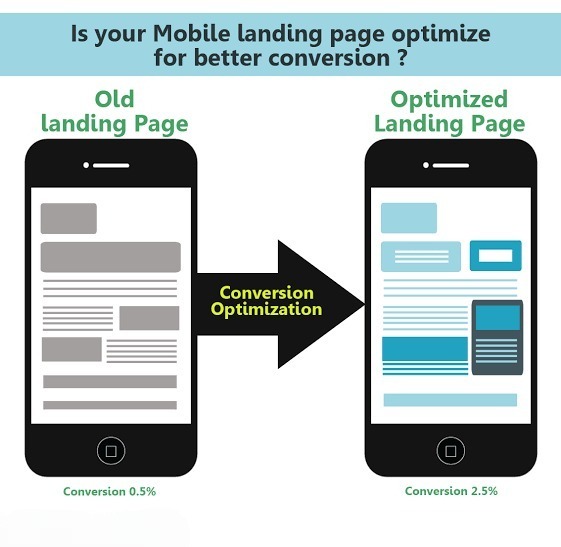
15. Optimize the Page for Mobile
A landing page that looks excellent on desktop can still perform poorly on mobile.
Check:
- Font size
- Button size
- Form usability
- Image scaling
- Navigation
- Horizontal scrolling
- Spacing
- Pop-ups
- Page speed
Google specifically highlights mobile usability as an important part of the landing-page experience.
Test the actual page on multiple phones rather than relying only on a desktop browser resize.
16. Improve Page Speed
A slow landing page can waste paid traffic.
Review:
- Image sizes
- Unused JavaScript
- Third-party scripts
- Fonts
- Tracking scripts
- Video embeds
- Large CSS files
- Server response time
Google notes that improving landing-page speed can help mobile ad performance, and recommends regularly evaluating landing pages for mobile experience.
Don't obsess over achieving a perfect technical score while ignoring the actual user experience.
Focus on making the page load quickly and become usable quickly.
17. Compress Your Images
Large images are one of the easiest things to overlook.
Before uploading images:
- Resize them to the required dimensions
- Compress them
- Use modern formats where appropriate
- Avoid uploading huge original files
For example, there is rarely a good reason to load a 5 MB photograph when a properly optimized version can provide the same visual experience at a fraction of the size.
18. Remove Unnecessary Navigation
A landing page designed specifically for advertising doesn't always need the same navigation as your main website.
Too many links can create distractions.
Ask yourself:
"Is this link helping the visitor convert or helping them leave?"
Some businesses intentionally use simplified navigation on campaign landing pages.
However, important information such as privacy policies and necessary trust information should remain accessible.
19. Build Trust Before Asking for the Lead
If someone has never heard of your company, asking for their phone number immediately can create friction.
Use trust elements around the conversion journey.
These might include:
- Testimonials
- Case studies
- Client logos
- Reviews
- Guarantees where legitimate
- Security information
- Business credentials
- Transparent pricing or process information
Trust isn't a single section.
It should be built throughout the page.
20. Answer Common Objections
Good landing page copy doesn't only explain the product or service.
It answers the questions visitors are already thinking.
For example:
How much does it cost?
How long does setup take?
Do you work with businesses in my industry?
What happens after I submit the form?
Do I need a minimum advertising budget?
Can you manage tracking as well?
Addressing these objections can remove unnecessary hesitation.
21. Add a Strong FAQ Section
An FAQ section is useful when visitors repeatedly ask the same questions.
For example:
Do you work with international businesses?
How quickly can campaigns be launched?
Do you provide conversion tracking?
Do you manage Google Ads and Meta Ads?
What information do you need to get started?
Keep answers direct.
Don't turn every FAQ answer into a sales pitch.
22. Make the Page Visually Scannable
Most visitors don't read every word.
They scan.
Use:
- Short paragraphs
- Subheadings
- Bullet points
- Bold important phrases
- Cards where appropriate
- Visual hierarchy
- White space
A visitor should be able to understand the basic offer by scanning the page.
23. Use Relevant Images
Images should support the message rather than simply fill empty space.
For a service landing page, useful visuals might include:
- Dashboard screenshots
- Product images
- Before-and-after examples
- Case study graphics
- Process diagrams
- Team images
- Relevant industry photography
Avoid generic stock images that have nothing to do with your actual offer.
24. Keep the Design Consistent With Your Brand
Your landing page shouldn't look like it belongs to a completely different company.
Keep consistency across:
- Logo
- Typography
- Colors
- Button styles
- Icons
- Tone of voice
- Visual elements
Visitors should recognize your brand when moving between your ads, landing page and website.
If the page represents a specific service, you can still give it a conversion-focused design while maintaining your overall brand identity.
25. Remove Distracting Pop-Ups
Pop-ups can work, but poorly timed pop-ups can also interrupt the visitor.
Be particularly careful with:
- Immediate full-screen pop-ups
- Multiple pop-ups
- Exit-intent pop-ups appearing too frequently
- Pop-ups covering forms
- Mobile pop-ups that are difficult to close
If you use one, make sure it serves a clear purpose.
26. Create Dedicated Landing Pages for Paid Campaigns
Don't automatically send every Google Ads or Meta Ads visitor to your homepage.
For example:
Google Ads campaign → Google Ads service landing page
SEO campaign → SEO service landing page
Meta Ads campaign → Meta Ads service landing page
This allows you to match the content with the visitor's intent.
You can see the same principle in our Google Ads campaign structure guide, where dedicated landing pages are recommended instead of sending all paid traffic to a generic homepage.
If you need professional Google Ads management, the landing page should clearly communicate the exact service being advertised.
27. Track Every Important Conversion
You can't properly optimize a landing page if you don't know what visitors are doing.
Track meaningful actions such as:
- Form submissions
- Phone clicks
- WhatsApp clicks
- Book-a-call clicks
- Purchases
- Lead confirmations
Avoid treating every small interaction as a primary conversion.
For example, someone clicking a phone icon isn't necessarily the same as someone completing a qualified lead form.
Our Google Ads conversion tracking guide explains how conversion tracking can be configured and tested.
28. Test Your Tracking Before Launch
Don't assume your tracking works because the tag exists.
Complete a real test.
Check:
- GTM Preview Mode
- Google Tag Assistant
- GA4 DebugView
- Google Ads conversion diagnostics
- Form submission behavior
- Thank-you page
- Phone and WhatsApp events
A tracking problem can make a good landing page look like a bad one because you're optimizing based on incomplete data.
29. Test One Major Change at a Time
Landing page optimization isn't about randomly changing everything.
If you change:
- Headline
- CTA
- Form
- Offer
- Design
- Testimonials
all at once, you won't know which change affected performance.
Instead, test meaningful variables individually where your traffic volume allows it.
Possible tests include:
Headline A vs Headline B
Short form vs longer form
"Book a Call" vs "Get a Free Audit"
Different offers
Different hero sections
30. Review the Actual Conversion Funnel
Don't stop at the landing page.
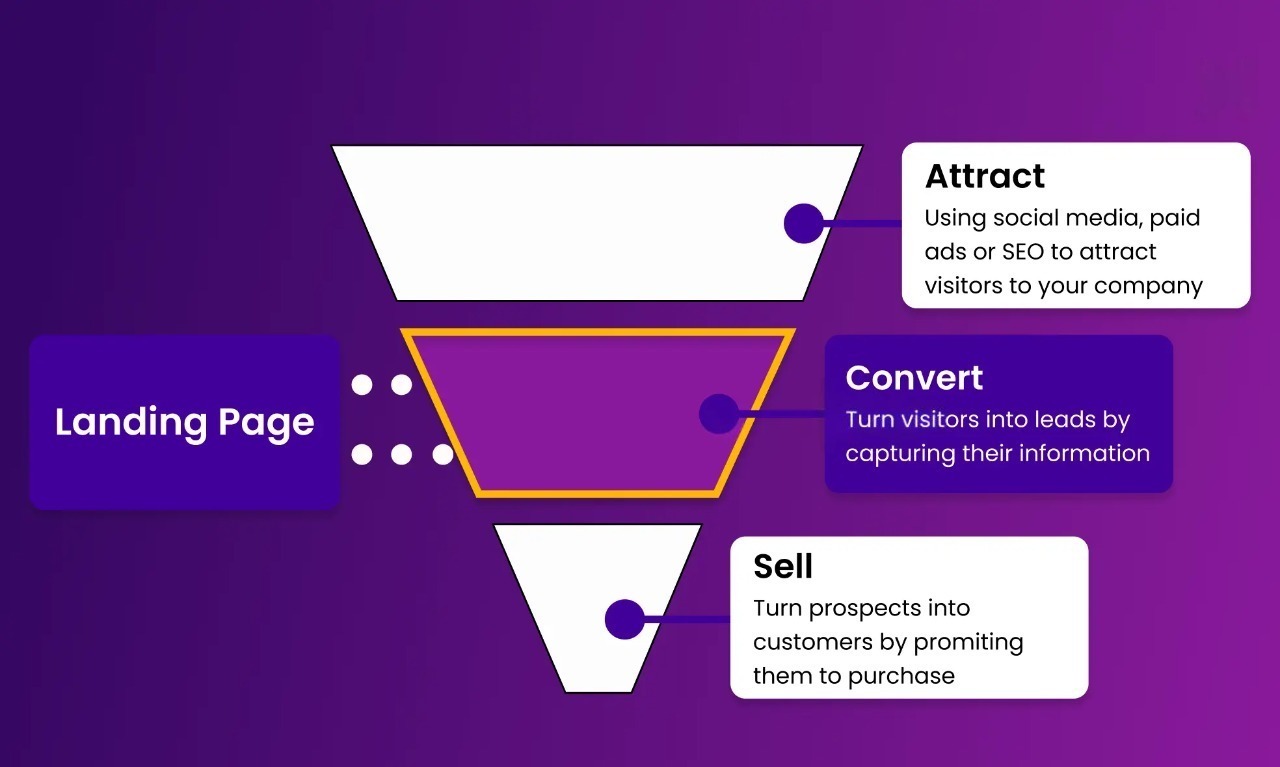
Look at the complete journey:
Ad → Landing Page → Form → Thank You Page → Sales Follow-Up → Qualified Lead → Customer
A landing page can have a high conversion rate and still generate poor business results if the leads aren't qualified.
That's why landing page optimization should ultimately connect with your advertising, tracking and sales process.
If you're also working on analytics, our GA4 setup guide explains how website events and user behavior can be measured.
Landing Page Optimization Checklist: Quick Audit
Before sending more traffic to your page, check these 30 items:
- Clear headline
- Ad-to-page message match
- Strong value proposition
- Main CTA above the fold
- Specific CTA wording
- CTA repeated naturally
- Benefits clearly explained
- Focused copy
- Clear offer
- Testimonials or social proof
- Real results where appropriate
- Short conversion form
- Clear form instructions
- Alternative contact options
- Mobile-friendly design
- Fast loading speed
- Optimized images
- Minimal distractions
- Trust signals
- Objections addressed
- Useful FAQs
- Scannable content
- Relevant images
- Consistent branding
- Limited pop-ups
- Dedicated campaign landing page
- Conversion tracking
- Tracking tested
- A/B testing plan
- Full funnel reviewed
- Lead quality monitored
Final Thoughts
Landing page optimization isn't about adding more sections, more buttons or more marketing buzzwords.
It's about removing friction.
A visitor should quickly understand:
What are you offering?
Is it relevant to me?
Can I trust you?
What should I do next?
If your landing page answers those questions clearly, you're already solving many of the problems that prevent visitors from converting.
And remember, don't optimize your landing page in isolation.
Your ad, keyword, landing page, tracking setup and sales process all work together.
If you're running Google Ads or Meta Ads and getting traffic but not enough leads, the problem may not always be the advertising campaign. Sometimes the biggest opportunity is sitting after the click.
You can explore Scale With Clicks to learn more about Google Ads, Meta Ads, SEO and conversion tracking services designed around measurable business outcomes.
Frequently Asked Questions
What is landing page optimization?
Landing page optimization is the process of improving a landing page to increase the percentage of visitors who complete a desired action, such as submitting a form, booking a call or making a purchase.
How do I improve my landing page conversion rate?
Start with the basics: improve the headline, clarify the offer, strengthen the CTA, reduce form friction, add relevant trust signals, improve mobile usability and page speed, and verify that conversion tracking works correctly.
What should a high-converting landing page include?
A strong landing page typically includes a clear headline, value proposition, benefits, CTA, relevant visuals, trust signals, an easy conversion process and answers to common objections.
Should I send Google Ads traffic to my homepage?
Not necessarily. Dedicated landing pages are often more relevant because they can closely match the keyword, ad message and search intent. Google also recommends making the connection between ads and landing pages as relevant as possible.
How many fields should a landing page form have?
There is no universal number. Ask for the information you genuinely need to qualify or follow up with the lead. If a field isn't necessary, consider removing it.
How important is mobile optimization?
Very important. Visitors increasingly access websites from mobile devices, and Google specifically recommends checking mobile usability and landing-page performance.
How often should I optimize my landing page?
Review performance regularly and make changes based on actual data. If you have enough traffic, run controlled tests rather than making random changes.