Google Ads
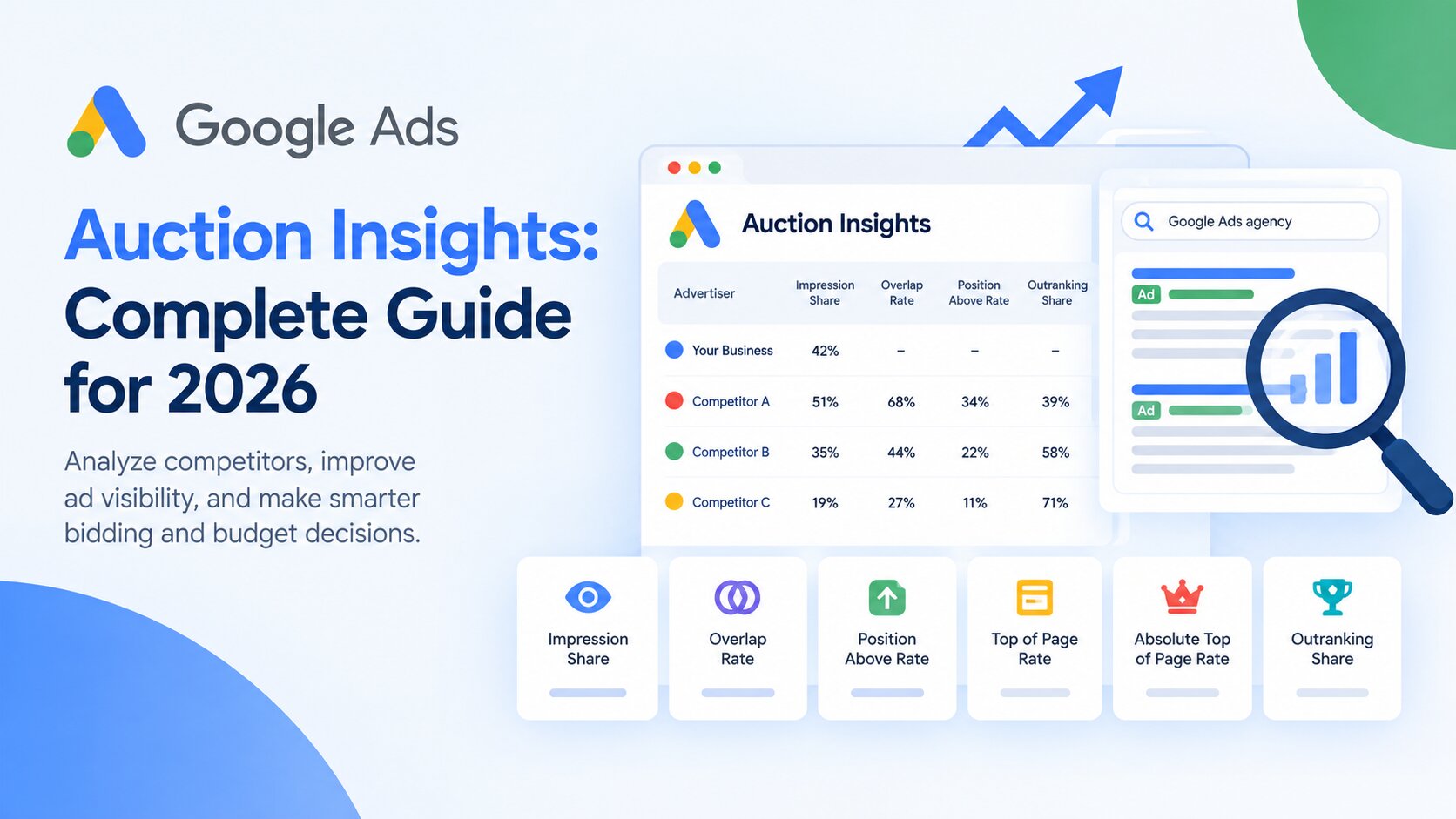
Google Ads Auction Insights - Complete Guide for 2026

Category: Google Ads
Running Google Ads is not just about looking at your own clicks, conversions, CPC, and ROAS.
Sometimes, the biggest clue about why your campaign performance changed is what happened against other advertisers in the same auctions.
This is where Google Ads Auction Insights becomes useful.
The Auction Insights report gives advertisers a way to compare their visibility with other advertisers competing in the same auctions. You can use it to understand how frequently competitors appear alongside your ads, how often they rank above you, and how much search visibility you are actually capturing.
It can also help answer questions such as:
- Which competitors are appearing most frequently?
- Is a competitor becoming more aggressive?
- Are we losing impressions because of budget?
- Are we losing auctions because of Ad Rank?
- Should we increase bids?
- Should we improve ad relevance instead?
- Is our impression share falling?
- Are competitors consistently appearing above our ads?
In this guide, we'll break down Google Ads Auction Insights, explain every important metric, and show how to turn the data into practical optimization decisions.

What Is Google Ads Auction Insights?
Google Ads Auction Insights is a competitive analysis report inside Google Ads that allows you to compare your advertising performance with other advertisers participating in the same auctions.
Instead of simply looking at your own campaign statistics, Auction Insights gives you another perspective:
How are we performing compared with the advertisers we're actually competing against?
For example, imagine you're running a Google Search campaign for "Google Ads agency."
Your campaign may have:
- 62% impression share
- 5.2% CTR
- ₹85 average CPC
- 12% conversion rate
Those numbers may look good.
But suppose a competitor has significantly higher visibility and appears above your ads in most auctions where both advertisers participate.
That changes the situation.
The issue may not be that your campaign is performing badly. You may simply have an opportunity to capture more visibility.
Google explains that Auction Insights can be used to make strategic decisions around bidding, budgeting, and keyword selection.
Why Auction Insights Matters in 2026
Google Ads has become increasingly automated.
Smart Bidding, broad match, responsive search ads, Performance Max, audience signals, and machine learning all influence how campaigns participate in auctions.
That makes competitive analysis even more important.
You don't need to beat every advertiser.
In many cases, you only need to understand:
Who is taking the impressions that matter to your business?
For example, if you're generating leads for a high-value service, you may care much more about competitors appearing on searches such as:
- Google Ads management services
- PPC agency
- Google Ads expert
- Google Ads agency
- hire Google Ads specialist
than competitors appearing on broad informational searches.
This is why Auction Insights should be analyzed alongside your conversion data, search terms, keyword performance, and profitability.
For more information about building a strong campaign foundation, see our guide to Best Google Ads Campaign Structure for High ROI.
How to Find Auction Insights in Google Ads
Finding the report is relatively simple.
For Search campaigns:
- Open your Google Ads account.
- Go to Campaigns.
- Select the campaign, ad group, or keywords you want to analyze.
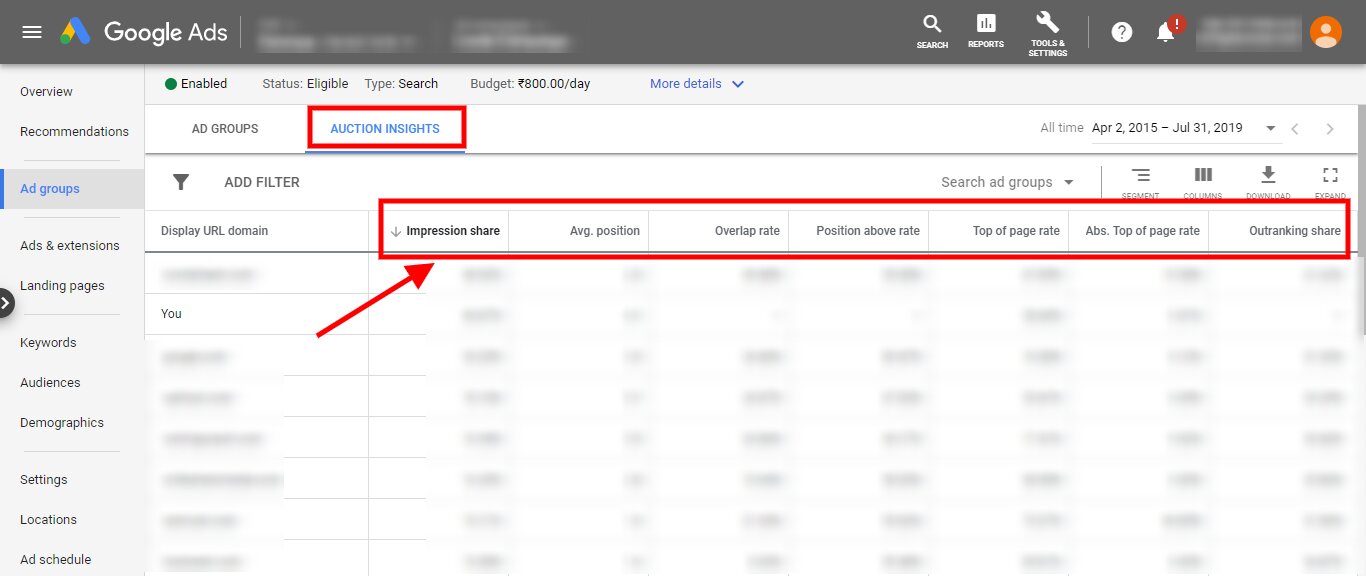
- Select Auction Insights.
- Review the available competitors and metrics.
Google only provides Auction Insights when the selected campaign, ad group, or keyword has enough activity to meet its reporting threshold. Google also notes that Auction Insights doesn't show data when impression share is below 10%.
The exact reporting options can differ depending on the campaign type.
Google Ads Auction Insights Metrics Explained
Understanding the individual metrics is more important than simply looking at competitor names.
Let's break them down.
1. Impression Share
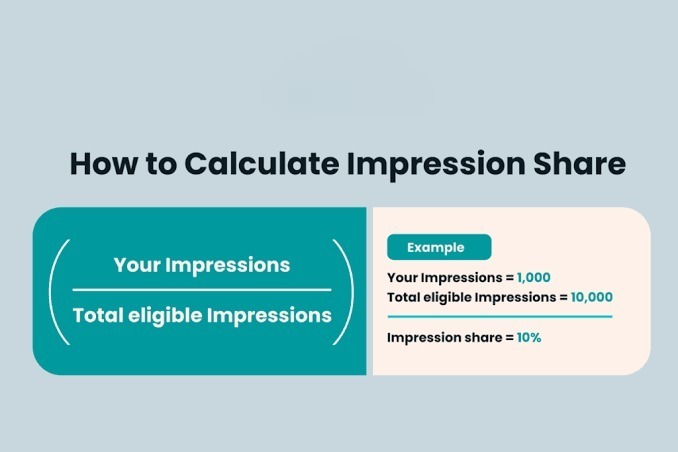
Impression Share (IS) is the percentage of impressions you received compared with the estimated number of impressions for which you were eligible.
The basic formula is:
Impression Share = Impressions Received ÷ Estimated Eligible Impressions
For example, if your ads were eligible for approximately 10,000 impressions and received 6,000:
Impression Share = 60%
That means you captured approximately 60% of the available impression opportunity.
Google notes that impression share is influenced by factors such as targeting settings, ad approval, and quality.
Is higher impression share always better?
Not necessarily.
A 90% impression share for an unprofitable keyword isn't automatically better than a 50% impression share for a highly profitable keyword.
Always connect impression share with:
- Conversions
- CPA
- Conversion value
- ROAS
- Lead quality
- Profitability
The goal isn't to win every auction.
The goal is to win the right auctions.
2. Overlap Rate
Overlap Rate tells you how often another advertiser's ad received an impression when your ad also received an impression.
For example, suppose Competitor A has an overlap rate of 65%.
That means Competitor A appeared in the same auction as your ad approximately 65% of the times your ad received an impression.
A high overlap rate can indicate that the advertiser is a significant competitor for the searches you're participating in.
However, it doesn't automatically mean they're your biggest business competitor.
They could be competing with you only for a specific group of keywords.
That's why you should analyze Auction Insights at the campaign and keyword level, rather than treating the entire account as one market.
Google defines overlap rate as the frequency with which another advertiser received an impression when your ad also received an impression.
3. Outranking Share
Outranking Share is one of the most useful metrics in Auction Insights.
It tells you how often your ad ranked higher than another advertiser's ad, or your ad showed when theirs didn't.
For example, if your outranking share against Competitor A is 70%, your ads outranked that advertiser, or appeared when theirs didn't, in approximately 70% of the relevant auctions represented by the metric.
A low outranking share against a major competitor can indicate that they are frequently beating you in auctions.
But don't immediately respond by increasing bids.
First check:
- Search Lost IS (rank)
- Search Lost IS (budget)
- Quality Score
- CTR
- Conversion rate
- Landing page relevance
- Actual CPA or ROAS
Sometimes the solution is better campaign quality rather than higher bids.
4. Position Above Rate
Position Above Rate shows how frequently another advertiser's ad appeared in a higher position than yours when both ads were shown.
For example:
Competitor A — Position Above Rate: 72%
This means that when both advertisers appeared, Competitor A's ad was positioned above yours approximately 72% of the time.
This is useful when you have identified a competitor that consistently appears ahead of you.
However, don't treat position as the ultimate performance goal.
Being number one is not automatically profitable.
A competitor may appear above you but pay substantially more for each click.
Your campaign could still produce better CPA or ROAS.
Google specifically recommends using prominence metrics to understand placement, rather than treating ad position itself as the sole optimization target.
5. Top of Page Rate
Top of Page Rate shows how frequently an advertiser's ad appeared among the top ads above the organic search results.
For example:
Top of Page Rate = 80%
means the ad appeared at the top of the search results in approximately 80% of its impressions.
This metric is particularly useful when your business depends heavily on visibility for high-intent searches.
However, top-of-page visibility can come at a higher cost.
If increasing bids gives you more top placements but your CPA increases significantly, the additional visibility may not be worth the cost.
6. Absolute Top of Page Rate
Absolute Top of Page Rate tells you how often an ad appeared as the very first ad above the organic search results.
For example:
Absolute Top of Page Rate = 45%
means the advertiser's ad appeared in the first ad position for approximately 45% of its impressions.
This is a useful visibility metric, but it shouldn't become an obsession.
The objective isn't:
"I need to be number one."
The better objective is:
"I need to be visible enough on valuable searches to generate profitable conversions."
Search Lost IS: Rank vs Budget
One of the biggest mistakes advertisers make is seeing a low impression share and immediately increasing their budget.
That's not always the right answer.
Google Ads provides additional metrics that help identify why you are missing impressions.
Search Lost IS (Budget)
Search Lost IS (budget) estimates the percentage of eligible impressions you lost because your campaign budget wasn't sufficient.
If this number is high, budget may genuinely be limiting your reach.
For example:
- Impression Share: 48%
- Search Lost IS (budget): 35%
- Search Lost IS (rank): 17%
In this situation, budget appears to be a bigger limitation than Ad Rank.
Increasing budget may help you capture additional impressions.
Search Lost IS (Rank)
Search Lost IS (rank) estimates the percentage of eligible impressions you lost because your Ad Rank wasn't high enough.
If this number is high, simply increasing the campaign budget may not solve the problem.
You may need to improve:
- Ad relevance
- Expected CTR
- Landing page experience
- Keyword-to-ad alignment
- Bid strategy
- Overall Ad Rank
Google confirms that Search Lost IS (rank) indicates opportunities where ads were eligible but didn't show because Ad Rank was too low.
For a deeper explanation, see our guide on Google Ads Quality Score Explained.
How to Read an Auction Insights Report
Don't look at the report one metric at a time.
Look for patterns.
Imagine you see:
| Metric | Your Campaign | Competitor A |
|---|---|---|
| Impression Share | 52% | 68% |
| Overlap Rate | — | 74% |
| Position Above Rate | — | 61% |
| Outranking Share | — | 39% |
At first glance, Competitor A looks stronger.
But now check your campaign performance.
Suppose:
Your campaign
- CPA: ₹1,100
- Conversion rate: 9%
- ROAS: 5.4
Competitor benchmark isn't available, but your business is profitable at the current level.
In this situation, blindly increasing bids just to match the competitor could actually hurt your profitability.
Auction Insights is a decision-making tool, not a scoreboard.
How to Use Auction Insights for Competitor Analysis
One of the best uses of the report is identifying competitors you may not have known about.
You might think your main competitors are:
- Company A
- Company B
- Company C
But Auction Insights may reveal that your ads frequently compete against:
- Directory websites
- Aggregators
- Marketplaces
- Lead-generation websites
- Large national brands
- Smaller specialist businesses
This matters because the strategy for competing against a directory may be completely different from competing against another specialist business.
For example, if a directory is taking a large amount of impression share, trying to outbid it everywhere may be a poor strategy.
Instead, focus on:
- High-intent keywords
- Strong ad messaging
- Better landing pages
- Specific services
- Geographic targeting
- Conversion-focused campaigns
How to Use Auction Insights to Improve Bidding
Auction Insights can help you determine whether you should increase bids.
But don't use competitor position alone to make the decision.
First ask:
Are we losing impressions because of rank?
If yes, investigate Ad Rank, Quality Score, bids, relevance, and landing page experience.
Are we losing impressions because of budget?
If yes, test whether additional budget produces profitable incremental conversions.
Are competitors outranking us but our CPA is better?
If yes, you may not need to change anything.
Is a competitor's visibility increasing rapidly?
Monitor the trend.
A sudden increase in overlap or competitor impression share could indicate a new advertiser, aggressive bidding, seasonal demand, or a change in the market.
How to Improve Your Auction Performance
If your Auction Insights report shows that you're consistently losing valuable auctions, work through these areas.
1. Improve Ad Relevance
Make sure your keywords, ad copy, and landing page address the same intent.
Your Google Ads campaign structure plays an important role here.
2. Improve Quality Score
Review:
- Expected CTR
- Ad relevance
- Landing page experience
Don't optimize Quality Score simply for the number itself. Focus on improving the underlying user experience.
3. Improve Landing Pages
A relevant landing page can improve the overall journey from:
Search → Ad → Landing Page → Conversion
Don't send every keyword to your homepage.
4. Review Your Search Terms
Auction performance means very little if you're paying for irrelevant traffic.
Regularly review search terms and add appropriate negative keywords.
Our guide on Google Ads mistakes that waste your budget covers several common issues that can quietly increase wasted spend.
5. Increase Budget When the Data Supports It
If your campaign is profitable and losing significant impression share due to budget, increasing budget may create additional growth.
But increase it gradually and monitor:
- CPA
- Conversion volume
- Conversion rate
- ROAS
- Lead quality
- Marginal return
Our guide on How to Optimize Your Google Ads Budget for Better ROI goes deeper into budget allocation and scaling.
Auction Insights for Shopping and Performance Max
Auction Insights isn't limited to traditional Search campaigns.
Google also provides Auction Insights for Shopping and Performance Max, although the available metrics differ.
For Shopping campaigns, the report includes metrics such as:
- Impression share
- Overlap rate
- Outranking share
Performance Max Auction Insights can provide competitive information across relevant Search and Shopping ad impressions.
This makes the report useful when you're trying to understand competitive pressure beyond standard Search campaigns.
How Often Should You Check Auction Insights?
You don't need to open Auction Insights every day.
For most accounts, a practical approach is:
Weekly: Check important campaigns for major competitive changes.
Monthly: Compare competitor trends, impression share, budget limitations, and campaign performance.
Before major budget increases: Use Auction Insights to understand whether additional investment could help capture more valuable demand.
During seasonal periods: Monitor competitors more closely because auction pressure can change significantly.
Don't react to every small fluctuation.
Google notes that impression share is an estimate and that changes in bids, quality, and Google's systems can affect the auctions considered competitive.
Common Google Ads Auction Insights Mistakes
1. Trying to Beat Every Competitor
You don't need to dominate every auction.
Focus on profitable searches.
2. Increasing Bids Immediately
A competitor appearing above you doesn't automatically mean your bid is too low.
Check the rest of the account first.
3. Optimizing for Impression Share Alone
More impressions don't necessarily mean more revenue.
4. Ignoring Search Lost IS
A low impression share without understanding whether the problem is budget or rank doesn't tell you what action to take.
5. Looking Only at Account-Level Data
A competitor may be extremely aggressive for one service but irrelevant for another.
Analyze important campaigns and keyword groups separately.
6. Ignoring Conversion Quality
Cheap leads aren't necessarily valuable leads.
Your optimization decisions should ultimately connect back to customers and revenue.
Final Thoughts
Google Ads Auction Insights is one of the most useful reports for understanding the competitive side of paid search.
It helps you see more than your own campaign numbers.
You can use it to identify competitors, monitor impression share, understand overlap, measure outranking performance, and determine whether budget or Ad Rank is limiting your visibility.
But the biggest lesson is this:
Don't use Auction Insights to chase competitors. Use it to make better business decisions.
If your competitors have higher impression share but your campaigns generate better conversions at a lower CPA, you may already be in a strong position.
If you're losing valuable impressions because of budget, increasing investment could make sense.
If you're losing because of rank, improving ad relevance, Quality Score, landing pages, or bidding may be the better route.
The right approach is to combine Auction Insights with:
- Conversion data
- Search terms
- Keyword performance
- Quality Score
- Impression share
- CPA
- ROAS
- Landing page performance
- Lead quality
- Revenue
That gives you a much clearer picture of where your Google Ads account stands and what you should actually do next.
If you want to improve the performance of your paid search campaigns, explore Google Ads Services from Scale With Clicks or visit Scale With Clicks to learn more about performance-focused digital marketing services.
Frequently Asked Questions
What is Google Ads Auction Insights?
Google Ads Auction Insights is a competitive reporting tool that shows how your ads compare with other advertisers participating in the same auctions.
What does impression share mean in Google Ads?
Impression share represents the percentage of eligible impressions your ads actually received. It helps you understand how much of the available search visibility you're capturing.
What is overlap rate in Auction Insights?
Overlap rate shows how frequently another advertiser's ad received an impression when your ad also received an impression.
What is outranking share?
Outranking share measures how often your ad ranked higher than another advertiser's ad or appeared when their ad did not.
What is Search Lost IS (budget)?
Search Lost IS (budget) estimates how often your ads didn't show because your campaign budget wasn't sufficient.
What is Search Lost IS (rank)?
Search Lost IS (rank) estimates how often your ads didn't show because your Ad Rank wasn't high enough.
Should I increase my Google Ads budget if my competitor has higher impression share?
Not automatically. First determine whether the additional impression opportunity is likely to produce profitable conversions. If you're already achieving strong CPA or ROAS, maximizing impression share may not be necessary.
How often should I check Auction Insights?
For most accounts, reviewing important campaigns weekly and analyzing broader competitive trends monthly is a practical approach. Increase monitoring during major seasonal or competitive changes.
Can Auction Insights show every competitor?
No. Auction Insights only reports advertisers that meet Google's reporting requirements and have sufficient activity in the relevant auctions. The report is not a complete list of every business competing in the market.
Does Auction Insights work with Performance Max?
Yes. Google provides Auction Insights for Performance Max campaigns, with the reporting focused on relevant Search and Shopping ad impressions.
Need Help Improving Google Ads Performance?
More impressions aren't useful if they don't generate meaningful business results.
A strong Google Ads strategy combines competitive analysis with the right campaign structure, conversion tracking, keyword strategy, landing pages, bidding, and ongoing optimization.
Explore Google Ads Management Services or Contact Scale With Clicks to discuss your campaign.