Google Ads
How to Optimize Your Google Ads Budget for Better ROI

Category: Google Ads
How to Optimize Your Google Ads Budget for Better ROI
Spending more money on Google Ads doesn't automatically mean you'll generate more leads or sales.
In fact, many businesses increase their advertising budget while their results barely improve. The problem is often not the size of the budget. It is how that budget is being allocated.
A campaign can have thousands of impressions and clicks but still produce poor returns if the money is going toward low-intent keywords, irrelevant searches, weak landing pages, or campaigns that don't generate meaningful conversions.
Effective Google Ads budget optimization is about putting more money behind what works and reducing spend on what doesn't.
Whether you're managing a small local campaign or a larger account, the goal should be simple: generate more valuable conversions from every rupee or dollar you spend.
In this guide, we'll look at practical ways to optimize your Google Ads budget, reduce wasted ad spend, and improve your overall ROI.
What Is Google Ads Budget Optimization?
Google Ads budget optimization means strategically distributing your available advertising budget across campaigns, keywords, locations, audiences, and products based on their actual performance.
Instead of giving every campaign an equal budget, you identify where your advertising money is producing the best business results.
For example, suppose you have a monthly Google Ads budget of ₹1,00,000.
You could divide it equally across five campaigns at ₹20,000 each.
But what if two campaigns generate 80% of your qualified leads while the other three generate very few conversions?
Keeping the same allocation simply because it was decided at the beginning of the month doesn't make sense.
A better approach would be to gradually shift more budget toward the campaigns producing profitable results while reducing or restructuring campaigns that aren't performing.
This is the foundation of effective Google Ads cost optimization.
1. Start With Your Actual Business Goal
Before deciding how much to spend, determine what you actually want Google Ads to achieve.
Your objective could be:
- Generate qualified leads
- Increase online sales
- Generate phone calls
- Increase bookings
- Drive store visits
- Acquire new customers
- Increase revenue
- Improve return on ad spend (ROAS)
Your budget strategy should depend on the objective.
For example, an eCommerce business may focus heavily on:
- Revenue
- Conversion value
- ROAS
- Average order value
- Customer acquisition cost
A B2B company may care more about:
- Qualified leads
- Cost per qualified lead
- Sales opportunities
- Customer acquisition cost
- Revenue generated from leads
This is why optimizing for cheap conversions isn't always enough.
A campaign generating leads at ₹500 each may look better than one generating leads at ₹1,000.
But if the ₹500 leads never become customers while the ₹1,000 leads regularly generate sales, the second campaign may actually be much more profitable.
For more information on tracking meaningful conversions, see our guide on How to Set Up Conversion Tracking in Google Ads.
2. Understand Where Your Budget Is Going
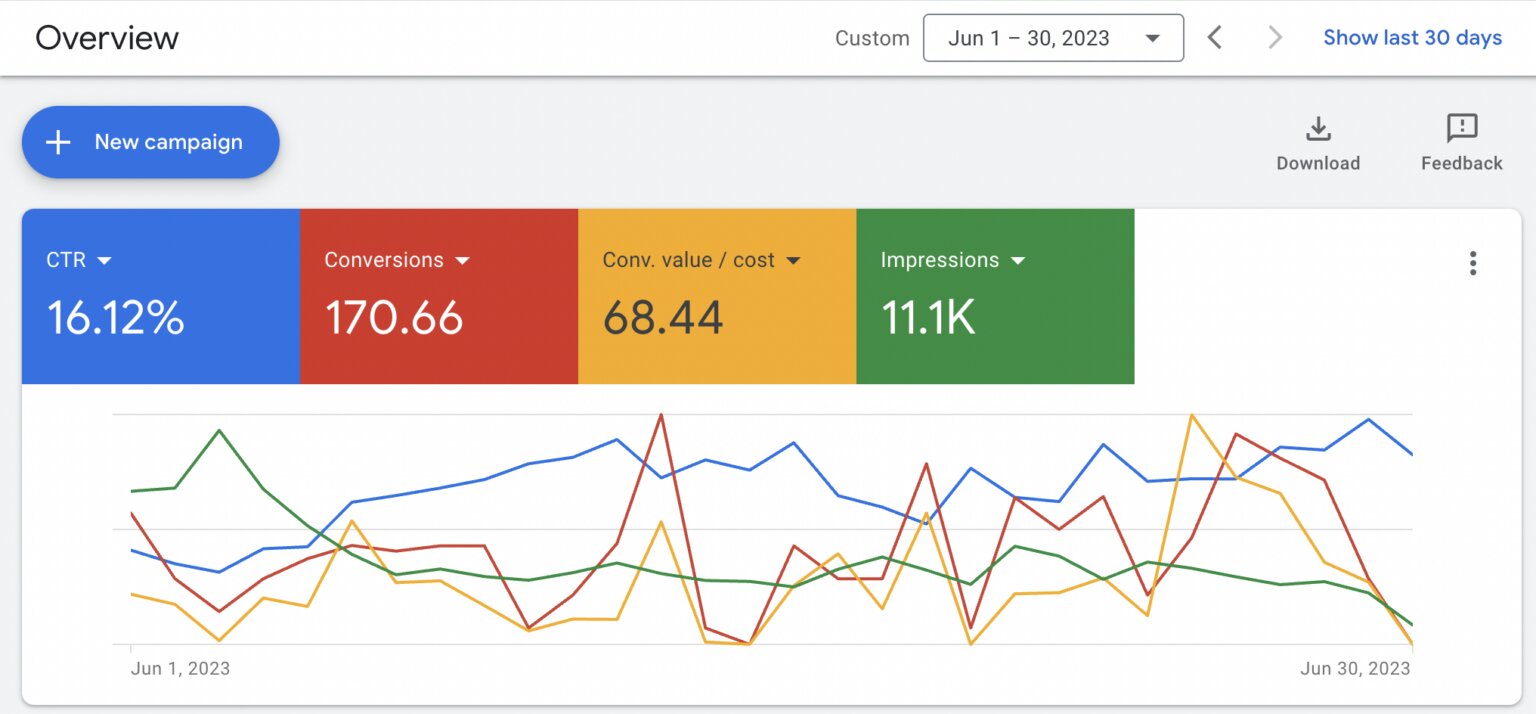
Before making changes, analyze your current account.
Look at:
- Campaign spend
- Impressions
- Clicks
- CTR
- Average CPC
- Conversions
- Conversion rate
- Cost per conversion
- Conversion value
- ROAS
- Search impression share
- Search terms
- Device performance
- Location performance
Don't make budget decisions based on clicks alone.
A campaign receiving 1,000 clicks isn't necessarily better than one receiving 300 clicks.
If those 1,000 clicks generate only five customers while the 300 clicks generate 20 customers, the smaller campaign is clearly more valuable.
The question should always be:
"What business result am I getting from this spend?"
3. Allocate More Budget to High-Intent Campaigns
Not every search has the same commercial value.
Consider these searches:
- What is Google Ads?
- Google Ads tutorial
- Google Ads pricing
- Google Ads agency
- Hire Google Ads expert
- Google Ads management services
The first search is mostly informational.
The last two indicate much stronger buying intent.
Your budget should reflect that difference.
High-intent keywords generally deserve more attention because the people searching them are closer to taking action.
For example, if your monthly budget is limited, it may make more sense to prioritize:
"Google Ads management services"
over:
"how does Google Ads work"
This doesn't mean informational keywords are useless. They can support awareness and remarketing strategies. However, when the objective is immediate lead generation, transactional searches usually deserve priority.
Our guide on Best Google Ads Campaign Structure for High ROI covers how to organize campaigns around intent and performance.
4. Stop Paying for Irrelevant Searches
One of the easiest ways to improve your Google Ads ROI is to reduce wasted clicks.
Check your Search Terms Report regularly.
You may discover that your ads are appearing for searches that aren't relevant to your business.
For example, a company selling professional PPC management might find clicks from searches such as:
- Free Google Ads course
- Google Ads jobs
- Google Ads certification
- Google Ads tutorial
- Google Ads salary
- Free PPC tools
These users may have no intention of becoming customers.
Adding irrelevant queries as negative keywords prevents your ads from appearing for those searches.
This is one of the simplest ways to reduce wasted ad spend.
Don't assume Google will automatically filter every irrelevant search perfectly. Automation can help, but regular human review is still important.
For a deeper look at this topic, read Complete Google Ads Keyword Match Types Guide.
5. Don't Spread a Small Budget Across Too Many Campaigns
One common mistake is creating too many campaigns with a limited budget.
Imagine a business has ₹50,000 per month but creates:
- Search campaign
- Display campaign
- Performance Max
- Competitor campaign
- Remarketing campaign
- Brand campaign
- Five location campaigns
The budget becomes fragmented.
Some campaigns may receive too little data to optimize properly.
Instead, start with a focused structure.
For example:
Campaign 1: High-Intent Search
Target your most valuable commercial keywords.
Campaign 2: Brand
Protect searches for your own business name.
Campaign 3: Remarketing
Bring back users who already interacted with your website.
Additional campaigns can be introduced when the account has enough budget and data to justify them.
A focused account is often easier to manage and optimize than an unnecessarily complicated one.
6. Use Conversion Data Before Increasing Budgets
Don't increase a campaign's budget simply because it is spending its entire daily limit.
Check whether the additional spend is producing additional conversions.
For example:
| Campaign | Spend | Conversions | Cost/Conversion |
|---|---|---|---|
| Campaign A | ₹30,000 | 60 | ₹500 |
| Campaign B | ₹30,000 | 20 | ₹1,500 |
| Campaign C | ₹30,000 | 8 | ₹3,750 |
If the campaigns target similar business goals, Campaign A clearly deserves closer attention.
You might gradually move more budget toward Campaign A while investigating what is causing Campaign B and C to underperform.
However, don't blindly pause campaigns based on a small amount of data.
Allow enough time and conversion volume to identify a meaningful trend.
7. Improve Quality Score to Reduce Unnecessary Costs
Budget optimization isn't only about deciding where to spend money.
You should also work on making each click more valuable.
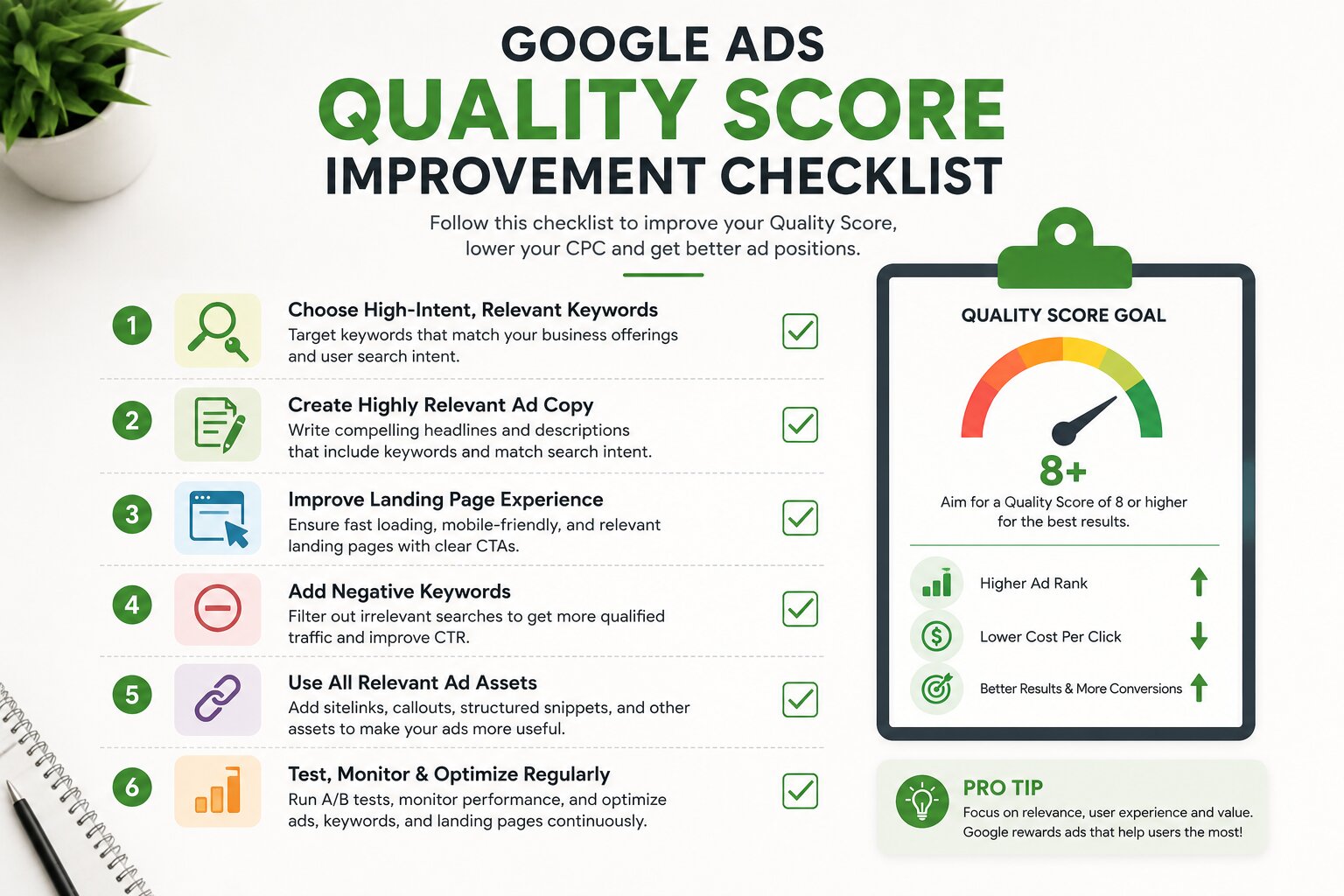
Google Ads Quality Score is influenced by factors including:
- Expected CTR
- Ad relevance
- Landing page experience
Improving these areas can help your ads compete more effectively.
For example, if someone searches:
"Google Ads management agency"
your ad should clearly communicate that you provide Google Ads management rather than using a generic message such as:
"Grow Your Business With Digital Marketing."
The landing page should then continue that same message.
This creates a stronger connection between:
Keyword → Ad → Landing Page → Conversion
You can learn more in Google Ads Quality Score Explained: How to Improve It.
8. Send Traffic to the Right Landing Page
A surprisingly large amount of Google Ads budget can be wasted after the click.
You may have:
- Relevant keywords
- Good ads
- Competitive CPC
- Strong CTR
But if users land on a confusing page, they may leave without converting.
Avoid sending every campaign to your homepage.
Instead, match landing pages to search intent.
For example:
Keyword: Google Ads management services
Ad: ROI-Focused Google Ads Management
Landing page: Dedicated Google Ads service page
This creates a consistent user journey.
Your landing page should have:
- Clear headline
- Strong value proposition
- Relevant information
- Social proof
- Simple navigation
- Clear CTA
- Fast loading speed
- Mobile-friendly design
If you're investing heavily in paid traffic, landing page optimization should be considered part of your advertising budget strategy—not a separate concern.
9. Use the Right Bidding Strategy
Your bidding strategy can significantly affect how your budget is spent.
Depending on your campaign and conversion data, you may use strategies such as:
- Maximize Clicks
- Maximize Conversions
- Target CPA
- Maximize Conversion Value
- Target ROAS
There isn't one bidding strategy that is perfect for every account.
A new campaign with little conversion data may need a different approach from an established campaign generating hundreds of conversions.
Once reliable conversion data is available, automated bidding can help Google identify users who are more likely to complete your desired action.
But don't keep changing bidding strategies every few days.
Frequent changes can make performance harder to evaluate and can disrupt the optimization process.
10. Optimize Your Budget Based on Location
If your business operates in multiple cities, states, or countries, don't assume every location will perform equally.
Break down performance by location.
You may find that:
- Delhi generates high-quality leads
- Mumbai produces expensive leads
- Bangalore generates strong conversion volume
- Smaller cities have lower CPC but poor lead quality
Instead of treating every location equally, use performance data to guide your allocation.
You can increase investment in profitable locations while reducing spend where the economics don't work.
This is particularly important for local businesses and service-based companies.
For more ideas, check out our Google Ads Strategy for Small Businesses.
11. Review Device Performance
Your customers may behave differently on:
- Mobile
- Desktop
- Tablet
Don't assume that the device with the most clicks is automatically the best.
Look at:
- Conversion rate
- Cost per conversion
- Conversion value
- Lead quality
- Revenue
For example, mobile might generate 70% of your clicks but only 40% of your qualified leads.
That could indicate an issue with the mobile landing page, form, page speed, or user experience.
Before changing bids, investigate why the performance differs.
12. Track Revenue, Not Just Leads
This is one of the most important principles of Google Ads budget optimization.
A campaign shouldn't be considered successful simply because it generates conversions.
You need to know whether those conversions create business value.
For lead generation, track:
Ad Spend → Lead → Qualified Lead → Opportunity → Customer → Revenue
For eCommerce:
Ad Spend → Purchase → Revenue → Profit
This gives you a much better picture of your actual Google Ads ROI.
For example:
Campaign A:
- Spend: ₹50,000
- Leads: 100
- Customers: 5
- Revenue: ₹75,000
Campaign B:
- Spend: ₹50,000
- Leads: 50
- Customers: 15
- Revenue: ₹2,00,000
Campaign A has cheaper leads.
Campaign B has better business performance.
If you optimize only for cost per lead, you might accidentally put more money into Campaign A.
If you optimize for revenue, Campaign B becomes the obvious winner.
13. Don't Increase Your Budget Too Quickly
Once you find a profitable campaign, it can be tempting to double the budget immediately.
That's usually not the best approach.
Instead, scale gradually while monitoring:
- CPA
- ROAS
- Conversion rate
- Conversion volume
- Search terms
- Impression share
- Lead quality
The objective is to find the point where additional spending continues to produce acceptable returns.
For example:
₹2,000/day → ₹2,400/day → ₹2,900/day
is generally easier to evaluate than:
₹2,000/day → ₹5,000/day
Large budget changes can alter traffic quality and campaign behavior, making it harder to determine whether the additional spend is actually profitable.
14. Create a Regular Google Ads Optimization Routine
Google Ads should not be treated as a "launch it and forget it" channel.
A simple optimization routine can include:
Daily
Check for:
- Major spending changes
- Tracking problems
- Sudden CPC increases
- Campaign disapprovals
- Unusual conversion drops
Weekly
Review:
- Search terms
- Negative keywords
- Keyword performance
- Ads
- Conversion rate
- CPA
- Budget distribution
- Location performance
Monthly
Analyze:
- Revenue
- ROAS
- Customer acquisition cost
- Campaign profitability
- Budget allocation
- New growth opportunities
This approach helps prevent small problems from turning into expensive ones.
If your campaigns are consistently spending without producing results, our guide on 10 Common Google Ads Mistakes That Waste Your Budget is worth reviewing.
A Simple Google Ads Budget Optimization Framework
You can use this framework when reviewing your account:
Step 1: Define your business goal.
Step 2: Identify your most valuable conversion.
Step 3: Analyze campaign-level performance.
Step 4: Find high-intent keywords and campaigns.
Step 5: Remove irrelevant search traffic.
Step 6: Improve ads and Quality Score.
Step 7: Optimize landing pages.
Step 8: Check location and device performance.
Step 9: Track qualified leads, customers, and revenue.
Step 10: Gradually shift budget toward profitable campaigns.
Step 11: Continue testing and optimizing.
The process is simple, but consistency is what makes it effective.
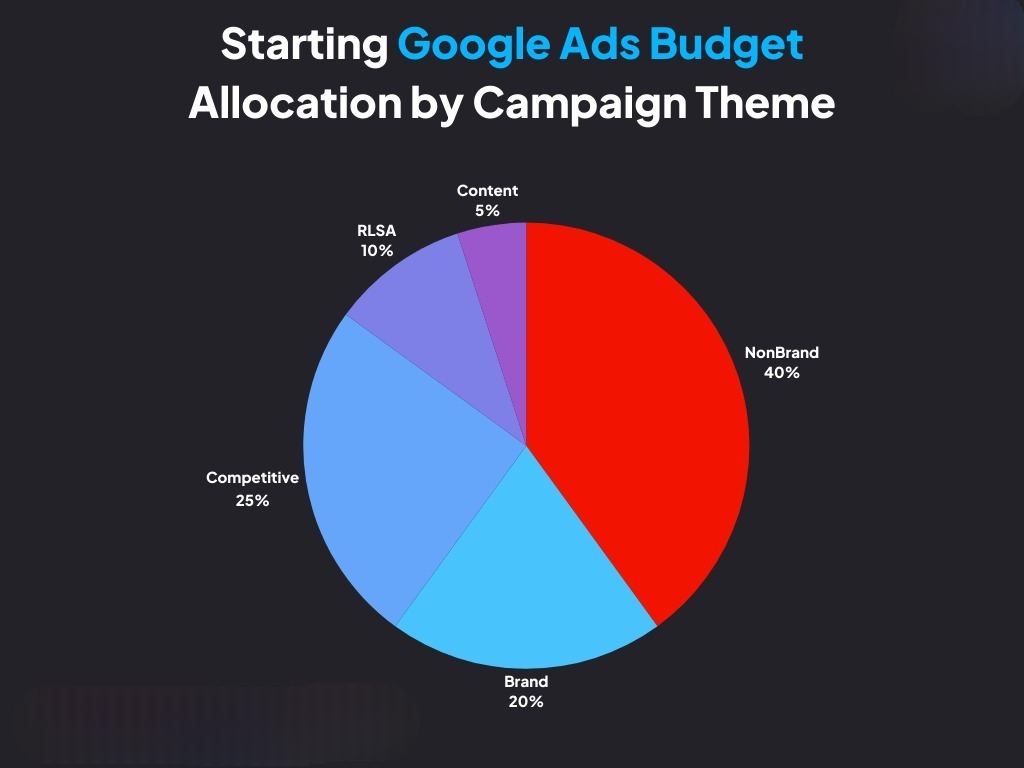
How Much Should You Spend on Google Ads?
There isn't a universal Google Ads budget that works for every business.
Your required budget depends on:
- Industry
- Competition
- Average CPC
- Target location
- Customer lifetime value
- Conversion rate
- Target CPA
- Average order value
- Sales cycle
- Available search volume
A business selling a ₹500 product cannot use the same economics as a B2B company selling a ₹5 lakh service.
Start with a budget that can generate enough meaningful data, then scale based on performance.
The goal isn't to spend the maximum amount.
The goal is to find the maximum profitable spend.
Final Thoughts
Optimizing your Google Ads budget isn't about cutting costs everywhere.
It's about making better decisions about where your money goes.
The biggest opportunities usually come from:
- Prioritizing high-intent searches
- Removing irrelevant traffic
- Using negative keywords
- Improving Quality Score
- Sending traffic to relevant landing pages
- Tracking conversions accurately
- Measuring lead quality and revenue
- Allocating more budget to profitable campaigns
- Scaling gradually
- Reviewing performance consistently
A campaign that spends ₹1 lakh and generates ₹3 lakh in revenue is more valuable than a campaign that spends ₹50,000 and generates ₹75,000.
That's why Google Ads ROI should always be considered alongside CPC, CTR, CPA, and conversion rate.
If you want to build a more profitable Google Ads strategy, explore Google Ads Management Services from Scale With Clicks or visit Scale With Clicks to learn more about our performance marketing services.
Frequently Asked Questions
What is Google Ads budget optimization?
Google Ads budget optimization is the process of distributing advertising spend toward campaigns, keywords, locations, and audiences that generate the best business results while reducing wasted spend.
How can I reduce wasted Google Ads spend?
Start by reviewing your Search Terms Report, adding negative keywords, removing irrelevant targeting, improving campaign structure, and focusing more budget on high-intent searches.
Should I increase my Google Ads budget if my campaign is performing well?
Yes, but scale gradually. Monitor CPA, ROAS, conversion volume, and lead quality as you increase spending to make sure performance remains profitable.
What is more important: CPC or ROI?
ROI is more important. A low CPC doesn't necessarily mean a profitable campaign. What matters is whether the traffic generated from your advertising produces valuable leads, sales, or revenue.
How often should I optimize my Google Ads campaigns?
Check for major issues regularly, conduct deeper optimization at least weekly, and review overall profitability and budget allocation every month.
Can a small Google Ads budget still generate results?
Yes. A smaller budget can work when it is focused on the right locations, high-intent keywords, strong landing pages, and properly tracked conversions. The key is avoiding unnecessary budget fragmentation.