SEO
Google Ranking Drop - 12 Ways to Recover Your SEO Traffic

Category: SEO
Google Ranking Drop: 12 Ways to Recover Your SEO Traffic
A sudden Google ranking drop can be frustrating, especially when your website was generating consistent organic traffic just a few weeks ago.
One day, your pages are ranking on the first page. Then suddenly, impressions decline, important keywords move down, and organic traffic starts falling.
The first reaction is usually:
"Did Google release another algorithm update?"
Sometimes the answer is yes. But a drop in Google rankings can also happen because of technical SEO problems, indexing issues, outdated content, stronger competitors, search intent changes, website changes, or even a decline in demand for the keywords you're targeting.
The good news is that a ranking drop doesn't automatically mean your website is permanently damaged.
The right approach is to find what changed, which pages were affected, and why before making major SEO changes.
In this guide, we'll look at 12 practical ways to recover SEO traffic and improve Google rankings.
Why Did My Google Rankings Drop?
Before trying to recover lost traffic, you need to understand what actually caused the decline.
A ranking drop can happen for several reasons:
- Google algorithm changes
- Competitors publishing better content
- Outdated or inaccurate information
- Technical SEO problems
- Indexing issues
- Website redesigns or URL changes
- Poor internal linking
- Keyword cannibalization
- Changes in search intent
- Weak backlinks or loss of important links
- Poor mobile experience
- Declining search demand
Google continuously changes and improves its search systems, including smaller updates that can affect individual websites. Google also recommends looking at the specific pages and search queries affected instead of assuming that an entire website has become "bad."
That makes diagnosis the first step.
1. Check Google Search Console First
Before changing your content, open Google Search Console.
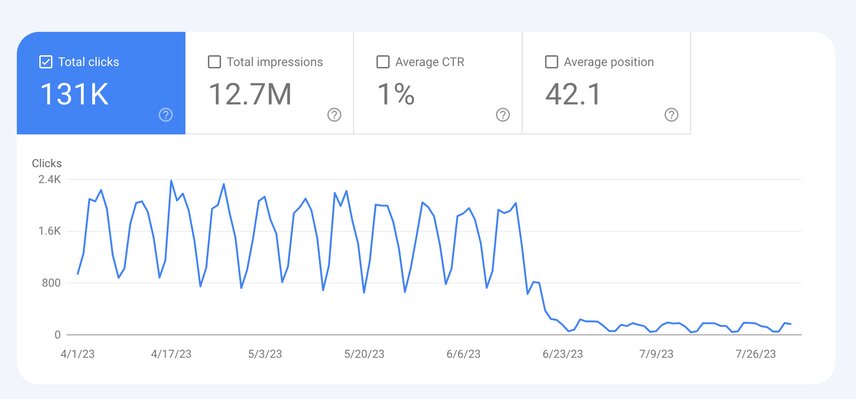
Go to:
Performance → Search Results
Compare your recent performance with the previous period.
Look at:
- Total clicks
- Total impressions
- Average position
- Average CTR
- Top queries
- Top pages
- Countries
- Devices
The most important thing is to identify where the traffic loss happened.
For example, suppose your website normally receives 5,000 organic clicks per month.
After a decline, you discover:
- Homepage traffic is stable
- Service pages are stable
- Three blog posts lost 70% of their traffic
That's very different from your entire website losing visibility.
You should then investigate those three pages rather than changing everything.
Also compare the affected queries. If impressions remained similar but clicks dropped, your problem may be related to rankings, SERP appearance, or CTR rather than demand.
2. Find the Pages That Lost the Most Traffic
Don't just look at total website traffic.
Find your losing pages.
In Search Console, compare the previous period with the current period and sort pages by clicks or impressions lost.
Create a simple list:
| Page | Previous Clicks | Current Clicks | Change |
|---|---|---|---|
| Blog A | 1,200 | 500 | -58% |
| Blog B | 800 | 320 | -60% |
| Service Page | 450 | 290 | -36% |
Now investigate these pages individually.
Ask:
- Did rankings fall?
- Did impressions fall?
- Did CTR fall?
- Did competitors move above the page?
- Has search intent changed?
- Is the content outdated?
- Is Google showing different SERP features?
This process is much more useful than randomly editing dozens of pages.
If you're building organic traffic from scratch, our guide on how to get your first 1,000 organic visitors explains how keyword targeting, content, internal linking, technical SEO, and authority work together.
3. Check Whether Google Released an Algorithm Update
If your traffic dropped suddenly, check Google's official Search Status Dashboard and Search Central documentation.
A major ranking change around the same time as an announced update can provide an important clue.
However, don't immediately conclude:
"Google updated its algorithm, so there's nothing I can do."
That's not how recovery should work.
Google's current documentation specifically explains that sites can improve after making content improvements and don't necessarily need to wait for another major core update.
Instead, compare your affected pages against the pages that are now ranking above you.
Ask:
- What information do they provide that you don't?
- Are their examples better?
- Is their content more current?
- Do they answer the searcher's question faster?
- Is their page easier to navigate?
- Do they demonstrate more first-hand experience?
This gives you something actionable.
4. Update Outdated Content
One of the fastest opportunities for recovering SEO traffic is often sitting inside your existing blog.
You don't always need to publish another article.
Sometimes you need to improve the article you already have.
Look for:
- Old statistics
- Outdated screenshots
- Broken links
- Old examples
- Missing sections
- Outdated terminology
- Weak introductions
- Questions competitors answer better
- Missing FAQs
For example, if you published an article about Google Ads two years ago, the platform may have changed considerably since then.
Updating that article can make it significantly more useful.
We've also covered this in our guide on how to optimize existing blog posts for SEO.
The goal isn't to change the date and add a few paragraphs.
The goal is to make the page better than the version that previously ranked.
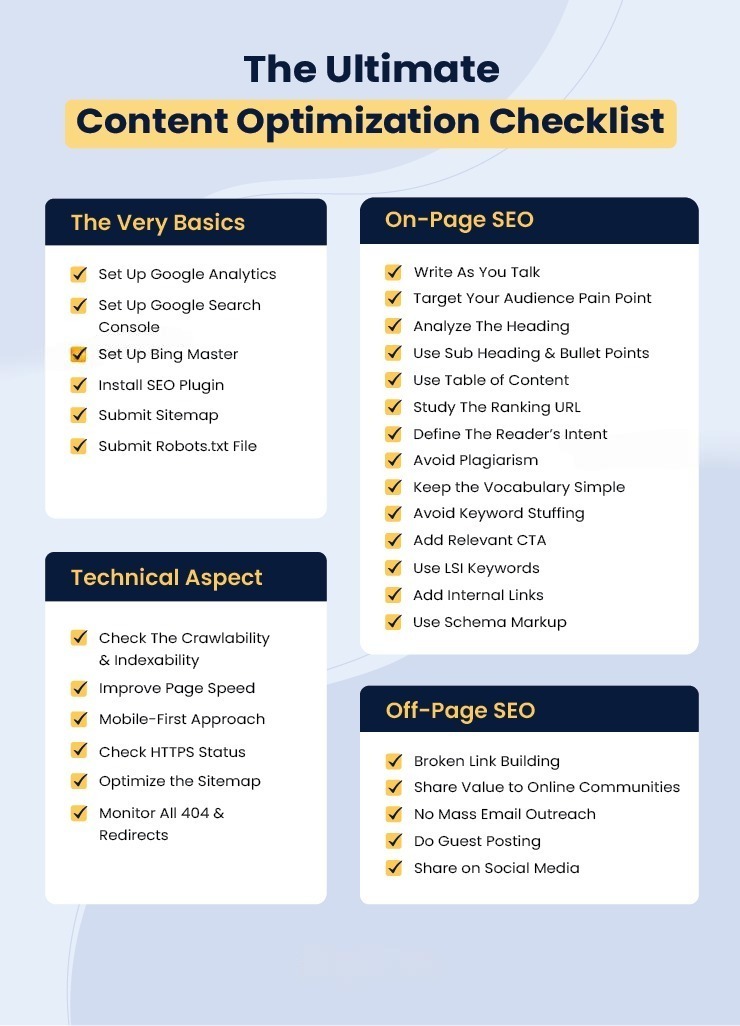
5. Recheck Search Intent
This is one of the most overlooked causes of a ranking drop.
You may still have a well-written article, but the search intent behind the keyword may have changed.
Suppose you wrote an article targeting:
"Google Ads campaign structure"
Your article may focus heavily on theory.
But the current search results might be dominated by:
- Practical campaign structures
- Examples
- Templates
- Step-by-step guides
- Screenshots
- Campaign naming conventions
Your article may be technically correct but no longer satisfy what searchers want.
Search your primary keyword and examine the current first page.
Look for patterns.
If most high-ranking pages answer the query differently from your page, consider restructuring the content.
Don't simply add more words.
Match the intent better.
6. Improve Thin or Weak Sections
Long content isn't automatically good content.
A 2,000-word article containing 1,000 words of repetition isn't better than a useful 1,200-word guide.
Instead, look for sections where the reader would still have questions after reading your explanation.
For every major heading, ask:
"What would the reader ask next?"
Then answer it.
Add:
- Examples
- Screenshots
- Step-by-step instructions
- Data
- Original observations
- Comparisons
- Practical recommendations
- Common mistakes
- FAQs
Google's guidance encourages content that provides original information, substantial coverage, and a genuinely useful experience for people rather than content created primarily to manipulate rankings.
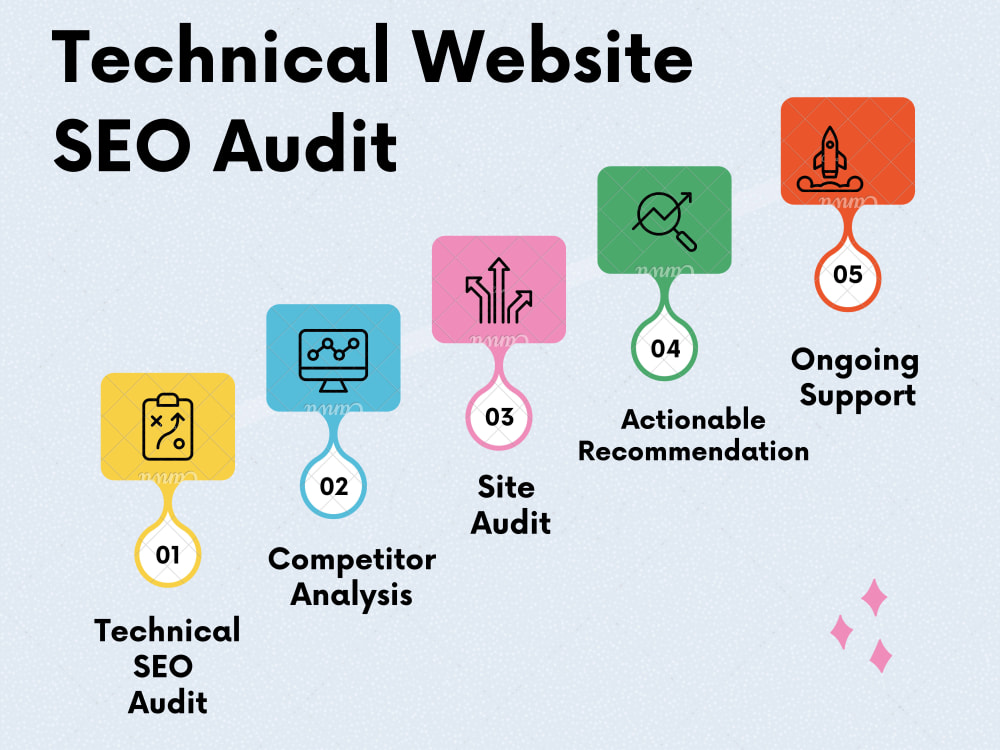
7. Fix Technical SEO Problems
Sometimes the content isn't the problem at all.
A technical SEO issue can cause valuable pages to lose visibility.
Check:
- Robots.txt
- XML sitemap
- Canonical tags
- Noindex tags
- 404 errors
- Redirects
- Internal links
- Mobile usability
- HTTPS
- Page loading speed
- Duplicate URLs
- JavaScript rendering
- Indexing status
Use Google Search Console's URL Inspection tool for important pages.
Check whether Google can:
- Crawl the page
- Index the page
- Understand the canonical URL
Also check whether recent website changes accidentally removed important pages from the index.
For businesses serious about organic growth, a proper SEO Services strategy should cover technical SEO alongside content and authority building rather than focusing only on keywords.
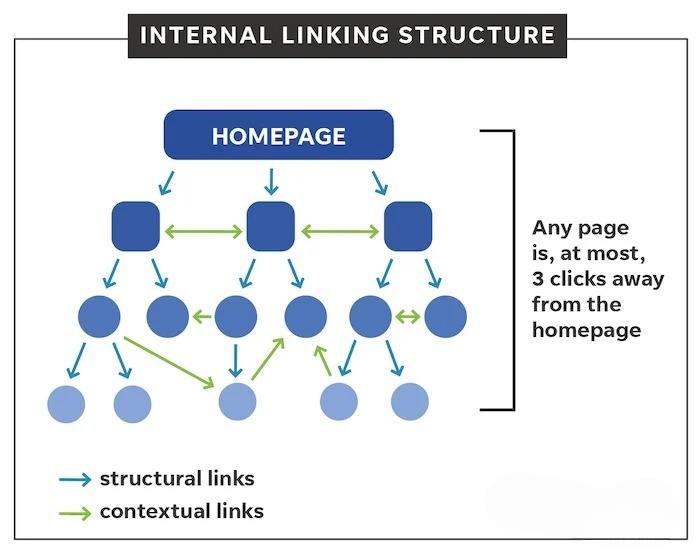
8. Strengthen Your Internal Linking
Internal links are one of the easiest SEO improvements you can control yourself.
Instead of publishing an article and leaving it isolated, connect it with other relevant pages.
For example, this article discusses SEO traffic recovery.
A reader may also want to learn about:
- Building organic traffic
- Optimizing existing content
- Technical SEO
- Schema markup
- Google Business Profile
- Conversion tracking
Those topics can naturally connect to other articles and service pages.
For example, readers interested in technical SEO can continue with our schema markup SEO guide.
Use descriptive anchor text.
Instead of:
Click here
write:
learn how schema markup supports technical SEO
The link should make sense even if the reader hasn't seen the surrounding paragraph.
Internal linking also helps Google discover relationships between your pages and helps users move deeper into your website.
9. Improve Your Page Experience
If your website is slow, difficult to use, or frustrating on mobile devices, fix it.
Look at:
- Core Web Vitals
- Mobile responsiveness
- Page loading time
- Intrusive popups
- Layout shifts
- Navigation
- Font readability
- Image sizes
- Ad placement
Google explains that page experience is broader than simply achieving a perfect Core Web Vitals score. A good experience includes mobile usability, secure pages, sensible advertising, and making the main content easy to access.
Don't obsess over getting a perfect technical score just for the sake of SEO.
Focus on making the website fast, accessible and easy to use.
10. Review Your Backlinks and Authority
If your competitors have stronger authority, improving the page itself may not be enough.
Check whether you've lost important backlinks.
Look for:
- Lost referring domains
- Broken backlinks
- Deleted mentions
- Links pointing to old URLs
- Low-quality links
- Competitors gaining relevant links
Then look for legitimate opportunities to build authority.
Some options include:
- Digital PR
- Industry publications
- Guest contributions
- Resource pages
- Partnerships
- Relevant business directories
- Original research
- Data-driven content
Don't buy hundreds of random backlinks simply because someone promises quick rankings.
A smaller number of relevant, trustworthy links is generally much more useful than a huge collection of unrelated links.
11. Check for Keyword Cannibalization
Sometimes your website is competing with itself.
You may have five articles targeting almost the same keyword:
- Google Ads tips
- Google Ads strategies
- Google Ads best practices
- Google Ads campaign optimization
- Google Ads optimization guide
If the articles have overlapping intent, Google may struggle to determine which page should rank.
Look for pages targeting the same primary topic.
You may need to:
- Combine similar articles
- Redirect outdated pages
- Change the target keyword
- Differentiate search intent
- Strengthen the most important page
This can turn several weak pages into one much stronger resource.
12. Don't Forget Conversions While Recovering Traffic
Here's a mistake many businesses make.
They recover traffic but forget to improve what happens after the visitor arrives.
SEO traffic is valuable only when it contributes to business growth.
Check:
- Contact forms
- Calls
- WhatsApp clicks
- Consultation bookings
- Product purchases
- Newsletter signups
- Lead quality
A page receiving 10,000 visitors and generating zero business is not necessarily better than a page receiving 1,000 highly qualified visitors.
That's why SEO should work alongside proper conversion tracking.
If you want to understand whether your organic visitors are actually generating leads, explore Conversion Tracking Services.
For businesses using paid acquisition alongside SEO, Google Ads Services can also help capture demand while organic rankings recover.
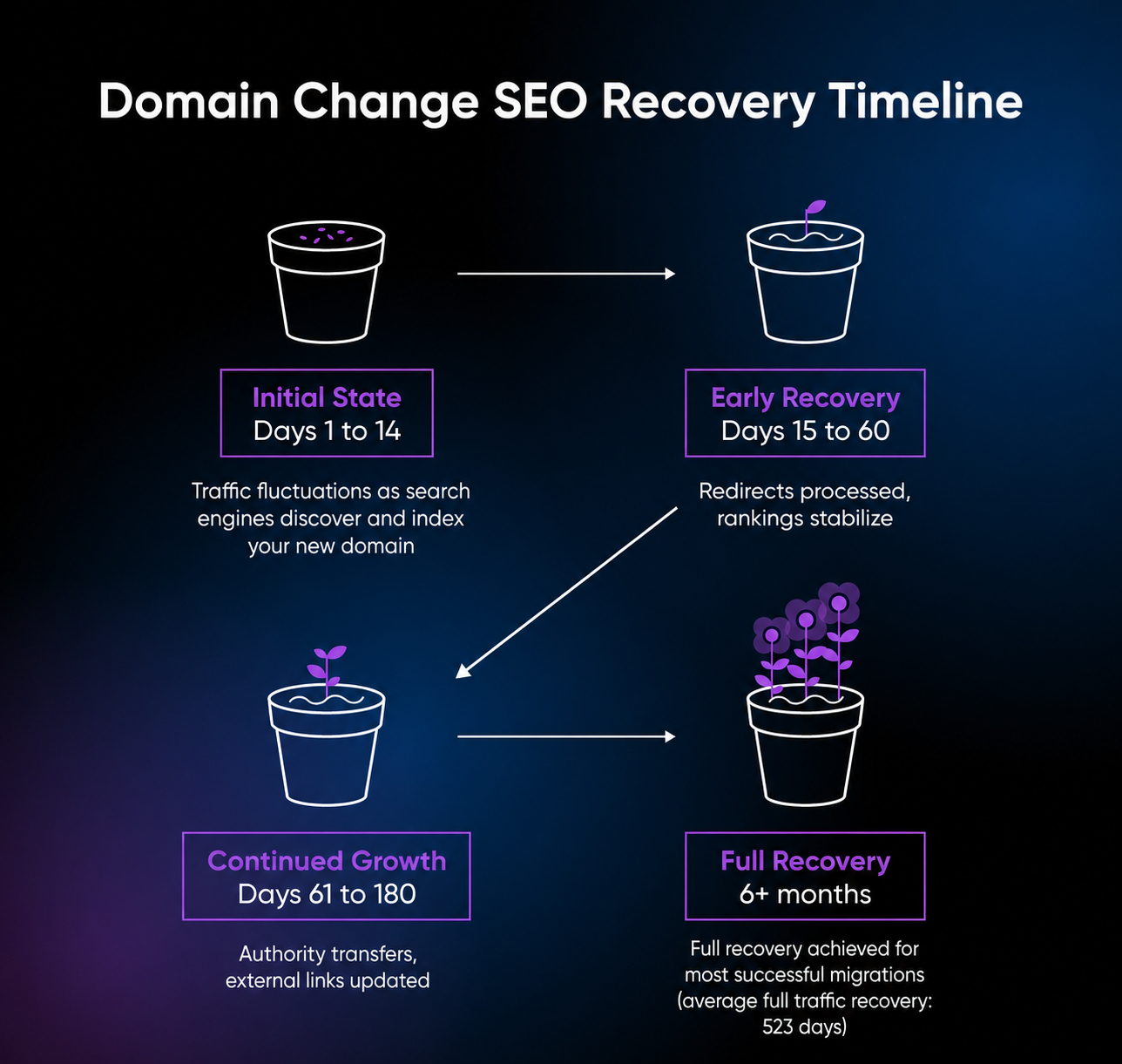
How Long Does It Take to Recover a Google Ranking Drop?
There is no fixed recovery timeline.
It depends on the cause of the decline.
A technical indexing problem can sometimes be resolved relatively quickly.
Content-related ranking losses may take longer because Google needs to recrawl and reassess the improved page, while competitive changes can require a broader SEO strategy.
Don't make major changes every few days.
Give your improvements enough time to be evaluated, then monitor:
- Impressions
- Clicks
- Average position
- CTR
- Keyword rankings
- Organic conversions
Recovery is usually a process rather than a single SEO fix.
Google Ranking Drop Recovery Checklist
If your organic traffic suddenly falls, work through this checklist:
- Check Google Search Console
- Identify the pages that lost traffic
- Identify the keywords that declined
- Check Google algorithm updates
- Check indexing and crawling
- Review robots.txt and sitemap
- Check canonical URLs
- Look for noindex issues
- Update outdated content
- Reassess search intent
- Improve weak sections
- Strengthen internal links
- Improve page experience
- Check lost backlinks
- Investigate keyword cannibalization
- Review organic conversions
Don't try to fix everything at once.
Start with the pages responsible for the largest percentage of your lost traffic.
Final Thoughts
A Google ranking drop can feel like a disaster, but it doesn't always mean your website has been permanently penalized.
The most important thing is to avoid making random SEO changes without understanding what happened.
Start with the data.
Find the pages and keywords that declined. Check whether the problem is technical, content-related, competitive, or related to changing search intent. Then make focused improvements.
In many cases, the path to recovering SEO traffic isn't publishing 50 new articles.
It is making the pages you already have substantially better.
If you're building long-term organic visibility, explore Scale With Clicks to see how SEO, paid advertising, conversion tracking and content can work together as part of a broader growth strategy.
And if your website has experienced a significant decline in organic traffic, a detailed SEO audit can help identify the pages, technical issues and content gaps that deserve attention first.
Frequently Asked Questions
Why did my Google rankings suddenly drop?
Google rankings can decline because of algorithm changes, competitors improving their content, technical SEO problems, indexing issues, outdated content, changes in search intent, lost backlinks, or website changes.
How do I recover lost SEO traffic?
Start by using Google Search Console to identify the pages and queries that lost visibility. Then check technical SEO, search intent, content quality, internal linking, backlinks and page experience.
Does a Google algorithm update always cause ranking drops?
No. A traffic decline can happen for many reasons. An algorithm update is only one possible explanation.
Should I rewrite an article that lost rankings?
Not automatically. First determine why the page declined. If the content is outdated, incomplete or no longer matches search intent, updating it can be a good recovery strategy.
How long does it take to recover Google rankings?
There is no guaranteed timeline. Technical problems can sometimes be fixed quickly, while content and competitive ranking changes may take considerably longer.
Can internal linking help recover rankings?
A strong internal linking structure can help search engines discover pages and understand relationships between topics. It can also help users navigate to relevant content and important service pages.
Should I create a new page if my existing page lost rankings?
Not necessarily. If the existing page already has backlinks, history and useful content, improving it may be more effective than starting from zero. A new page makes more sense when the search intent is genuinely different.
Is SEO traffic more important than rankings?
Not always. Rankings are useful, but qualified traffic and conversions are ultimately more important for a business. A page ranking for highly relevant, commercial searches can be more valuable than one ranking for a high-volume keyword that produces no customers.