SEO
The Complete Guide to Optimizing Existing Blog Posts for SEO in 2026

Category: SEO
The Complete Guide to Optimizing Existing Blog Posts for SEO in 2026
If your website has dozens or even hundreds of blog posts that no longer bring consistent traffic, you're not alone. Many businesses invest heavily in creating new content while ignoring one of the easiest ways to improve organic rankings—updating what already exists.
Search engines have evolved significantly over the last few years. In 2026, Google places much greater emphasis on content freshness, topical authority, user experience, and helpful information than simply publishing new articles every week.
Refreshing older content is often faster, more cost-effective, and more impactful than creating a brand-new blog from scratch.
Whether you run a business website, an eCommerce store, or a digital marketing agency, learning how to optimize existing blog posts can help you:
- Increase organic traffic
- Improve keyword rankings
- Generate more qualified leads
- Increase time on page
- Reduce bounce rates
- Strengthen topical authority
- Improve conversions from organic visitors
If your website isn't generating the traffic you'd expect, it may not be a content creation problem—it could be a content optimization problem.
For businesses looking to build long-term organic visibility, combining content optimization with professional SEO Services creates a much stronger foundation than continuously publishing low-quality articles.
Why Updating Old Blog Posts Matters More Than Publishing New Ones
Many website owners believe Google rewards websites that publish fresh content every day.
That's only partially true.
Google rewards helpful, relevant, and updated content.
Imagine two articles targeting the same keyword:
- Article A was published in 2022 and hasn't been updated since.
- Article B was published in 2024 but was refreshed last week with current statistics, new screenshots, improved headings, FAQs, and better internal links.
In most cases, Google will consider the updated article more relevant for today's users.
Refreshing existing content also offers several advantages:
- Existing backlinks remain intact
- URL authority continues to grow
- Historical rankings are preserved
- Search engines crawl updated pages more frequently
- Users receive current and accurate information
Instead of writing ten average-quality blogs every month, many successful websites now update their best-performing articles regularly.
When Should You Update an Existing Blog Post?
Not every article needs immediate attention.
Start with blog posts that show one or more of these signs:
- Rankings have dropped over the last few months.
- Organic traffic has declined.
- Information is outdated.
- Screenshots no longer match current platforms.
- Statistics are several years old.
- Competitors have more comprehensive articles.
- The page receives impressions but very few clicks.
- Bounce rate is unusually high.
- Conversion rate is poor.
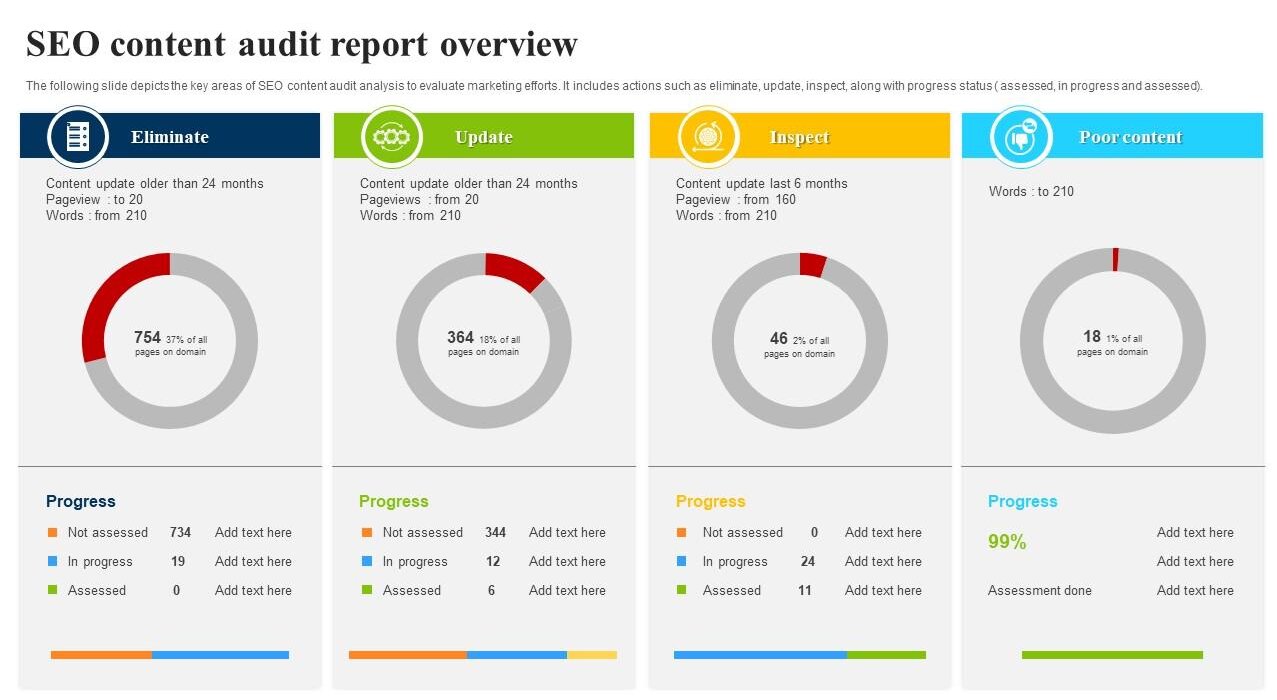
If you're already tracking your website through Google Analytics and Search Console, these opportunities become much easier to identify.
Step 1: Identify Posts That Have the Highest SEO Potential
Before making changes, determine which posts deserve your attention first.
Look for articles that already rank between positions 5 and 20 in Google.
These pages often require only modest improvements to move onto the first page.
Some useful metrics include:
- Organic traffic
- Keyword rankings
- Click-through rate (CTR)
- Average position
- Bounce rate
- Average engagement time
- Conversion rate
- Backlinks
Updating a page already ranking on page two usually delivers faster results than creating an entirely new article targeting the same keyword.
Step 2: Refresh Your Keyword Research
SEO in 2026 isn't about repeating one keyword dozens of times.
Google now understands:
- Search intent
- Related entities
- Semantic keywords
- Natural language
- Context
Instead of focusing only on one primary keyword like:
Optimize Existing Blog Posts
Also include related search terms naturally throughout the article:
- Content optimization
- Blog SEO
- SEO content audit
- Refresh old blog posts
- Update website content
- Organic traffic growth
- Improve keyword rankings
- On-page SEO
- SEO checklist
- Content freshness
These related terms help Google understand your article covers the topic comprehensively.
Step 3: Improve Your Title Tag
Your title is often the first thing users see in Google search results.
A weak title can significantly reduce your click-through rate—even if you're ranking well.
For example:
❌ Blog SEO Tips
A stronger version would be:
✅ The Complete Guide to Optimizing Existing Blog Posts for SEO in 2026
Even better if appropriate:
✅ How to Optimize Existing Blog Posts (15 Proven SEO Strategies for 2026)
Numbers, years, and benefit-driven wording generally improve CTR.
Step 4: Rewrite the Introduction
Many older blog posts begin with generic introductions that provide little value.
Instead, explain the reader's problem immediately.
For example:
Your website already has valuable content—but if those articles haven't been updated recently, they're likely losing rankings every month. Fortunately, refreshing existing blog posts is often one of the quickest ways to recover organic traffic without producing entirely new content.
A compelling introduction encourages readers to continue scrolling, which can improve engagement signals.
Step 5: Expand Thin Sections
One of the most common reasons blog posts lose rankings is that competitors publish more comprehensive content.
Review your article and ask:
- Can this section answer additional questions?
- Can examples be added?
- Would screenshots help?
- Are there new trends to include?
- Have Google's best practices changed?
Instead of keeping sections short, provide practical insights supported by examples.
Step 6: Update Outdated Statistics
Nothing reduces credibility faster than outdated numbers.
If your article mentions:
- Search trends
- Industry reports
- Advertising statistics
- Marketing benchmarks
Replace them with the latest available information.
Readers trust current content more, and Google also values freshness for many search queries.
Whenever possible, reference original studies instead of secondary sources.
Step 7: Improve Heading Structure
Proper heading hierarchy improves both readability and SEO.
Instead of inconsistent formatting, organize your article like this:
H1
 ├── H2
 │    ├── H3
 │    ├── H3
 │
 ├── H2
 │    ├── H3
 │
 └── H2
Clear headings also increase your chances of appearing in featured snippets.
Step 8: Add Helpful Internal Links
Internal linking helps both users and search engines discover relevant pages across your website.
Rather than inserting links randomly, use descriptive anchor text that naturally fits the surrounding content.
For example:
-
If you're discussing improving website visibility through search engines, readers can learn more about comprehensive SEO strategies on the SEO Services page.
-
When explaining how accurate conversion data supports SEO decisions, it's helpful to reference Conversion Tracking Services.
-
Businesses investing in paid search alongside organic growth should also explore the Google Ads Agency service to build a balanced acquisition strategy.
-
Brands running both organic and paid social campaigns can complement their SEO efforts through professional Meta Ads Management.
You can also guide readers to additional educational resources from your own blog.
For example, if someone is trying to improve traffic after updating content, they may also benefit from reading:
- Why Your Google Ads Are Not Converting
- Google Ads Setup Guide for Beginners (2026)
- 7 Costly Google Ads Mistakes That Are Wasting Your Budget
- How to Reduce Cost Per Click in Google Ads
Whenever relevant, encourage visitors to browse the complete collection of marketing resources available on the Scale With Clicks Blog or return to the Scale With Clicks homepage to explore additional services and case studies.
Step 9: Optimize Images for SEO
Images do much more than make your content visually appealing—they also contribute to search visibility, page engagement, and even rankings when optimized correctly.
Every image you upload should serve a purpose. Avoid using generic stock photos that don't add value to the reader.
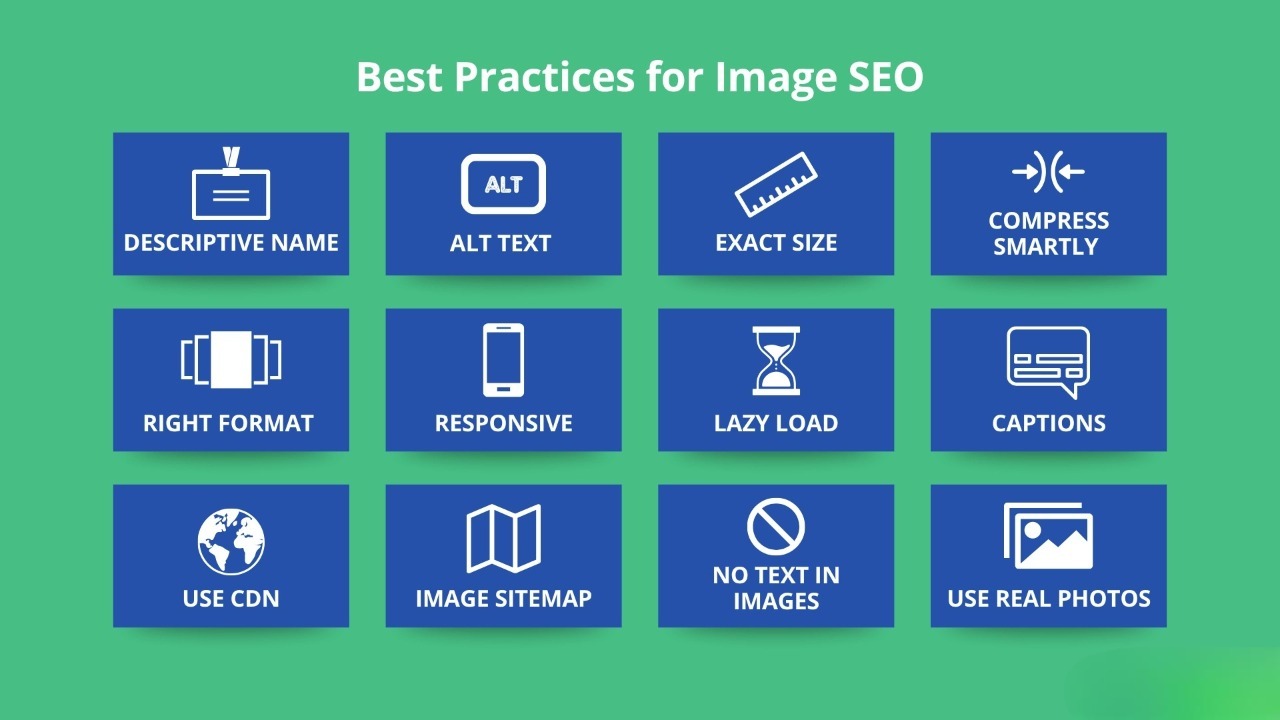
Before uploading an image, make sure to:
- Rename the file descriptively instead of using names like
IMG_1234.jpg. - Compress the image to reduce page load time.
- Add meaningful alt text describing the image.
- Use modern formats like WebP wherever possible.
- Ensure images are responsive across desktop and mobile devices.
For example:
Poor filename
image1.jpg
Better filename
optimize-existing-blog-post-seo-checklist.webp
Good Alt Text
SEO checklist showing steps to optimize existing blog posts in 2026
Optimized images can also appear in Google Image Search, bringing additional traffic to your website.
Step 10: Improve User Experience (UX)
Google increasingly measures how users interact with your content.
Even if your article contains excellent information, visitors won't stay if it's difficult to read.
Improve readability by:
- Writing shorter paragraphs.
- Using descriptive headings.
- Including bullet points.
- Breaking up long sections with images.
- Adding tables where appropriate.
- Highlighting key takeaways.
- Keeping plenty of white space.

For example, instead of presenting a wall of text, summarize key optimization factors in a table.
| SEO Element | Why It Matters |
|---|---|
| Updated Content | Improves freshness signals |
| Internal Links | Helps distribute authority |
| Optimized Images | Faster page speed |
| FAQs | Targets long-tail keywords |
| Better Titles | Improves CTR |
| Schema Markup | Increases SERP visibility |
The easier your article is to consume, the longer visitors are likely to stay on the page.
Step 11: Strengthen EEAT Signals
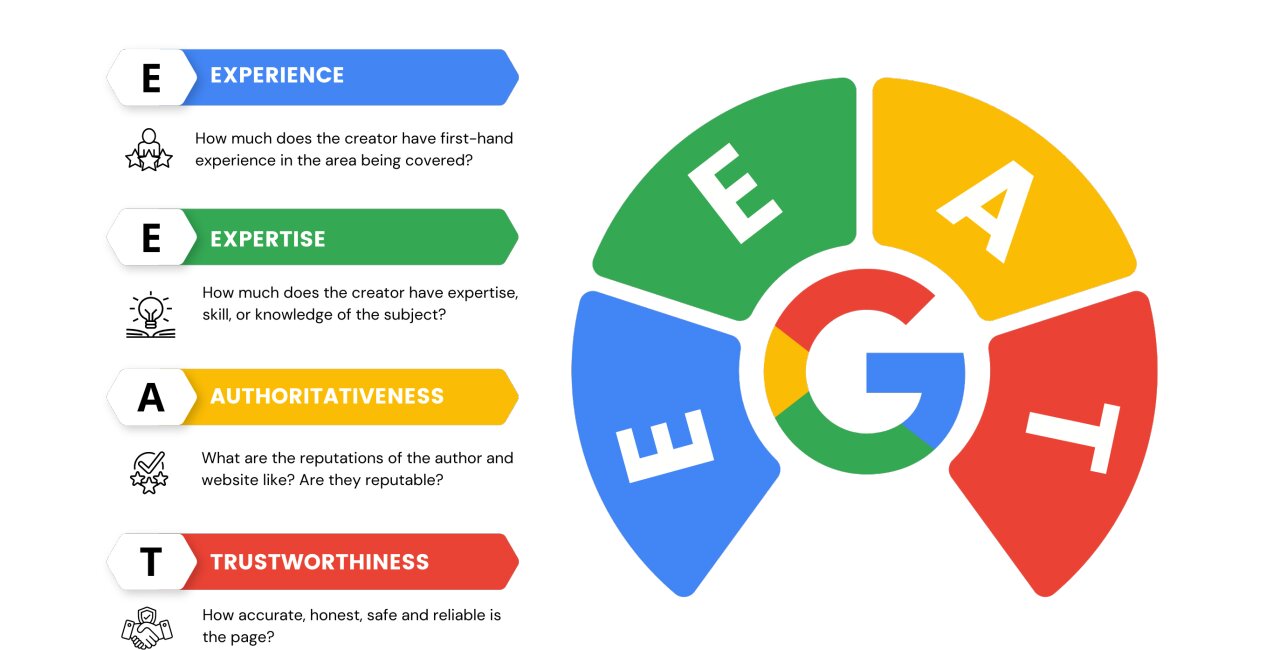
Google's Helpful Content System continues to prioritize content demonstrating:
- Experience
- Expertise
- Authoritativeness
- Trustworthiness
This is commonly referred to as EEAT.
You can improve these signals by:
- Sharing real-world experience.
- Including practical examples.
- Adding screenshots where relevant.
- Referencing reputable sources.
- Keeping author information updated.
- Linking to genuine case studies.
For example, instead of writing:
SEO improves rankings.
Write something more specific:
We've consistently seen updated blog posts regain first-page rankings after improving internal linking, refreshing outdated information, and expanding topical coverage.
Readers trust content backed by experience far more than generic advice.
Step 12: Add FAQ Sections
FAQs help answer additional user questions while also targeting conversational search queries.
They can also improve your chances of appearing in Google's "People Also Ask" results.
Examples include:
- How often should you update blog posts?
- Is updating content better than writing new articles?
- How long does it take for Google to recognize updated content?
We'll include a complete FAQ section later in this guide.
Step 13: Add Relevant Schema Markup
Structured data helps search engines better understand your content.
For blog posts, consider implementing:
- Article Schema
- FAQ Schema
- Breadcrumb Schema
- Organization Schema
- Author Schema
While schema doesn't guarantee higher rankings, it can improve how your content appears in search results.
If you're already using structured data across your website, ensure your older articles are also updated accordingly.
Step 14: Remove Outdated Information
One of the simplest ways to improve an article is by removing content that no longer serves readers.
Examples include:
- Expired offers
- Outdated screenshots
- Discontinued tools
- Old interface instructions
- Statistics from several years ago
- Broken external links
Readers notice outdated information quickly, and it can reduce trust in the rest of your content.
Whenever you update an article, review it from start to finish instead of editing only one section.
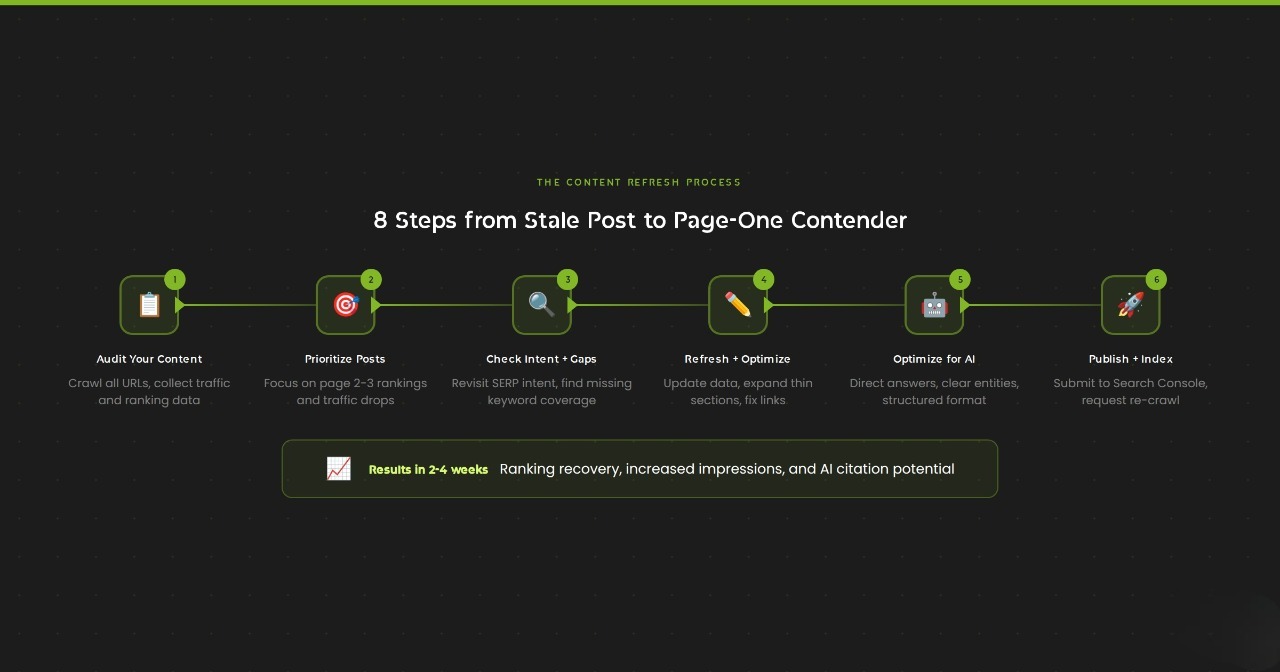
Step 15: Republish and Promote Updated Content
After refreshing a blog post, don't simply click "Update" and move on.
Treat it like a newly published article.
Share it through:
- X (Twitter)
- Email newsletters
- Relevant communities
- Internal newsletters
If you've made significant improvements, consider updating the publication date to reflect the latest revision (where appropriate).
This signals to both readers and search engines that the content has been maintained.
A Simple Content Refresh Checklist
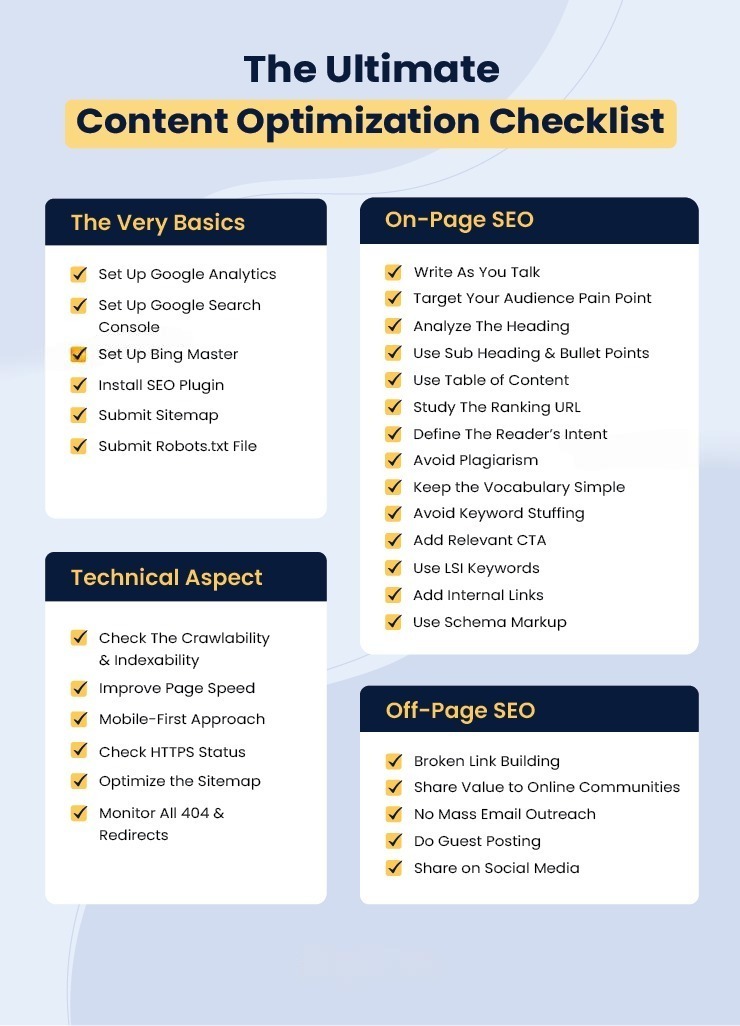
Before publishing an updated article, run through this checklist:
- ✅ Updated target keywords
- ✅ Improved title tag
- ✅ Rewritten introduction
- ✅ Expanded thin content
- ✅ Updated statistics
- ✅ Added recent examples
- ✅ Optimized images
- ✅ Added internal links
- ✅ Fixed broken links
- ✅ Added FAQs
- ✅ Improved readability
- ✅ Reviewed mobile experience
- ✅ Updated schema markup
- ✅ Checked page speed
- ✅ Verified all links are working
Following the same checklist for every content update helps maintain consistency across your blog.
Common Mistakes to Avoid
While refreshing older content, avoid these common pitfalls:
Keyword Stuffing
Repeating the same keyword unnaturally makes content harder to read and offers little SEO benefit.
Removing High-Performing Sections
If a section already ranks well or attracts backlinks, avoid deleting it without good reason.
Ignoring Search Intent
Make sure the updated article still satisfies what users are actually searching for.
Forgetting Internal Links
Every refreshed article should connect readers to other relevant resources on your website.
Leaving Broken Links
Broken internal and external links negatively affect user experience and can reduce trust.
Updating Only the Date
Simply changing the publish date without improving the content provides little value.
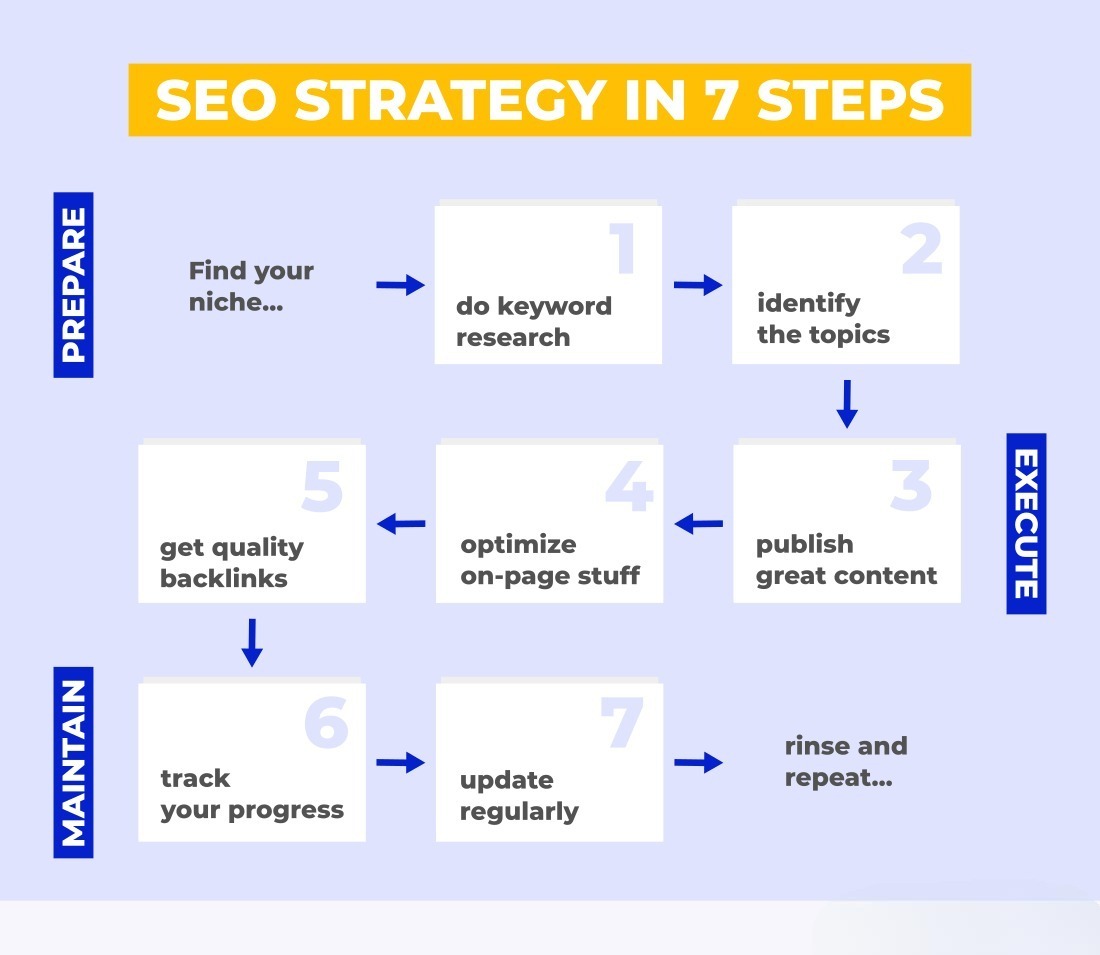
Build a Stronger Content Ecosystem with Internal Linking
Every blog post should guide readers naturally toward related resources.
For example:
If you're learning about SEO optimization, you may also find these resources useful:
-
Learn how a technically sound website supports better rankings by exploring our SEO Services.
-
Businesses looking to combine organic traffic with paid search can discover how our Google Ads Agency helps generate qualified leads.
-
If your goal is measuring every lead accurately, our Conversion Tracking Services ensure you make decisions based on reliable data.
-
Brands investing in social media advertising can also improve overall marketing performance with our Meta Ads Agency.
You can also continue learning by exploring related articles on the Scale With Clicks Blog, including:
- SEO Content Writing Guide
- How to Optimize Google Ads Campaigns Weekly
- How to Generate Leads with Google Ads
- Meta Conversion API (CAPI) Complete Guide - Setup, Benefits & Best Practices (2026)
For more digital marketing insights, visit the Scale With Clicks:
Final Thoughts
Creating fresh content will always play a role in a successful SEO strategy, but many websites overlook the untapped value sitting in their existing blog library. Updating older articles allows you to build on established authority instead of starting from scratch with every new topic.
By refreshing outdated information, improving keyword targeting, strengthening internal links, enhancing readability, and focusing on user intent, you give both search engines and readers compelling reasons to revisit your content.
Rather than asking, "What should we publish next?", start asking, "What can we improve today?" In many cases, that shift in mindset delivers quicker wins, stronger rankings, and more sustainable organic growth.
If you're looking to maximize the performance of your website, combining regular content updates with a well-planned SEO strategy can create long-term results that continue to generate traffic and leads well into the future.
Frequently Asked Questions
1. How often should I update existing blog posts?
Review important articles every six to twelve months. Competitive industries like SEO, PPC, and AI may require updates more frequently.
2. Is updating old content better than writing new content?
Both are important. However, updating an article that already has rankings and backlinks often delivers faster SEO improvements than publishing a completely new post.
3. Will changing the publication date improve rankings?
Updating the date alone won't help. Google looks for meaningful content improvements, not just a newer timestamp.
4. How do I know which blog posts need updating?
Use Google Search Console and Google Analytics to identify pages with declining traffic, lower rankings, or reduced click-through rates.
5. Should I change the URL when updating a blog?
No. Unless absolutely necessary, keep the same URL to preserve backlinks, authority, and search rankings.
6. Does internal linking really help SEO?
Yes. Strategic internal linking helps search engines understand your website structure while guiding users to related content, increasing engagement and distributing authority across important pages.